


See where context exists in your code.
Code explains what the system does.
But understanding usually lives somewhere else:
- debugging notes
- architectural decisions
- trade-offs
- investigations
- migration plans
- implementation reasoning
CodeContext+ keeps that context attached directly to the code where it matters.
Instead of searching through documents, pull requests, or scattered notes, context becomes visible directly inside your editor.
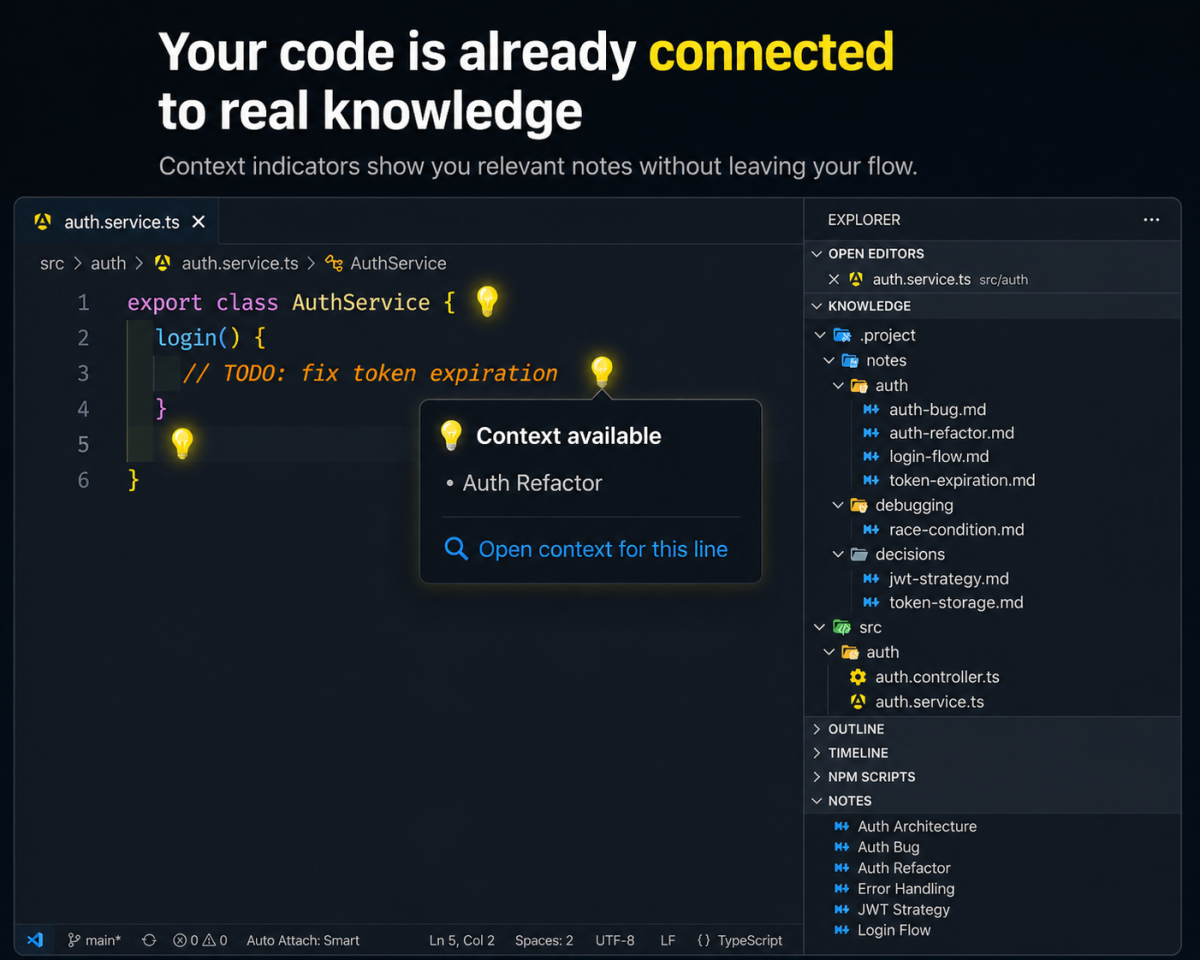
Development context disappears quickly.
A line of code may have:
- a bug investigation,
- a refactor discussion,
- an architectural decision,
- and a failed experiment behind it.
But once the work is finished, that knowledge gets fragmented across:
- markdown files,
- PR discussions,
- tickets,
- chats,
- and memory.
When another developer revisits the code later, the context is gone.
CodeContext+ connects contextual notes directly to files and lines in your workspace.
When context exists for the code you are reading:
- indicators appear inside the editor,
- related notes can be previewed,
- context can be opened immediately,
- and related context stays connected through references and links.
The goal is simple:
make context visible exactly where development happens
Imagine you are reading this code:
// TODO: fix token expiration
export class AuthService {
  login() {
    ...
  }
}
That line may already have important context attached to it:
- why the bug exists,
- what was tried before,
- related architectural decisions,
- or migration concerns.
A contextual note might look like this:
id: auth-token-expiration
title: Token expiration investigation

references:
  - src/auth/auth.service.ts#1

links:
  - auth-refactor
  - jwt-strategy

type: bug

summary: >
  Login flow accepts stale tokens during session refresh.
  Previous fixes caused invalid session reuse.
When you open the file:
- context indicators appear automatically,
- the note becomes discoverable from the editor,
- related notes can be opened immediately,
- and connected context stays navigable.
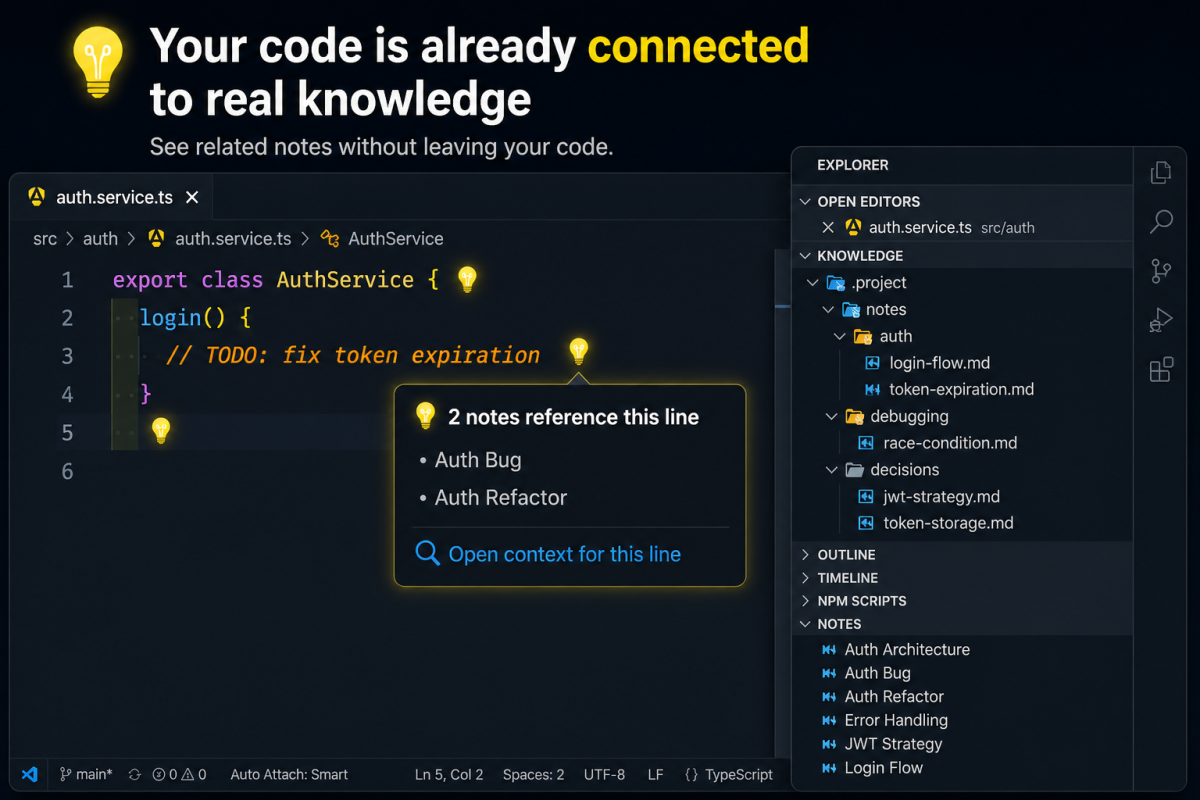
CodeContext+ is built around active code locality.
The extension focuses on:
- the file you are reading,
- the line you are editing,
- nearby contextual references,
- and recent contextual navigation.
It does not try to semanticize the entire repository.
Context stays:
- explicit,
- lightweight,
- deterministic,
- and attached directly to your workflow.
CodeContext+ exposes contextual information directly inside VS Code through lightweight runtime surfaces.
These include:
- inline context indicators,
- contextual hover previews,
- transient context previews,
- line-level contextual navigation,
- related-note exploration,
- backlinks,
- continuity breadcrumbs,
- and contextual TreeView projections.
The result is a workflow where context becomes visible without interrupting development flow.
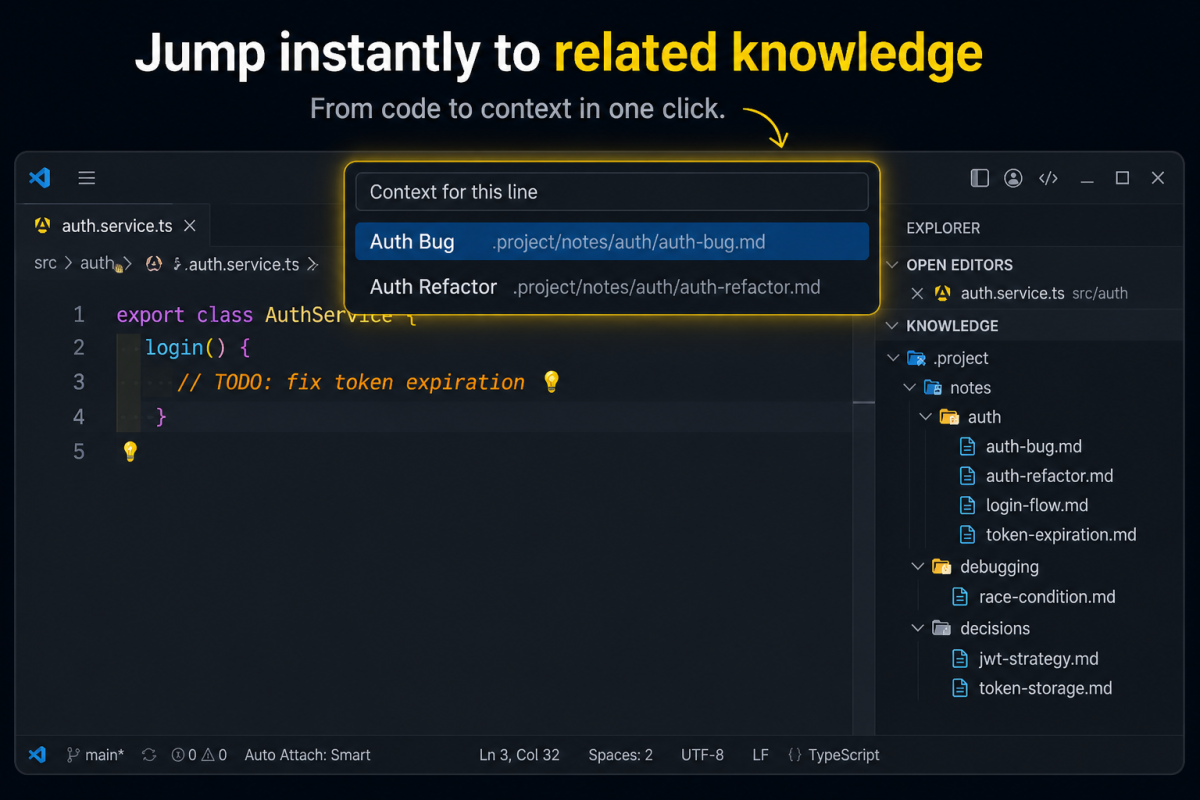
References create explicit connections between notes and code.
Compact references:
references:
  - src/auth/auth.service.ts#42
Structured references:
references:
  - file: src/auth/auth.service.ts
    line: 42
Both formats are supported and normalized into the same deterministic runtime model.
Notes can also connect to other notes.
Example:
id: auth-refactor

links:
  - jwt-strategy
  - token-storage
This allows related context to remain connected:
- investigations,
- decisions,
- migrations,
- debugging sessions,
- and architectural reasoning.
Backlinks are derived automatically, making contextual navigation bidirectional.
CodeContext+ is designed around contextual continuity.
As you navigate through files and notes, the extension keeps recent context locally available through:
- contextual previews,
- continuity breadcrumbs,
- recency prioritization,
- and lightweight contextual memory.
The goal is not to create a knowledge graph.
The goal is to reduce contextual interruption during development.
Markdown files containing contextual knowledge.
Examples:
- bug investigations,
- architecture notes,
- debugging sessions,
- migration plans,
- implementation reasoning.
Explicit links between notes and code.
References activate contextual surfaces directly inside the editor.
Connections between related notes.
They preserve relationships between investigations, decisions, and implementation context.
Automatically derived reverse relationships between notes.
They make contextual exploration navigable in both directions.
CodeContext+ follows a few core principles:
Context is explicitly attached to code through references.
Nothing is inferred automatically.
The runtime focuses on:
- the current file,
- the current line,
- nearby context,
- and recent navigation.
Not repository-wide semantic indexing.
Context resolution is predictable and explainable.
The extension does not rely on:
- AI inference,
- embeddings,
- hidden relationships,
- or probabilistic matching.
The system intentionally keeps semantics bounded.
The goal is operational clarity, not metadata complexity.
Create a contextual note:
id: auth-bug
title: Login Session Bug

references:
  - src/auth/auth.service.ts#1

type: bug

summary: >
  Session refresh may reuse stale authentication tokens.
Open the referenced file.
Context now becomes available directly from the editor.
CodeContext+ is not:
- a PKM system,
- a graph database,
- a semantic indexing engine,
- an AI assistant,
- or a repository-wide ontology layer.
It is a deterministic contextual runtime designed to keep development context attached to active code.
- Install CodeContext+ from the VS Code Marketplace
- Open a workspace
- Create contextual notes
- Add references to files or lines
- Navigate context directly from your editor
Most development knowledge disappears after implementation.
Code remains. Context does not.
CodeContext+ helps preserve that context directly where software development actually happens: inside the codebase itself.
CodeContext+ is open-source and welcomes community contributions:
-
Fork the GitHub repository.
-
Create a new branch:
git checkout -b feature/your-feature
-
Make your changes, commit them, and push to your fork.
-
Submit a Pull Request against the
mainbranch.
Before contributing, please review the Contribution Guidelines for coding standards, testing, and commit message conventions. Open an Issue if you find a bug or want to request a new feature.
We are committed to providing a friendly, safe, and welcoming environment for all, regardless of gender, sexual orientation, disability, ethnicity, religion, or other personal characteristic. Please review our Code of Conduct before participating in our community.
For a complete list of changes, see the CHANGELOG.md.
- Manuel Gil - Owner - @ManuelGil
See also the list of contributors who participated in this project.
- GitHub:
- X (formerly Twitter):



-
Auto Barrel Automatically generates and maintains barrel (
index.ts) files for your TypeScript projects. -
Angular File Generator Generates boilerplate and navigates your Angular (9→20+) project from within the editor, with commands for components, services, directives, modules, pipes, guards, reactive snippets, and JSON2TS transformations.
-
NestJS File Generator Simplifies creation of controllers, services, modules, and more for NestJS projects, with custom commands and Swagger snippets.
-
NestJS Snippets Ready-to-use code patterns for creating controllers, services, modules, DTOs, filters, interceptors, and more in NestJS.
-
T3 Stack / NextJS / ReactJS File Generator Automates file creation (components, pages, hooks, API routes, etc.) in T3 Stack (Next.js, React) projects and can start your dev server from VSCode.
-
Drizzle ORM Snippets Collection of code snippets to speed up Drizzle ORM usage, defines schemas, migrations, and common database operations in TypeScript/JavaScript.
-
CodeIgniter 4 Spark Scaffolds controllers, models, migrations, libraries, and CLI commands in CodeIgniter 4 projects using Spark, directly from the editor.
-
CodeIgniter 4 Snippets Snippets for accelerating development with CodeIgniter 4, including controllers, models, validations, and more.
-
CodeIgniter 4 Shield Snippets Snippets tailored to CodeIgniter 4 Shield for faster authentication and security-related code.
-
Mustache Template Engine - Snippets & Autocomplete Snippets and autocomplete support for Mustache templates, making HTML templating faster and more reliable.
For developers who work with .vsix files for offline installations or distribution, the complementary One-Click VSIX extension is recommended, available for both Chrome and Firefox.
One-Click VSIX integrates a direct "Download Extension" button into each VSCode Marketplace page, ensuring the file is saved with the
.vsixextension, even if the server provides a.ziparchive. This simplifies the process of installing or sharing extensions offline by eliminating the need for manual file renaming.
This project is licensed under the MIT License. See the LICENSE file for details.