







| Images | Feature Description |
|---|---|
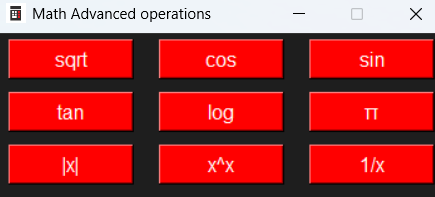 |
Advanced math operations: sqrt, sin, cos, tan, log, abs |
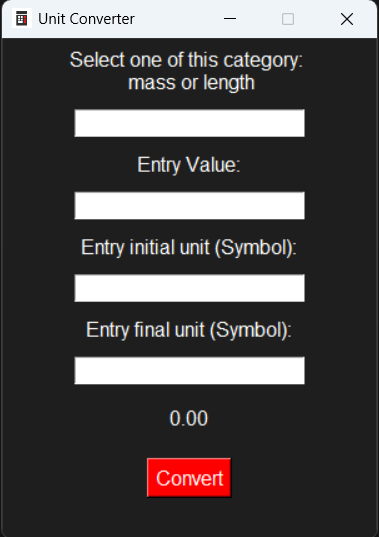 |
Unit converter: mass, length; |
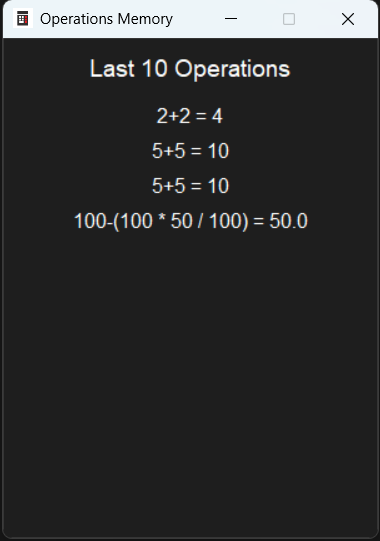 |
Operations memory: last 10 operations |
PyCalcPro/
├── src/                               # Application source code
│   └── pycalcpro/                     # Main application package
│       ├── __init__.py                # Package initializer
│       ├── main.py                    # Application entry point
│       ├── calculator.py              # Main GUI and calculator logic
│       ├── operations.py              # Calculator math operations
│       ├── storage.py                 # Operations history management
│       ├── ui.py                      # UI windows and components
│       ├── assets.py                  # Asset paths management
│       │
│       └── Assests/                   # Application assets
│           ├── PyCalc_Pro_Logo.ico    # Application icon
│           └── DATA.json              # Operations history storage
│
├── docs/                              # Website Source Code
│   ├── index.html
│   ├── style.css
│   └── images                         # Website images and ico
│
├── LICENSE.txt                        # MIT License
├── README.md                          # Project overview
├── CHANGELOG.md                       # Version history
├── CONTRIBUTING.md                    # Contribution guidelines
├── pyproject.toml                     # Project metadata and build config
├── SECURITY.md                        # Security Policy
└── .gitattributes                     # Git repository settings
About assets:
Assets (icons and data files) are stored inside so the application can find them when run from source or packaged.
About the docs/ folder:
The docs/ folder contains files used for the source code of website. It is not required to run the application locally.
 You can access PyCalc Pro Website from this link: PyCalc Pro Website
To donwload PyCalc Pro V.1.7 follow this link, the software is for Windows OS, for linux use Wine: Download PyCalc Pro V1.7
For macOS
The EXE file is not available.
However, the application can be run from source by executing the main.py file,
provided that Python and the required dependencies are installed.
Warning
For proper program execution, please read the notes below
Do not delete the .json or .ico or .txt other file types in the download folder they are required for the program to function correctly.
Follow this steps:
git clone https://github.com/Lorydima/PyCalcPro.gitrun main.pyAll libraries used in this project are part of Python's standard library. No external libraries are required
I do my best to keep this project stable and reliable, but bugs can still happen. If you spot any issues or errors, feel free to open a GitHub issue. Your feedback really helps me improve the project.
Thanks for contributing and helping make this project better from LDM Dev❤️
Before you use the software please read the MIT License license at this link: License