
A high-performance local web gallery generator for your BoothDownloader library. Organize, search, and preview your VRChat assets and Booth items with a modern, responsive interface.
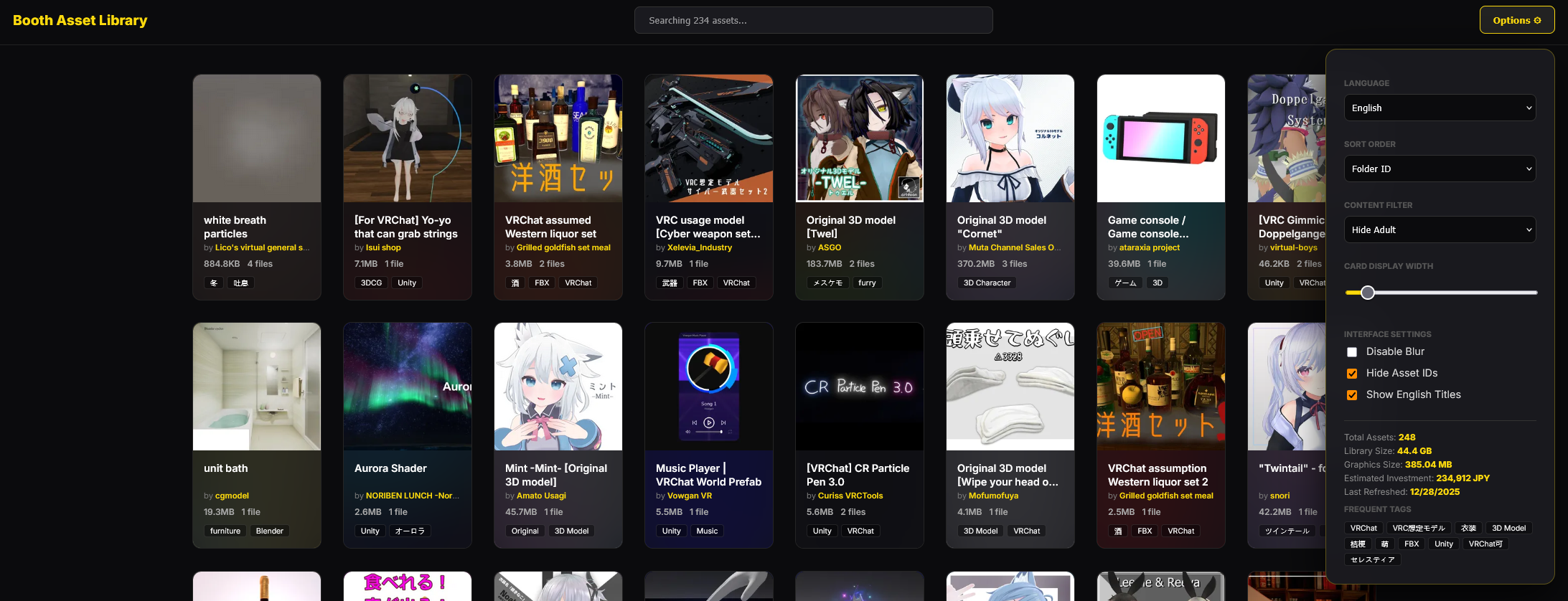
- Smart Asset Relationships: Automatically links clothing and accessories to their base avatars by parsing names, tags, descriptions, and
related_booth_ids. - Translation: Translates Japanese titles, authors, tags, and descriptions to English (cached locally). Supports DeepL, Langbly, or free Google Translate.
- Smart Filtering: Built-in NSFW/Adult content filter and tag-based searching.
- VRChat Integration: Detects and links public VRChat Avatars (
avtr_) and Worlds (wrld_) directly from item descriptions. - Video Covers: Square mp4 files in an item's root folder become autoplaying grid tiles (requires
ffprobe, optional). - Asset Optimization: Generates WebP thumbnails and extracts an accent color per item for stand-out borders.
- Detailed Stats: Track total library size, image storage, and estimated amount spent on Booth.
- Multilingual UI: Support for English, Japanese, Korean, Chinese, German, French, and more.
The script features a cross-referencing system:
- Base Avatars: Automatically identified when items are placed in the "3D Characters" category.
- Compatibility Detection: Accessories, hair, and clothing are scanned for avatar names in their metadata.
- Manual Overrides:
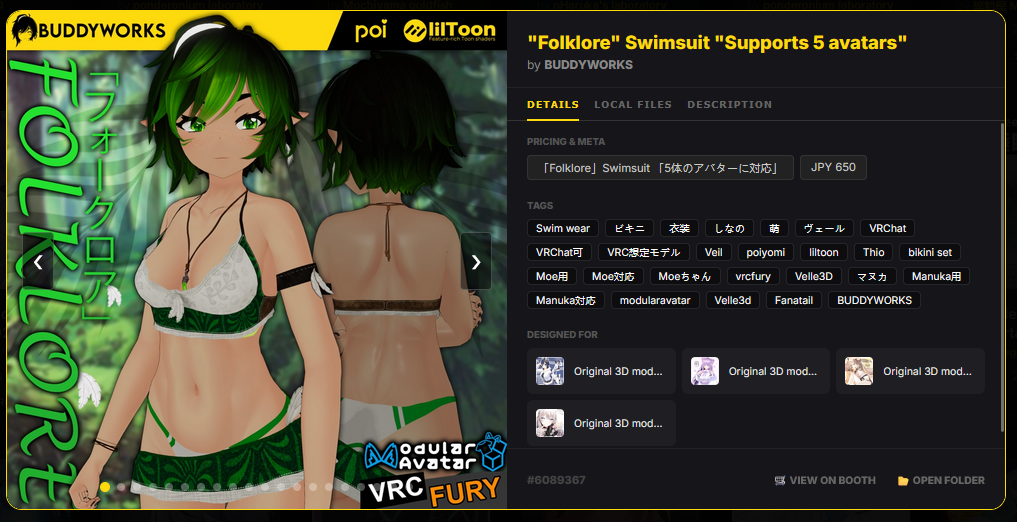
web_data/alias.jsonlets you define search aliases per item ID to fix missed matches. - Bidirectional Links: In the item details modal, avatars show "Compatible Assets," while clothes show "Designed For" links to the respective avatars.
- Filter Aware: Related assets respect your current Adult Content filter settings.
- Install Python 3.
- Install dependencies:
pip install deep-translator Pillow requests
- Optional: install ffprobe for square-video cover detection.
- Critical: Ensure
AutoZipis set tofalsein yourBDConfig.json(BoothDownloader must keep folders extracted). - Place
library_parser.pyin the same directory as yourBoothDownloaderOutfolder, along with theweb_datafolder. - Run the script:
python library_parser.py
- Open
asset_library.htmlin your browser.
Items not downloaded via BoothDownloader can be added manually. Create an item_descriptor.json inside the item's folder:
{
  "name": "My Item",
  "author": "Author Name",
  "description": "...",
  "tags": ["tag1", "tag2"],
  "wish_count": 0,
  "is_avatar": false,
  "price": 0
}By default the script uses free Google Translate. For better quality and rate limits, create a .env file next to the script:
DEEPL_API_KEY=yourkey        # or
LANGBLY_API_KEY=yourkey
DeepL wins if both are set. Translation caches live in web_data/cache/.
The following variables can be adjusted at the top of the script:
ROOT_FOLDER: Location of your assets (default:BoothDownloaderOut).MAX_TRANSLATION_WORKERS: Parallel threads for translation (default:3).MAX_OPTIMIZATION_WORKERS: Parallel threads for image optimization (default:16).OPTIMIZE_THUMBNAILS: Set toFalseto skip WebP thumbnail generation.OPTIMIZE_GALLERY: Set toFalseto skip converting gallery images to WebP.SKIP_TRANSLATION: Set toTrueto skip generating translations entirely.ENABLE_GRID_VIDEOS: Set toFalseto disable mp4 covers on grid tiles.
text— searches names, authors, tags, and aliasesauthor:name— filter by authorrel:<id>— show items related to a given item IDtype:avatar/type:asset— filter by item type
- USE LOCALLY ONLY: This tool is designed for private library management.
- NO DOWNLOADER: This script cannot download assets. It only parses items you already legally own and have downloaded via BoothDownloader.
- Liability: I am not responsible for any misuse or data issues.
Feel free to submit Pull Requests for translations, UI improvements or bug fixes. Please maintain the existing color palette (Inter font, dark aesthetic, yellow accents).