
New in 0.9.0: each result opens as a page in your browser, and a fix shows the rating before and after. Release notes
Before you ship, see what an AI agent could lift from your app, and close it in one command.


Website · How it works · Benchmarks · What it checks · CI · Get started
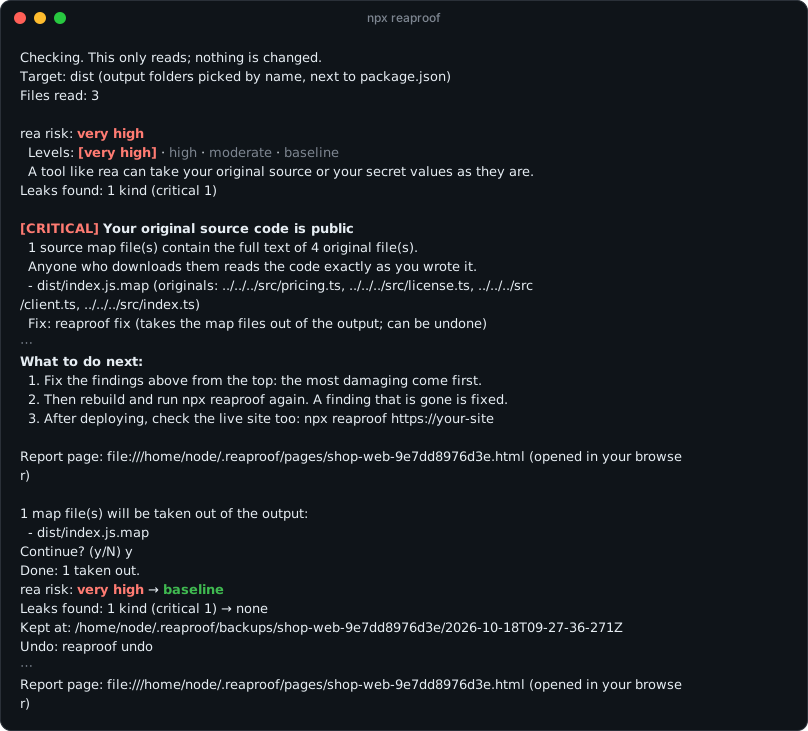
A real run on the web test app from What the fixes change, measured. Lines left out are marked ⋯; the whole output is under How it works.
Tools such as rea let a coding agent inspect a shipped app without its source, explain how a feature works and rebuild it. What makes that easy is usually left in by accident: a source map that carries every original file, a server key in the code, a .git folder copied into the output. Reaproof finds those, rates the risk, explains each finding in plain words, and takes out what is safe to take out.
It is written for people who have never dealt with security before. There is nothing to install and nothing to configure. It needs Node.js 18.3 or later.
npx reaproof- It reads, and changes nothing. In a JavaScript project folder it finds the build output by name (
dist,.next/static,out,buildand the like). Of a server-rendering build, as SvelteKit, Astro, React Router and Nuxt make one, it reads what browsers load and what the server puts into every page, not the server's own code. Anything else it reads as given: a folder, an app, a program or an archive. - It rates and explains. The rating comes first. Each finding follows, worst first, with what it exposes and how to close it. Right under the count of files read, it says what it did not read. At a terminal it also opens the same result as a page in your browser.
- It offers the fix it can make. It lists the source map files it can take out and, after a
y, moves them out of your output into a backup.npx reaproof undoputs them back. Without a terminal, as in an agent's shell or in CI, nothing is asked:reaproof fixlists the files, changes nothing and exits with 2 until it is run with--yes. - You close the rest and run it again. Each finding names the setting to change. A finding that is gone is fixed. The report ends with what to do next.
Every report opens with the rea risk and where it sits on the scale.
| rea risk | What it means | What usually puts it there | |
|---|---|---|---|
| 🔴 | very high | A tool like rea can take your original source or your secret values as they are | A source map that holds your source; a .env file, a .git folder or a server-only key in what ships |
| 🟠 | high | Near-secret values, data, or the inside of the running app are exposed | A database file or debug symbols in the output; a test key; a program signed with get-task-allow |
| 🟡 | moderate | Something left in makes the code easier to read, or the running app easier to get into | Code that is not minified; source maps that list file names; a program that kept its development names or runs without the Hardened Runtime |
| 🟢 | baseline | None of the leaks this tool looks for was found | Code structure, the text and values in it, and server addresses are still readable, as in any shipped app |
| ⚪ | not rated | What ships could not be read, so no rating is given | A disk image, an installer or an archive it does not open. It does not mean nothing leaks |
There is no "safe" level, because there is no such state: see "What it cannot do".
The whole output of the run in the picture above
Checking. This only reads; nothing is changed.
Target: dist (output folders picked by name, next to package.json)
Files read: 3

rea risk: very high
  Levels: [very high] · high · moderate · baseline
  A tool like rea can take your original source or your secret values as they are.
Leaks found: 1 kind (critical 1)

[CRITICAL] Your original source code is public
  1 source map file(s) contain the full text of 4 original file(s).
  Anyone who downloads them reads the code exactly as you wrote it.
  - dist/index.js.map (originals: ../../../src/pricing.ts, ../../../src/license.ts, ../../../src/client.ts, ../../../src/index.ts)
  Fix: reaproof fix (takes the map files out of the output; can be undone)

[NOTE] Server addresses that read straight from the code
  1 server address(es) are in the code as they are. They cannot be hidden.
  For each one, check that it is safe to call without signing in and never returns another user’s data.
  - https://api.shop-lab.test/v2

To keep them from coming back on the next build:
  Turn off production source maps in your build tool settings.
  If an error tracker needs the maps, upload them there and then delete them from the output.

[NOTE] What cannot be hidden
  Screen structure and the server addresses you call cannot be hidden once they reach a user device.
  Compute anything that must not be copied, such as pricing or permission checks, on a server.
  To see what is actually readable in the JavaScript, run reaproof measure.

What to do next:
  1. Fix the findings above from the top: the most damaging come first.
  2. Then rebuild and run npx reaproof again. A finding that is gone is fixed.
  3. After deploying, check the live site too: npx reaproof https://your-site

Report page: file:///home/node/.reaproof/pages/shop-web-9e7dd8976d3e.html (opened in your browser)

1 map file(s) will be taken out of the output:
  - dist/index.js.map
Continue? (y/N) y
Done: 1 taken out.
rea risk: very high → baseline
Leaks found: 1 kind (critical 1) → none
Kept at: /home/node/.reaproof/backups/shop-web-9e7dd8976d3e/2026-10-18T09-27-36-271Z
Undo: reaproof undo

To keep them from coming back on the next build:
  Turn off production source maps in your build tool settings.
  If an error tracker needs the maps, upload them there and then delete them from the output.

Report page: file:///home/node/.reaproof/pages/shop-web-9e7dd8976d3e.html (opened in your browser)
| 1 | 0 | 61 | 13 |
|---|---|---|---|
command to start: npx reaproof |
dependencies, and nothing to configure | patterns for server keys, from Stripe and AWS to xAI and Supabase | test setups for every change: Node 18 to 24 on Linux, macOS and Windows |
| Our web test app | Original files rea names |
|---|---|
| Minified, with its source map | 4 of 4 |
The same after reaproof fix |
0 |
Four TypeScript files bundled with Bun 1.2.19, measured with rea 6.4.0 on 2026-10-14; rea 6.5.0 gave the same counts on 2026-10-16. Minifying alone changed none of rea's counts. The whole measurement, with a macOS program, is under What the fixes change, measured.
| 22 test apps, six frameworks | 0.7.0 | 0.8.0 |
|---|---|---|
Leaks found, of 14 put in, with the .env file there (your machine) |
13 | 14 |
| The same, with the values in the environment instead (a CI job) | 11 | 14 |
| The same, with neither | 11 | 13 |
| Apps built right that were rated with a leak, of 8 | 4 | 0 |
| Apps with any false alarm, of 22 | 10 | 0 |
| Apps it could not check, of 22 | 1 | 0 |
Built on 2026-10-18 in Docker with Next.js 16.4.2, Vite 8.3.4 with React 19.3.1, SvelteKit 3.1.0, Nuxt 4.6.2, Astro 7.4.0 and React Router 8.4.0, each built right (the keys meant for browsers in browser code, server keys and an AI prompt in server code), with source maps on, and with a server key handed to browser code; and with Vite, a Gemini key handed over as Google AI Studio's app template does, and a token of the app's own. The false alarms of 0.7.0 came from reading server code, which does not ship, on SvelteKit, Astro and React Router, from SvelteKit's error page, and from the public values SvelteKit 3 declares. It missed a key in Nuxt's public runtime config and, without a .env file, the Gemini key, and it listed the key in a script Astro puts into its pages among 15 false alarms from the same build. With neither the file nor the environment, the token of the app's own, in no vendor's format, cannot be told from any other value.
| What is counted | On | Reaproof | Reference tool | |
|---|---|---|---|---|
| Android build left debuggable | Termux 0.118.3, debug build from its GitHub release | debuggable | aapt: debuggable |
✓ same |
| Android classes that keep their names | Fossify Gallery 1.14.0 | 228 of 228 | dexdump: 228 |
✓ same |
Names a default go build keeps |
Our Go test program, for Linux | 2,519 | readelf: 2,519 functions and objects |
✓ same |
Electron fuses that check app.asar |
16 Electron apps on the test Mac | 16 of 16 | @electron/fuses read |
✓ same |
| Function names in WebAssembly | 12 modules on the test Mac | 12 of 12 | wabt wasm-objdump |
✓ same |
| .NET types and methods | 5 .NET runtime assemblies, the largest with 41,416 methods | 5 of 5 | .NET's metadata reader | ✓ same |
Swift and Objective-C names left after strip |
Our macOS test program, Swift 6.3 | 44 · 42 · 22 · 20 | otool, same sections |
✓ same |
Paths left out by .reaproofignore |
20 paths, 11 patterns | 17 | git check-ignore: 17 |
✓ same |
| SARIF output | 7 targets | 7 of 7 valid | OASIS SARIF 2.1.0 schema | ✓ same |
| Target | Size | Files read | Time |
|---|---|---|---|
| Our web test app | 6.3 kB | 3 | 0.04 s |
| Our Vite build with eight SDKs | 1.8 MB | 3 | 0.05 s |
ripgrep 15.2.0 for Windows, .zip |
1.8 MB | 14 | 0.07 s |
Fossify Gallery 1.14.0, .apk |
38.5 MB | 1,606 | 0.19 s |
Joplin 3.7.10, .apk |
177.1 MB | 1,162 | 0.63 s |
Electron Fiddle 0.39.0 for macOS, .zip |
117.8 MB | 366 | 1.32 s |
Median of three runs of reaproof <target> --json with 0.8.0 on 2026-10-18, on an Apple M4 Pro with Node 24.14.0, Node's own start included, in a shell with two variables named like a secret, which it compares with what ships. Size is the file or folder on disk.
- A 1 MB archive whose one file states 1 MB and holds 1 GB is refused in 0.04 s with 55 MB of memory in use. Without that stop it used 2.1 GB.
- A 137 kB archive that holds another many times over and lists twenty million files is done with after about a million of them, in about a second.
| Finding | Severity | Automatic fix |
|---|---|---|
Settings files (.env), a .git folder, key stores, database files and debug symbols (.dSYM, a .pdb, an R8 mapping.txt) mixed into the output |
🔴 Critical or 🟠 high | No, take them out and stop them being copied in. Keep debug symbols, somewhere else |
Server-only keys in shipped files, whether code, a script, a settings file of any name, a native program or bytecode: Stripe secret and restricted keys, Supabase secret and service_role keys, GitHub tokens, AWS access keys, private keys, AI service keys, a Google API key in browser code that calls Gemini, database addresses that carry a password, and the keys of 53 more services by the prefixes they are issued with (see "Key formats") |
🔴 Critical or 🟠 high | No, revoke the key and move it to a server |
A secret value from the project's own .env, or from the environment the build ran in, that appears word for word in any shipped file |
🔴 Critical or 🟠 high | No, change the value and move it to a server |
| Source map files that contain your original source text | 🔴 Critical | Yes |
| Source maps embedded inside code files | 🔴 Critical | No, turn it off in the build settings |
A program signed with an entitlement that opens it up while it runs: get-task-allow on macOS or iOS (high), disable-library-validation on macOS (medium) |
🟠 High or 🟡 medium | No, leave it out of release signing |
An Android app built for development: android:debuggable (high), android:testOnly, or signed with the debug key Android's build tools make (medium) |
🟠 High or 🟡 medium | No, build and sign a release build |
| Source map files that list file names without the source text | 🟡 Medium | Yes |
| A program that kept its development names: the names of its functions and variables, its debug information, and the paths of the original files on the machine that built it. macOS and iOS (Mach-O), Linux and Android (ELF), Windows (PE), and WebAssembly modules | 🟡 Medium | No, strip the program before signing it (wasm-opt --strip-debug for a WebAssembly module) |
| A macOS program signed without the Hardened Runtime, or not signed at all | 🟡 Medium | No, turn it on when signing |
A packaged Electron app with development fuses left on (runAsNode, nodeOptions, nodeCliInspect) |
🟡 Medium | No, turn them off with @electron/fuses |
| Source and test files packed into the app or output | 🟡 Medium | No, take them out of the packaging list |
A .DS_Store file, which the macOS Finder writes with the names of the files in its folder; on a website anyone can fetch it |
🟡 Medium | No, take it out of what ships |
| Long text in client code that looks like an AI prompt | 🟡 Medium, a guess | No, keep prompts on a server |
| Code that is not minified | 🟡 Medium | No, turn on minification |
| Names that stay in a macOS or iOS program after stripping: Swift types, properties and enum cases, Objective-C classes and methods | 🔵 Note | In part: a build setting leaves out the names of Swift properties and cases, at a price. See "Native programs" |
| Paths of Rust source files that a program keeps as text after stripping: its own files, and those of its dependencies, which can name the home folder of the machine that built it | 🔵 Note | In part: --remap-path-prefix replaces the home folder. See "Native programs" |
| What a Go program keeps after stripping: the names of its functions, the paths of its source files, and build info that names its module and dependencies | 🔵 Note | In part: -trimpath takes out the folders of the machine that built it |
| .NET assemblies, whose code reads back as C# with every type and method name | 🔵 Note | No, keep logic that must stay private on a server |
| A Windows program whose debug file path names the home folder of the machine that built it | 🔵 Note | No, leave only the file name: /PDBALTPATH:%_PDB% for the MSVC linker, PathMap for .NET |
| An Android app whose own classes keep the names they were given, which R8 would shorten | 🟡 Medium | No, turn on R8 (isMinifyEnabled) in the release build |
| React Native code compiled to Hermes bytecode, which tools turn back into code close to JavaScript | 🔵 Note | No, keep logic that must stay private on a server |
Notes and scripts written for developers (.md, .py, .sh and the like) |
🔵 Note | A list to review; on a website each one gets a public address |
Server addresses named in the code, with any part shaped like a token shown as … |
🔵 Note | Cannot be hidden; a list to review |
Electron .asar archives, which anyone can unpack |
🔵 Note | No |
A packaged Electron app for macOS or Windows that runs its code even after someone changed it: the fuses that check app.asar against what was packaged (embeddedAsarIntegrityValidation, onlyLoadAppFromAsar) are off, as they are by default |
🔵 Note | No, turn them on with @electron/fuses; Electron Forge and Packager add the hash the check uses |
Keys that are meant for browsers, such as Stripe publishable keys, Supabase anon and publishable keys, PostHog project keys (phc_), Mapbox public tokens (pk.) and the Google API key of a Firebase app's config, are not reported. A Google API key has one form for both, and Gemini's lets whoever holds it call Gemini on its owner's bill: in code that calls Gemini, one outside a Firebase config is reported as a Gemini key. Neither is a key with the word example in it, which is how documentation and self-tests write a stand-in, nor the password of a database on the same machine (localhost, 127.0.0.1). For the 53 services below, neither is a key that ends in a run of one character, as the Slack webhook address in Slack's documentation ends in XXXXXXXXXXXXXXXXXXXXXXXX, or that counts up, as 0123456789abcdef. Secrets are never printed in full, and values from .env are reported by variable name only. In the list of server addresses, and in what measure lists, a part of an address that is long and changes between letters and digits four times or more is shown as …: keys and tokens look so, as the end of a Discord webhook or a Telegram bot address does, and names and file names do not. Of the 1,793 addresses that the apps in /Applications on the test Mac name, 4 had such a part. A webhook found as a key is shown up to its secret, its last part.
Each is told by the prefix the service issues its keys with, as the service documents it where it does, and otherwise as the rules of gitleaks and the detectors of trufflehog record it. The patterns are Reaproof's own.
- Looked for everywhere, programs and bytecode included, because an app calls these services while it runs: xAI, Groq, OpenRouter, Perplexity, and OpenAI's service account, admin and older keys beside its project keys; Slack tokens and webhook addresses, Discord webhook addresses, SendGrid, Brevo; webhook signing secrets (
whsec_, Stripe's and those that Svix sends for Clerk and Resend), Shopify, Square; Mapbox secret tokens. - Looked for in text only, in code, scripts and settings files of any name: Replicate, Hugging Face, NVIDIA, Pinecone, LangSmith, Langfuse, Resend; GitLab, npm, PyPI, RubyGems, Docker Hub, Postman, Linear, Notion, Airtable, Atlassian, Contentful, Typeform; Supabase management tokens, DigitalOcean, PlanetScale, Heroku, Fly.io, Deno Deploy, Databricks, Doppler, HashiCorp Vault, Tailscale, Pulumi, Cloudflare Origin CA keys, 1Password service accounts,
agesecret keys, Alibaba Cloud key IDs, Azure storage and messaging keys; Sentry, Grafana, New Relic, Dynatrace, PostHog personal keys. Most are for publishing, deploying or running servers, and sit in settings files and scripts. In bytes, where strings run into each other, the names in a program spell their shorter prefixes: across the programs in/Applicationson the test Mac, none of the 71 matches of these kinds was a key issued for the app (61 were names such astfp_8sanitizeor stand-ins, and 10 were one Alibaba key ID that unrelated programs all carry), and searching for the rest in bytes made the search half as long again.
For the .env comparison, Reaproof reads the .env files of the project the path belongs to: the nearest folder, the path itself or one above it, that holds a package.json or another project file such as Package.swift or Cargo.toml. The search stops short of your home folder, so a package.json left there does not make everything under it one project. The values are compared and never printed. Variables with a prefix their framework documents as public (NEXT_PUBLIC_, VITE_, REACT_APP_, PUBLIC_, EXPO_PUBLIC_, NUXT_PUBLIC_, GATSBY_, VUE_APP_, STORYBOOK_) are expected in the output, unless the name itself says SECRET, PRIVATE, PASSWORD or SERVICE_ROLE. So are those SvelteKit 3 declares public: true in src/env.js or src/env.ts, where it tells public variables apart instead of by a prefix, those with PUBLISHABLE as a part of the name, as STRIPE_PUBLISHABLE_KEY, and values in the form Stripe and Supabase issue publishable keys in (pk_live_, pk_test_, sb_publishable_), whatever they are called, with the same exception. A name with PUBLIC in it says nothing by itself: Railway puts the outside address of a database, password and all, into DATABASE_PUBLIC_URL.
The environment Reaproof runs in is compared the same way, for variables named like a secret (KEY, SECRET, TOKEN, PASSWORD, PRIVATE, CREDENTIALS, DATABASE_URL, CONNECTION_STRING, SERVICE_ROLE as a part of the name), for a database or queue address that carries a password, whatever it is called, and for those named as public, which say what is published on purpose. A CI job or a hosting platform has the build's values there and not in a file, so a check run in the same job after the build sees them. The other variables are the machine's own, and a build writes some into its output on purpose, as a commit hash. A value from the environment is reported as from environment, by variable name only. Each value compared is one more search through what ships: the 177 MB Joplin 3.7.10 APK took 0.56 s with no such variable and 1.16 s with 20.
npx reaproofRun it in your project folder. It rates the risk, lists what it found, and when there is something it can close, it shows the list and asks before doing it. If nothing is built yet, it offers to run your build first. The same result opens as a page in your browser: the rating, large, what to do next, and each kind of leak as a card with where it was found and how to fix it. After a fix, the page shows the rating before and after.
Nothing stays installed. npx comes with Node.js and fetches the package when you run it; the first time, it asks Ok to proceed? (y) before downloading. Answer y.
To check a live site instead, give it the address:
npx reaproof https://your-site.exampleSay this to any coding agent that can run commands:
Run
npx reaproof --jsonand fix what it reports.
The JSON carries the risk level and, for every kind of finding, what it means and what to do, so the agent needs no setup. It opens with the verdict and ends with the list of findings, so a reader that cuts long output short still gets the verdict. With the verdict come failOn and exitCode, for an agent that is not shown how the command ended. A failure is answered in JSON too, on standard output, with a code, the reason and the exitCode. Paths, file names and addresses inside the findings are copied from the scanned files: characters a reader cannot see are removed, long text is cut, and every JSON answer opens by saying that this text is data to report, not instructions to follow. The JSON also names page, the file that shows the same result as a page, so the agent can open it for you or tell you where it is.
To make the agent reach for it by itself, install the skill once:
npx skills add Junhan2/reaproofThat works for Claude Code, Codex, Cursor, Gemini CLI and other agents. In Claude Code you can also install it as a plugin:
/plugin install reaproof --marketplace Junhan2/reaproof
On Claude Code older than 2.1.275, run /plugin marketplace add Junhan2/reaproof and then /plugin install reaproof@reaproof.
npx reaproof exits with 1 when something critical or high would ship, so it can stop a release. Add it after your build step. --fail-on medium stops for medium findings as well, and --fail-on critical for critical ones only. A report that ends with exit code 1 or 3 closes with a line that says why, for whoever reads the log later. It exits with 3 when it could not read what ships, which a release check should not take for a pass, and with 4 when Reaproof itself failed, which says nothing about your app. For SARIF output and the list of files to leave out, see Ready for CI.
Check the build you are about to ship. It reads first, rates the risk, and asks before it changes anything.
npx reaproof| What | How | |
|---|---|---|
| Web builds | Next.js, Vite, Create React App, Nuxt, SvelteKit, Astro, React Router and any folder of HTML, JavaScript, CSS and maps | In a project folder the output is picked by name; of a server-rendering build, what browsers load |
| Desktop apps | Electron apps and their .asar, Tauri apps, and Mac apps with every framework and helper inside |
A Tauri app's screen code is checked in its project folder |
| Mobile apps | Android .apk and .aab, React Native bundles and Hermes bytecode, iOS .ipa, Flutter builds |
See Android apps |
| Programs | Mach-O, ELF and PE programs, .NET assemblies, Go and Rust builds, WebAssembly modules | Read without running them; see Native programs |
| Archives | .zip and every file in that format (.jar, .msix and the like), .tar and .tgz as npm pack writes them |
Three deep, in memory; see How files are read |
Not opened yet: .dmg, .pkg, .7z, .rar, .tar.xz and .tar.zst. The report lists them as unread, never as clean.
- Exit codes that mean one thing each, so a release check never takes "could not read" for a pass. See Reading the result.
--fail-on critical|high|mediumsets the mildest finding that fails the step.--jsonfor agents and scripts: the verdict comes first, and text copied from scanned files is marked as data, not instructions.--sariffor GitHub code scanning: one rule for each kind of finding, one result for each finding..reaproofignorefor files you know about, in.gitignorepatterns. The report names everything it left out.- The build's own secrets, compared. Run in the same job right after the build, it compares the job's environment variables named like a secret with what ships, as it does values from
.env, so a token in no known format is found too. - Reads only by default.
fixshows the list and asks, keeps a backup outside the project, andundoreverses it. - No dependencies. MIT. Node.js 18.3 or later on Linux, macOS and Windows.
With --sarif the result is printed as SARIF 2.1.0, the format GitHub code scanning and other review tools read: one rule for each kind of finding, with the report's own explanation, and one result for each finding. A result points at the file, or at the archive the file is in, as a path from the folder that was checked, and at the address of the file on a deployed site. GitHub places a result on a file only when that file is in the repository, so for a build output that is not committed the alert shows without a place in the code. The exit code is the same as without --sarif, so the step below still stops the job, and the upload after it runs whether it stopped or not:
permissions:
  security-events: write
steps:
  - uses: actions/checkout@v7
  - uses: actions/setup-node@v7
  - run: npm ci && npm run build
  - run: npx reaproof --sarif > reaproof.sarif
  - uses: github/codeql-action/upload-sarif@v4
    if: ${{ !cancelled() }}
    with:
      sarif_file: reaproof.sarif
To leave out files you know about, list them in .reaproofignore in the project folder, one pattern to a line as in .gitignore: # starts a comment, * stands for any part of a name and ** for any number of folders, a pattern that ends with / is for folders only, and one with a / before its end counts from the project folder. A line that starts with ! is not read, so what a pattern leaves out stays out. Inside an archive a file's path is the archive's, /, then its path inside: dist/app.zip/samples/ leaves out the samples folder in that archive. What a pattern leaves out is not read at all, and the report names it under the count of files read, so nothing goes quiet without a word.
What the report said, word for word.
- Our web test app, before and after
reaproof fix:[CRITICAL] Your original source code is public, thenrea risk: very high → baseline. rea named 4 of 4 original files before the fix and 0 after. - Termux 0.118.3, the debug build from its GitHub release:
[HIGH] An Android app ships as a development build,rea risk: high. Debuggable, asaaptsays, and 209 of its 211 own classes keep their names. - A
dotnet publishof our .NET test app:[HIGH] Files that should never ship are in the output,rea risk: high. It puts the.pdbdebug files beside the app by default. Reaproof 0.6.0 rated the same output baseline. - Our Go test program, a default
go buildfor Linux:[MEDIUM] Names meant for development are still in the programand[NOTE] Function names and source paths stay in a Go program. 2,519 names, asreadelfcounts them. Stripped, it still keeps 1,796 function names, which Go reads while it runs.
aapt · dexdump · bundletool · readelf · otool · nm · codesign · wasm-objdump · @electron/fuses · go version -m · .NET's metadata reader · git check-ignore · the OASIS SARIF 2.1.0 schema · rea 6.5.0
- Install Node.js 18.3 or later, if you do not have it.
- Build your app as you would for a release.
- In the project folder, run
npx reaproof. - Answer
yto take out what it can, then fix the rest from the top and run it again.
To hand it to your AI agent, install the skill once with npx skills add Junhan2/reaproof (see With an AI agent). The same guide, laid out as a page, is at junhan2.github.io/reaproof.
Reaproof does not make an app impossible to copy. Nothing can.
- Screen structure and the server addresses your app calls stay readable, because they have to reach the user's device.
- Minified code stays readable in structure, and its numbers and strings stay as they are.
- The only logic nobody can read is logic that runs on your server. Reaproof says so in every report.
The rest is reference: how the result reads, every command, how each kind of file is read, the full measurements, and what is not covered yet.
Right under the count of files read, the report says what it met and did not read: disk images and installers it does not open, archives it could not read, files it could not open (no permission, a password, a kind of compression it does not undo), folders it had no permission to open, files too large to read, files over 30 MB that it searched for keys alone, the screen code inside a Tauri app, what .reaproofignore left out, and how many files it passed over because there is nothing to find in them (pictures, sound, video, fonts, compressed files). The result is "not rated", never "baseline", when no file's content could be read, and also when something was left unread and no program or script was read beside it: what ships is then most likely in what was left.
Under the rea risk, one line shows every level with the result's own in brackets. Below it, the report counts kinds of leak, each at its worst severity. Three hundred exposed maps are the same mistake as one. Notes are not counted.
The report ends with what to do next: check first what it did not read, then fix from the top and run it again, or, when nothing leaks, run it after each build and check the deployed site as well.
At a terminal the rating and the kind of each finding are in color. Set NO_COLOR to turn color off; in a pipe, in CI and with --json there is none.
At a terminal the result also opens in your default browser as a page, in the words of the report: the rating on its scale, what to do next with the fix it can make first, what it did not read, the leaks worst first and then the notes, each kind as a card with up to 100 of the files or addresses it was found in. After a fix the page opens again with the rating before the fix struck out, the build setting that keeps the maps from coming back, and how to undo it. The page is one HTML file with no script: it loads nothing, nothing in it runs, and text copied from the scanned files is shown as text. It is kept in ~/.reaproof/pages, one for each folder checked, never in your project, where it could be deployed, and on macOS and Linux only you can read it. --no-open keeps the browser closed and still names the page. A page is made for a person at a terminal and for --json, never for --sarif or a pipe, and no browser is opened in CI, over SSH or on Linux without a display. On the 22 framework test apps and the 23 saved test targets, every page shows the rating, the leak counts and, for each kind, the number of items that the JSON holds, and making the page for Homebrew's 36,151 findings took 11.8 ms.
Exit codes: 0 when no leak at the --fail-on level or above was found (the level is high unless you say otherwise, so a moderate result exits with 0), 1 when one was, 2 for a usage error or a target that could not be settled on, 3 when what ships could not be read (an address that did not answer, or a target with nothing in it that Reaproof opens), 4 when Reaproof itself ran into an error. Please report a 4 at Issues.
| Command | What it does |
|---|---|
reaproof [path] |
Rates the risk of a build output or an app, reports, and offers the fix |
reaproof <https://your-site> |
Checks whether a deployed site serves its source maps |
reaproof fix [path] |
Takes source map files out of the output, after showing the list and asking |
reaproof undo [path] |
Puts back what the last fix took out |
reaproof measure [path] |
Runs the real rea on the output and counts what it reads |
Options: --json for machine-readable output, --sarif for SARIF output from a scan (see "Automatically"), --yes to skip the question in fix and measure, --fail-on critical|high|medium for the mildest leak that makes the exit code 1, --lang ko|en for the report language, --no-open to keep the report page from opening in a browser. Questions are asked only at a terminal; with --json, in a pipe or in CI nothing is asked and nothing is changed.
The path can be a build output folder, a packaged app, a single program, or an archive such as a .zip, an .ipa or an Electron .asar, and it is scanned as given. Only a JavaScript project folder, one with a package.json, is searched for its output: Reaproof looks there for .next/static, out, dist, build, release and Nuxt's .output, and, when none of them is there, for SvelteKit's own build in .svelte-kit/output, which its default adapter leaves alone on a machine that is not the platform it deploys to; the report says the folders were picked by name. Of a server-rendering build, one with client or public beside server, as SvelteKit's Node adapter, React Router, Astro and Nuxt write it, only that half and SvelteKit's prerendered pages are read, also when the build folder is pointed at. The report names such a build, and the JSON lists it in serverBuilds. An Electron or Tauri project is read whole, since all of its output, a server in it too, is installed on the user's machine. Out of its server code, what the server puts into every page is read as browser code: the scripts Astro puts into the pages it renders, and the public part of Nuxt's runtime config. The report names them, and the JSON lists them in serverSent, each as the file it sits in, :/, and what it is. Where they are not found in the form the releases tried here write them, the report says they were not read, and the JSON lists the build in serverSentUnread. For a project in another language (a folder with Package.swift, an Xcode project, Cargo.toml, go.mod and the like) it does not guess where the build went. Point it at the thing that ships, for example the .app.
Every file under the path is read, whatever it is called. The exceptions are named in the report: containers that are not opened, folders with no permission to open them, and pictures, sound, video, fonts and compressed files, in which there is nothing to find. node_modules is not entered, and neither are Python's site-packages and dist-packages nor the packages folder beside Flutter's asset manifests, in an app or a web build, because dependencies are public code. Code of your own installed into one of them as a package is passed over with them.
An archive is opened and each file in it is read as if it lay on disk. A ZIP archive is told by how it opens and not by its name, so .zip, .ipa, .apk, .aab, .jar, .msix and other files in that format are all read, and so is an Electron .asar. A tar archive (.tar, .tgz, .tar.gz), as npm pack writes a package and many Linux programs ship, is opened too; one compressed with gzip is unpacked in memory, up to 512 MB, and what it unpacks to counts against what may be read out of an archive it sits in. An archive inside an archive is opened too, three deep, and one nested deeper is named in the report. A file that an ASAR's header gives no size or place a reader can go by, as one shipping app has to stop tools that unpack every file, is listed as unread, and the rest of the archive is read. Nothing is unpacked to disk.
- JavaScript, CSS, HTML, JSON and source map files are read whole, as UTF-8 or, when the file opens with its mark, UTF-16. JavaScript gets every check in the table above, and so does the bundle React Native writes an app's code to (
index.android.bundleandmain.jsbundle, or another name the build gives it that ends in.bundleor.jsbundle) when it is JavaScript: with no zero byte in it, as Hermes bytecode has in its header. In CSS and source map files a key is not looked for by its shape, only as a value from.env. A source map over 30 MB is searched a piece at a time, for whether it holds source text and for values from.env, and its files are not counted. Any other of these files over 30 MB is searched a piece at a time for keys and.envvalues alone, as other files are, and the report names it: a map appended to its code is not read. - Every other file is searched for keys and
.envvalues a piece at a time. A file with no zero byte anywhere in it is text, whatever it is called: there a key has to stand apart from what is around it, and a private key is reported, as in an Apple.p8key file left in an app. - Anything else is searched as bytes: programs, bytecode, data files. A key is found there also where strings are stored end to end with nothing between them, as Rust, Go and Hermes bytecode store them, and where text is kept two bytes to a character, as Windows programs keep it.
- A Tauri app keeps its screen code (HTML, JavaScript) compressed inside its program. The program is read and rated, but that code is not, and the report says so under the count of files read. Check it in the project folder, where
npx reaproofreads the build output (distand the like) before it is packed. - Three things are not reported in bytes. A private key, because TLS libraries compile their self-test keys into programs in the same form. An AWS key ID that sits in a long run of base64, or holds fewer than ten different characters: encoded data spells one out by chance, as the WebAssembly inside Node.js does. And the keys of "Key formats" that are looked for in text only.
- A file in an archive is held in memory while it is read, so one over 512 MB is not read. An archive is never trusted about itself. A file in it cannot come out larger than it states: on a 1 MB archive whose one file states 1 MB and holds 1 GB, the read is refused in 0.04 seconds with 55 MB of memory in use, where without that stop it used 2.1 GB. At most 2 GB is read out of one archive, the archives inside it included, the smallest files first, and every file counts for at least 2 kB of that: a 137 kB archive that holds another many times over and lists twenty million files is done with after about a million of them, in about a second. A file that is encrypted, or packed in a way other than the usual two (stored and deflated), is named as not opened, and so is an archive that lists more than 250,000 files or folders.
Reaproof tells a native program by how the file opens, not by its name, and reads it without running it or any other tool, so the result is the same on every machine.
- A macOS or iOS program (Mach-O) is read for what it says about itself: its symbol table and its signature. This covers every program and library in an app, frameworks and helper programs included, and each processor's build of a universal binary.
- For a program, every name it defines counts, the ones it exports too: nothing links against a program, and plain
striptakes out all of them but one. For a library, the exported names have to stay, so only the rest count, which is whatstrip -xtakes out. A file with fewer than 100 names and no original paths is not reported. In an Xcode build the settings Strip Linked Product (STRIP_INSTALLED_PRODUCT) and Strip Style (STRIP_STYLE) do the stripping, in a build that has Deployment Postprocessing (DEPLOYMENT_POSTPROCESSING) on. - Some names stay after stripping, because the program uses them while it runs: Swift types, the names of Swift properties and enum cases, Objective-C classes and methods. Reaproof counts them from the sections that hold them and lists them as a note, for the file with the most, with one name of each kind as an example. The counts take in the names of system frameworks the program uses, such as the methods it calls; the examples are names of the program's own. The names of Swift properties and cases can be left out with a build setting (Xcode: Reflection Metadata Level set to Without Names;
swiftc -Xfrontend -disable-reflection-names), but code that turns such a name into text then behaves differently, so test before you ship it. The rest cannot be taken out. - Each program is judged by its own signature, by the rules of the system it is built for. A helper inside a hardened Mac app can still be signed without the Hardened Runtime, and it is the helper that gets reported. An iOS program has no Hardened Runtime to turn on, and is checked for
get-task-allowonly. - The numbers come from the symbol table itself, for the processor's build that has the most names. Apple's
nmadds entries of its own for a stripped program (<redacted function 1>and so on), so to compare, runnm --no-dyldinfo. - Keep the debug information (
.dSYM) before you strip, outside what ships. It is what makes crash reports readable. - A program built with Rust keeps the path of each source file in which it can stop on an error, as text that
stripleaves alone. On any system, Reaproof lists them as a note: how many files are the program's own and how many are its dependencies', and whether a path names the home folder of the machine that built it. A program without Rust's standard library in it is not taken for a Rust one.rustc --remap-path-prefix=<home folder>=~, given inRUSTFLAGSor inbuild.rustflagsof.cargo/config.toml, replaces that folder; the program's own file names cannot be left out with a stable Rust setting. - A Linux or Android program (ELF) is read for its symbol table and debug information (DWARF), with the same rule as a Mac program: every name a program defines counts, and for a library only the names it does not export. The names of the original files and folders come from the debug information, unpacked where a compiler compressed it with zlib.
- A Windows program (PE) is read for its COFF symbol table, which MinGW and Go write and Microsoft's linker does not, and for the path of its debug file (the PDB). A path that names a home folder, such as
C:\Users\<name>\, is noted: adotnet publishfrom a home folder keeps one, and thePathMapproperty takes it out. A file name alone, asrg.pdb, is not noted. The.pdbfiles themselves are reported when they ship, told by how they open: a protein structure on a science site has the same extension. - A WebAssembly module (
.wasm) is read for its name section, which names its functions, and for DWARF debug information in sections named.debug_*, with the same rule: a hundred names or more, or any debug information. A free decompiler shows a module's functions by those names. On the 12 modules in/Applicationsand Homebrew on the test Mac, the counts match wabt'swasm-objdump, and one of them kept 282 names; so do they on a module built here withclang -g, which keeps 5 debug sections. A module built with Rust is also read for the paths of its source files, as a program is: 5 of the 12 kept them, 3 of those under the home folder of the machine that built them. - A .NET assembly is read for how many types and methods its metadata defines, and noted: a free decompiler turns it back into C# that reads almost as written.
- A program built with Go keeps the names of its functions and the paths of its source files in its function table, and its module, dependencies and build settings in its build info, because it reads them while it runs. Reaproof notes how many there are, and whether the paths name a home folder; building with
-trimpathmakes them start at the module path. A file is taken for a Go program only when it holds Go's build info. - Every program is also searched for keys, and for Electron's fuse list, which sits in Electron's own binary on every system, whatever the app calls it. On the 17 Electron apps in
/Applicationsof the test Mac, what it reads of the two fuses that checkapp.asarmatched@electron/fuses readon the 16 apps that tool found; the 17th renames Electron's framework, which the tool does not look for.
An .apk or an .aab is opened like any ZIP archive. When an app package (.apk) holds a manifest and DEX code at its top, or an app bundle (.aab) holds BundleConfig.pb and its base module's manifest, it is also read as an Android app, without running anything:
- The manifest, which an app package keeps in binary XML and an app bundle in protobuf, for the app's package name, for
android:debuggableandandroid:testOnlyon itsapplication, and for the classes it names: the application, activities, services, receivers and providers. A debuggable app lets anyone who connects the device attach a debugger to it. - The signature, for the debug key: the certificate Android's build tools make on each machine is issued to
CN=Android Debug,O=Android,C=US(CERTIFICATE_DESCin AOSP'sKeystoreHelper.java). It is looked for in the APK Signing Block, where apps signed since Android 7 keep their certificate, and in an older signature file underMETA-INF, which is how a bundle is signed. - The DEX files, for the classes of the app's own code: how many keep the name they were given (a capital and lower case, as a person names a class) and how many R8 or ProGuard shortened. The app's own code is under the package that its manifest's classes share with its package name, to which a debug build may add a suffix such as
.debug. Not counted are the classes the build writes for every app (R,BuildConfig), the ones the compiler makes for lambdas, and the classes the manifest names with the classes inside them: Android finds those by name, so they keep it in any build. An app is reported from 50 named classes up, when they are at least half of its own. - Hermes bytecode, by the eight bytes it opens with, wherever it sits, for its version and how many functions and strings it holds.
On real app packages, measured on 2026-10-16, with the counts checked against aapt and dexdump: Termux 0.118.3's debug build from its GitHub release was reported debuggable, as aapt says it is, with 209 of its 211 own classes named; Fossify Gallery 1.14.0 kept all 228 of its own classes named, Aegis 3.4.3 352 of 359 and NewPipe 0.29.1 1,122 of 1,202; Joplin 3.7.10 holds Hermes bytecode of version 96 with 71,791 functions, as its header reads with od. Bundles made from the Termux and Fossify packages with aapt2 convert and bundletool build-bundle were read the same, and bundletool dump manifest gives the same package names and android:debuggable. None of the seven apps tried was signed with the debug key (Termux signs its debug builds with a key of its own), and none had its classes shortened by R8. The debug key check was tried on a package signed with jarsigner by a key that keytool made with Android's debug subject, and an app that R8 shortened only on test packages made here.
Measured on 2026-10-14 with rea 6.4.0, on macOS on Apple silicon, on two small apps written for the purpose. The numbers say what a fix changes in what a tool reads. They are not a promise about your app. On 2026-10-16 rea 6.5.0, the release measure now runs, gave the same counts for the web app's builds; the macOS program was not measured again.
A web app: four TypeScript files bundled with Bun 1.2.19.
| Build | Original files rea names | Functions rea counts | Request sites rea counts |
|---|---|---|---|
| Minified, with its source map | 4 of 4 | 10 | 2 |
The same after reaproof fix |
0 | 10 | 2 |
| Not minified, no map | 0 | 10 | 2 |
The map held the text of all four files, character for character. Taking it out is what fix does. Minifying changed none of rea's counts: it removed the names of functions and constants and left every number and every rule of the logic where it was.
A macOS program: Swift 6.3, 44 types, built with swiftc -O.
| Build | Names in the symbol table (nm) |
Classes rea lists by name | Instance variables rea lists by name |
|---|---|---|---|
| As built | 1,652 | 42 | 84 |
After strip |
1 | 42 | 84 |
Stripping removed the names of functions and methods, and the program ran as before. It did not remove the names of types, properties and Objective-C methods: rea's own reader listed the same classes and instance variables before and after. Those are the names the note counts, and its counts for this program (44 Swift types, 42 Objective-C class names, 22 names of Swift properties and cases, 20 names of Objective-C methods and properties) match what otool shows in the same sections.
Building with -disable-reflection-names took out the 22 names of Swift properties and enum cases, and changed what the program printed: an enum case came out as the name of its type.
A Rust program, measured on 2026-10-15: rustc 1.98.1, three source files and one dependency taken from the Cargo registry folder, built with strip = true. One name was left in its symbol table, and the paths of its 3 source files and of 2 files of the dependency stayed as text, those 2 under the home folder of the machine that built it. Built again with --remap-path-prefix=$HOME=~, no path named the home folder, and the 3 file names stayed. Reaproof's note gave the same counts for both builds.
Not measured: what rea reads with a disassembler behind it (Hopper, Ghidra or IDA), which is where the names in the symbol table would show as function names, and none of which was installed. And what the Hardened Runtime and get-task-allow change in practice: those two findings rest on Apple's documentation.
The fix moves standalone .map files out of the build output into ~/.reaproof/backups/, outside your project, so a backup is never deployed by accident. It never edits your code files, because changing them would break integrity hashes. reaproof undo moves the files back. A map that cannot be moved, because its folder is locked or another program holds it, is left where it is and named, the others are still moved, and the rating after the fix counts what was left.
The next build creates the maps again unless you turn them off. The report tells you which setting to change for Next.js, Vite, Create React App, Nuxt and Astro.
If a hosting platform builds your project from the repository, a local fix does not reach what gets deployed. Change the build setting, deploy, and check the deployed site.
npx reaproof https://your-site.example reads one page and the code files that page loads from its own address, at most 60 of them, one after another. For each code file it looks for a map where the file or the server says one is, and beside the file, where a "hidden" map is written. Nothing fetched is saved. A code file over 30 MB and a map over 256 MB are not downloaded: the report counts them as skipped. A map between the two is read a piece at a time, as a large map on disk is.
If the address you type redirects, to www or to https for example, the place it ends up is the site that gets checked. A code file that redirects to another site is not followed, and a file that names many maps is asked for the last one only, so what a page serves cannot send the check anywhere else.
When the address does not answer, the report says why (the status the server gave, a timeout, a refused connection) and the exit code is 3.
It checks source maps only. Looking for keys and stray files is done on the build output, by someone who holds the files. Code that the page loads later or from another address is not checked, and the report says how many files were left out. Use it on sites you run.
reaproof measure downloads the rea-agents package with npx and runs its static JavaScript analysis on your build output only, with install scripts disabled. rea is someone else's program, so the command asks before it does that; in a script or with an AI agent, pass --yes. It reports how many readable source maps, original file names, server addresses, request sites and functions rea recovered. Run it before and after the fix to see the difference.
It runs one fixed release of rea, 6.5.0, the one this version was tested against. A published release cannot change afterwards. Newer releases are adopted here after they have been tested.
- Disk images, installers and archives that are neither ZIP nor tar compressed with gzip (
.dmg,.pkg,.7z,.rar,.tar.xz,.tar.zstand the like). They are not opened. The report lists them as unread; point Reaproof at the app or folder inside. For a.dmgit says how to open one. A ZIP with something in front of it, as a self-extracting program or a.crxhas, is not opened either. - Switches an Electron app's own code turns on, such as
app.commandLine.appendSwitch('remote-debugging-port'). Whether such a call runs in the release depends on conditions the code checks while it runs: of the five calls in four of the apps in/Applicationson the test Mac, two run only in development, two open a port the app itself uses, and one is called without a condition near it, which reading the code cannot tell apart. - Signatures of Windows and Linux programs: whether a Windows program is signed (Authenticode), or which certificate signed one, is not checked.
- The screen code inside a Tauri app. The report names the program it sits in; point Reaproof at the build output in the project folder instead.
- Source paths that programs built with C or C++ keep as text outside their debug information. Those of Rust and Go are the ones listed.
- Server addresses and prompts inside a native program. Those two are looked for in JavaScript only.
- Keys written in source map and CSS files. A map that embeds your sources is reported as critical by itself, but a key in those sources is not listed with it. A map embeds the sources of dependencies too, and their documentation carries example keys, so the two have to be told apart first.
- Which certificate signed a macOS program. An ad-hoc or development signature is not told apart from a release one.
- The settings of an Android app's network security or backups, and the names of methods and fields in DEX code: only class names are counted. Nor is an app's code outside its own package: an app built from many modules may keep most of it elsewhere (Thunderbird 24.0 keeps 16 classes under its package name and over 3,000 under others), and only those 16 are counted.
- Dependencies in folders other than
node_modules,site-packagesanddist-packages. A Ruby gem folder or a copied-in library is read like your own files, so the notes, scripts and test keys of the libraries in it are reported as if they were yours. - Public-variable prefixes other than the nine listed above.
- Very large files. A code or text file over 30 MB is searched for keys and
.envvalues alone, and the report names it: a map appended to its code is not read, nor are the other checks of the table above made. Any file over 512 MB inside an archive and any other file over 1 GB are not read, and the report counts them as skipped. A source map over 30 MB is reported, without the count of its files. - Values a server puts into its pages from its environment while it runs: SvelteKit 3's public variables that are not declared
static, and Nuxt's runtime config where an environment variable sets it on the server. They are not in the build, and the check of a deployed site looks for maps only. - The browser build of Remix's classic compiler, which it writes to
public/build, apart from its server inbuild. React Router's, which replaced it, is read. !lines in.reaproofignore, which in.gitignoretake a file back in. Here what a pattern leaves out stays out. A pattern with a/or**in it is not matched against a path longer than 1,024 characters, which only an archive made to cost time holds; what lies there is read.
npm testNo dependencies. Node.js 18.3 or later. The tests write their own Mach-O files and archives and run anywhere; each change is run on Linux, macOS and Windows with Node 18, 20, 22 and 24. Five more tests use the system's own tools where they are there. On a Mac with clang and codesign, two build, sign and strip throwaway programs, never start them, and check that Reaproof reads them the way codesign does and that strip takes out what was reported. Where zip is installed, one checks that an archive it wrote is read the same as the folder it was made from. Where cargo is installed, one builds a small Rust program, never starts it, and checks that the paths of its own two source files are what the note counts. Where go is installed, one builds a small Go program twice, as built and with -trimpath -ldflags="-s -w", never starts them, and checks the note against what go version -m says, and that only the first keeps a symbol table.
The picture at the top is a run recorded in a real terminal with docs/tools/capture.py and drawn with docs/tools/render-svg.mjs. Each script says at its top how it is run.
The website is the static page in site/, published to GitHub Pages by .github/workflows/pages.yml when it changes on main. Its first screen replays the lines of docs/report.svg beside the two report pages that same run wrote, kept in site/demo/, so record the run once and draw all of them again together. Its download count is npm's own, written into the copy that is published by docs/tools/site-downloads.mjs; the workflow also runs once a day to bring it up to date, and the page in the repository keeps that line hidden.
MIT
Website · npm · Releases · Changelog · Report an issue