NAME: DO THE VINH
Assignment Programing
INTRODUCTION
C# in its own words
C# (pronounced "see sharp") is a simple, modern, object-oriented, and type-safe programing language. C# has its roots in the C family of language and will be immediately familiar to C, C++, Java, and JavaScript programmers. C# will introduce students to the core concepts of programming and understand how algorithms and characteristics of programming models
Part1
1.Defining and analyzing the problem:
The topic asked me to ask me to print out the number of withdrawals sufficient for the required number of users, so I need 5 variations including 4 variations of the input and the last variant of the output is the number Withdrawal
 2. propose an algorithm:
3. 2. propose an algorithm:
4.
2. propose an algorithm:
3. 2. propose an algorithm:
4. 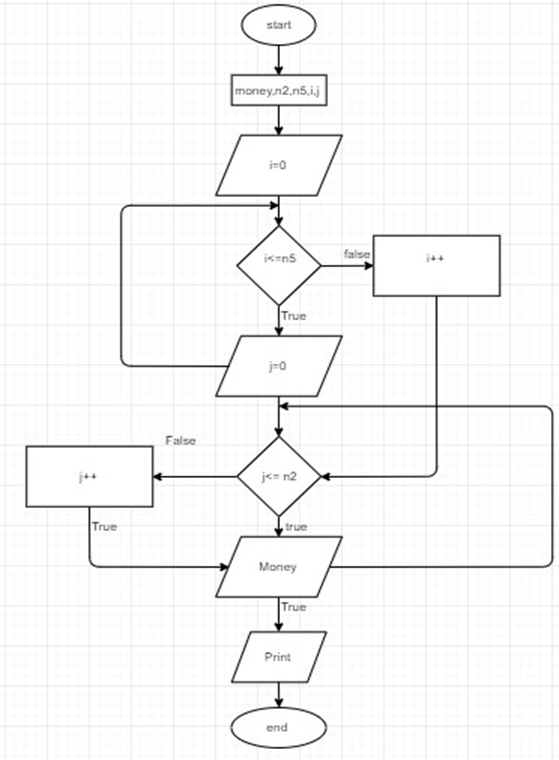 After analyzing the topic, I have an algorithm as follows. First, I set the condition for the input to be i = 0 and j = 0 and run the for loop for each condition to run the program and check which condition is correct and will specify the output as Money
3.Coding
After analyzing the topic, I have an algorithm as follows. First, I set the condition for the input to be i = 0 and j = 0 and run the for loop for each condition to run the program and check which condition is correct and will specify the output as Money
3.Coding
 Here I use the for command to check the condition and optimize the withdrawal amount when the user requests it
 and I use an if statement to limit the amount of money withdrawn
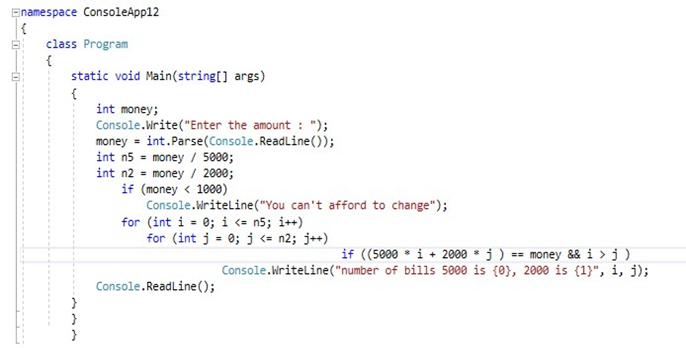 From the algorithm, we perform it by appropriate programming language, at this case, I use C#.
4.Run the program
From the algorithm, we perform it by appropriate programming language, at this case, I use C#.
4.Run the program
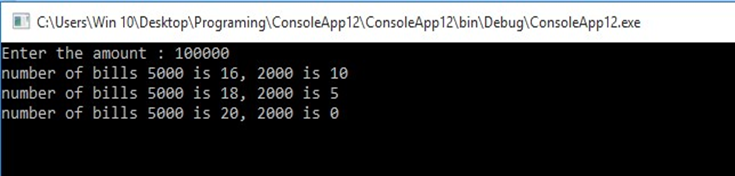 At last, run the program to make sure it executes correctly and give out the desired output.
Part2:
At last, run the program to make sure it executes correctly and give out the desired output.
Part2:
set problems and solutions
I am a graduate student who graduated and went to work at a company as a trainee. The company has a requirement for me to create software to calculate the electricity of the month including money last month, money this month, unit price, into money
solve problems
For the problem that the company requested to handle first, then I will deploy application model on visual studio software and write code with windowform this will be the interface of windownform I deploy applications and write code for it

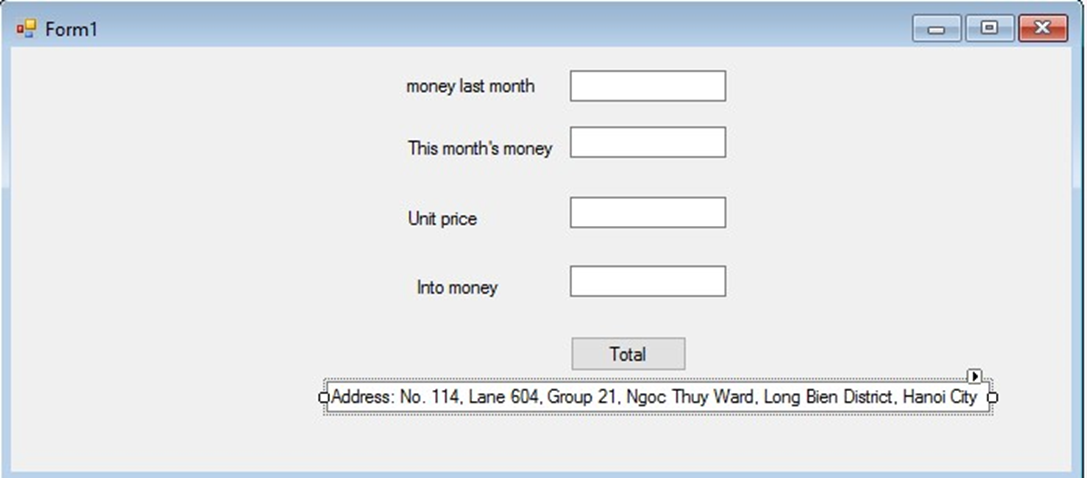
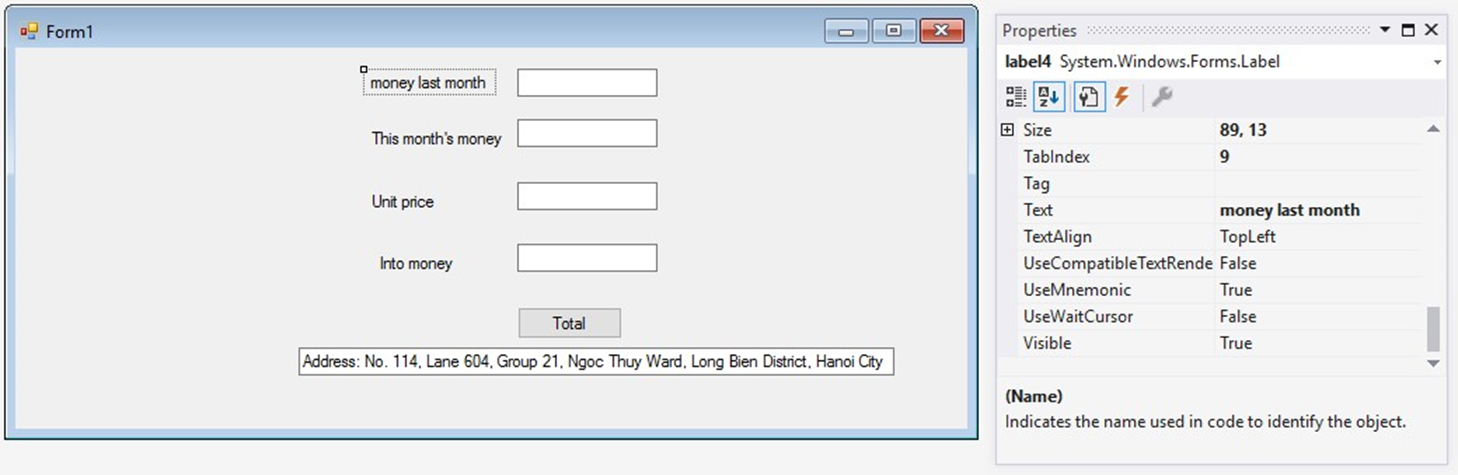
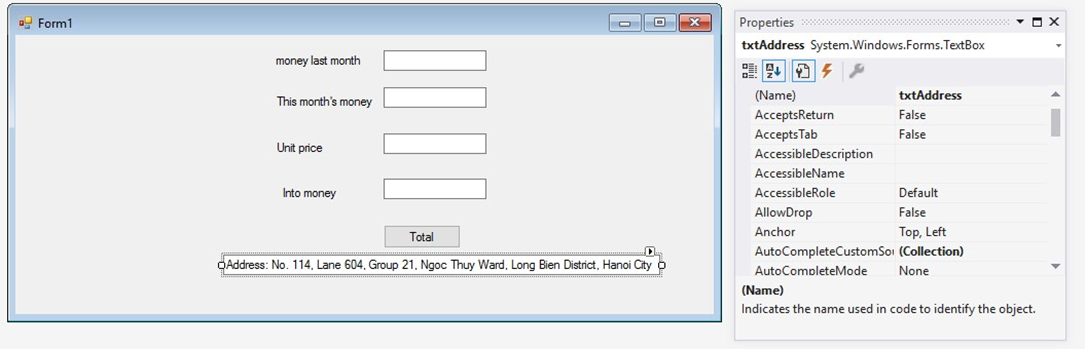
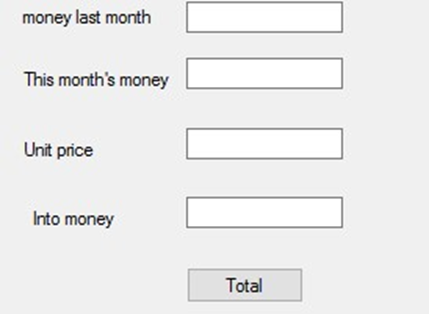 The design part I think is so temporary, followed by the coding and programming section for the application. First, I click on the sum and write code
 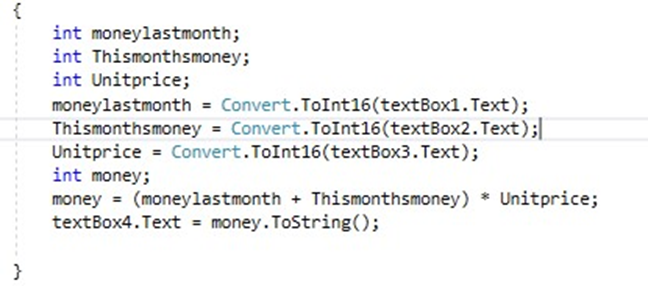 and next I will put in the test and run the code of the program and this is the result after entering the data
 Definition of algorithm
What is the algorithm? - Algorithm is a finite set of instructions or methods. Clearly defined for completing some things from an initial given state. When these directives have been thoroughly applied, it will lead to the last anticipated results. In other words, it can be understood that the algorithm is comprised of specific rules or processes. Aiming to solve some problems in some finite steps. Or it may be intended to provide any result from a set of facts that have been included.
Definition of algorithm
What is the algorithm? - Algorithm is a finite set of instructions or methods. Clearly defined for completing some things from an initial given state. When these directives have been thoroughly applied, it will lead to the last anticipated results. In other words, it can be understood that the algorithm is comprised of specific rules or processes. Aiming to solve some problems in some finite steps. Or it may be intended to provide any result from a set of facts that have been included.
- input: there are zero or more quantities which are externally supplied;
- output: at least one quantity is produced;
- definiteness: each instruction must be clear and unambiguous;
- finiteness: if we trace out the instructions of an algorithm, then for all cases the algorithm will terminate after a finite number of steps; (Tung Doan Trung, 2018)
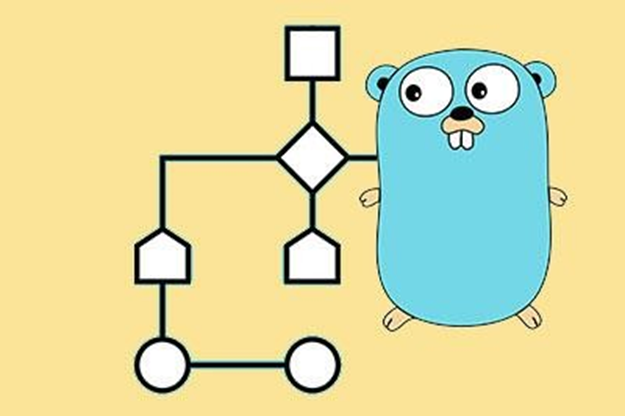 Algorithm for flowcharts
Source:
https://www.google.com/search?q=v%C3%AD+d%E1%BB%A5+v%E1%BB%81+thu%E1%BA%ADt+to%C3%A1n+l%E1%BA%ADp+tr%C3%ACnh+c
%23&source=lnms&tbm=isch&sa=X&ved=0ahUKEwiLxe3h8e3gAhUOUd4KHatoDYcQ_AUIDygC&biw=1366&bih=657#imgrc=6z2st8DwzVhLIM: Program development steps
According to We have 7 steps to build a program:
D. 7 steps of building an application
Basically, we have 7 steps to build an application:
Algorithm for flowcharts
Source:
https://www.google.com/search?q=v%C3%AD+d%E1%BB%A5+v%E1%BB%81+thu%E1%BA%ADt+to%C3%A1n+l%E1%BA%ADp+tr%C3%ACnh+c
%23&source=lnms&tbm=isch&sa=X&ved=0ahUKEwiLxe3h8e3gAhUOUd4KHatoDYcQ_AUIDygC&biw=1366&bih=657#imgrc=6z2st8DwzVhLIM: Program development steps
According to We have 7 steps to build a program:
D. 7 steps of building an application
Basically, we have 7 steps to build an application: - Problem Definition In this phase, we define the problem statement and we decide the boundaries of the problem. In this phase we need to understand the problem statement, what is our requirement, what should be the output of the problem solution. These are defined in this first phase of the program development life cycle.
- Problem Analysis In phase 2, we determine the requirements like variables, functions, etc. to solve the problem. That means we gather the required resources to solve the problem defined in the problem definition phase. We also determine the bounds of the solution. 3. Algorithm Development During this phase, we develop a step by step procedure to solve the problem using the specification given in the previous phase. This phase is very important for program development. That means we write the solution in step by step statements.
- Coding & Documentation This phase uses a programming language to write or implement actual programming instructions for the steps defined in the previous phase. In this phase, we construct an actual program. That means we write the program to solve the given problem using programming languages like C, C++, Java etc.,
- Compiling and running the program: This stage is execution by the computer, specify the compiler. From your programming code, Compiler program will translate it into machine code after several sub step to make the computer understand your code. After that, computer will execute this machine code.
- Testing & Debugging During this phase, we check whether the code written in the previous step is solving the specified problem or not. That means we test the program whether it is solving the problem for various input data values or not. We also test that whether it is providing the desired output or not.
- Maintenance During this phase, the program is actively used by the users. If any enhancements found in this phase, all the phases are to be repeated again to make the enhancements. That means in this phase, the solution (program) is used by the end user. If the user encounters any problem or wants any enhancement, then we need to repeat all the phases from the starting, so that the encountered problem is solved or enhancement is added. criteria are used to tell a good algorithm? • Precision – the steps are precisely stated(defined). • Uniqueness – results of each step are uniquely defined and only depend on the input and the result of the preceding steps. • Finiteness – the algorithm stops after a finite number of instructions are executed. • Input – the algorithm receives input. • Output – the algorithm produces output. • Generality – the algorithm applies to a set of input (Tung Doan Trung, 2018) IDE Evaluation I. Some basic understanding of IDE
- Definition The abbreviated IDE for Integrated Development Environment is software that provides programmers with an integrated environment that includes various tools such as code writing programs or code editors, debugger or debugger programs. Simulate application when running in real life or simulator .... In other words, IDE is software that includes other software packages to help develop software applications. In this report, I will be focusing on Visual Studio IDE.
- Features of an IDE An IDE has the following features:
- Features of an IDE An IDE has the following features:
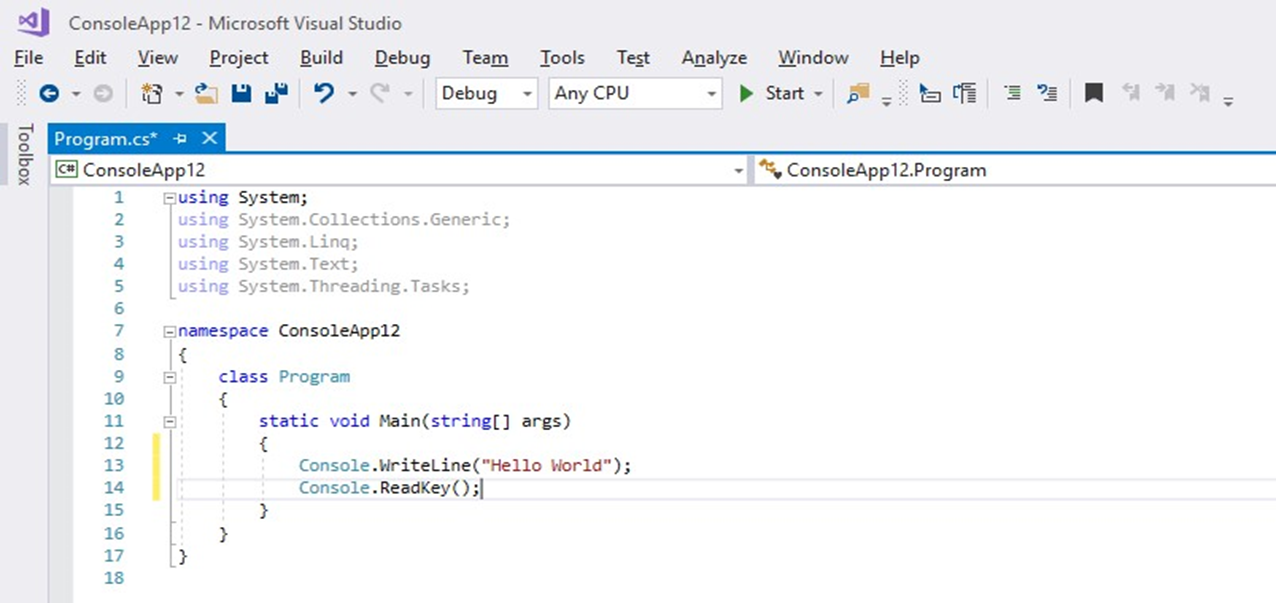
- Editing code Like any other IDE, Visual Studio includes a code editor that supports syntax highlighting and finishing by using IntelliSense not only for functions, variables, and methods but also for structures. language structures such as Query or control loops.
- Debugger Visual Studio has a debugger that features both machine-level debugging and source-level debugging. This feature works with both management code like machine language and can be used to debug applications written in languages supported by Visual Studio. - Design Windows Forms Designer Used for the purpose of building a GUI using Windows Forms, which are used to build internal controls or can lock them next to the template. Controls that present data can be linked to data sources such as databases or queries.
- WPF Designer This feature is similar to Windows Forms Designer, which supports metaphorical drag and drop. Use interaction between people and computers targeted at Windows Presentation Foundation.
- Web designer / development
Visual Studio also has an editor and website design that allows websites to be designed with drag and object features.
This is what a code editor looks like in Visual Studio 2017:
 II. How IDE help me in developing my application
 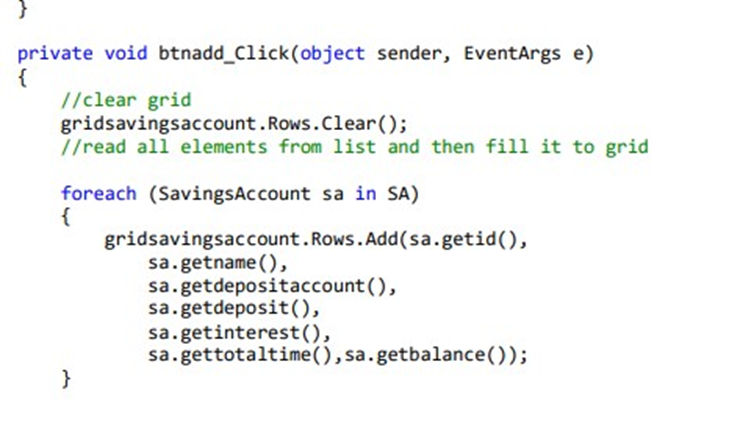 First enter the code using the code editor
The most helpful feature is probably the code editor as it helps me distinguish many components of the code by showing them in different colors such as keywords “private void” and “foreach” in blue
The code editor feature recommends that you use the correct command whenever you type incorrectly or type missing
First enter the code using the code editor
The most helpful feature is probably the code editor as it helps me distinguish many components of the code by showing them in different colors such as keywords “private void” and “foreach” in blue
The code editor feature recommends that you use the correct command whenever you type incorrectly or type missing
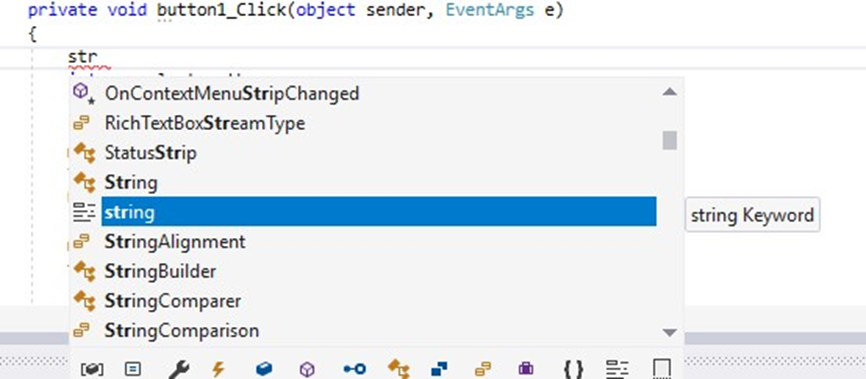 This saves a lot of time, especially when running the program with a large amount of code
After writing the code the compiler feature translates them so that the computer can understand and run them
This saves a lot of time, especially when running the program with a large amount of code
After writing the code the compiler feature translates them so that the computer can understand and run them

 Double click on the error and you will be taken directly to the problem where you can fix it. in this situation I accidentally created or errors should have removed unnecessary fixes and program has run well
III. Using IDE and not using IDE
Using IDE
Double click on the error and you will be taken directly to the problem where you can fix it. in this situation I accidentally created or errors should have removed unnecessary fixes and program has run well
III. Using IDE and not using IDE
Using IDE - Visual Studio supports programming in many languages such as C / C ++, C #, F #, Visual Basic, HTML, CSS, JavaScript.
- Is a tool to support Debug easily and strongly like: Break Point, see the value of variables in the process of running, support debugging each command.
- Visual Studio interface is easy to use for beginners.
- Visual Studio supports developing applications: desktop MFC, Windows Form, Universal App, mobile application Windows Phone 8 / 8.1, Windows 10, ...
- Visual Studio supports building applications professionally with drag and drop tools.
- Visual Studio is used by many programmers around the world. Not using IDE
- It takes a long time to run the program
- Writing code can be wrong, long and unnecessary when running the program
- You can only write code for Console Application.
- if the code program you write has errors you will have to find the error yourself if the code is long, many tools are not used like Breakpoints or Watch windows Debugging Evaluation Definition and facilities of Debugging What is DEBUG?
- Debug is the process of finding the error or the cause of the error (where the bug is) to get a fix (bug bug).
- Programmers are the tools that generate the most Bugs because they program. And therefore, the best tool to remove Bugs is Programmers Breakpoint Definition Breakpoints: The point where the program will stop to allow you to run step by step the lines of code. Can set multiple breakpoints in the program. Variable tracking windows: Helps you track changes of variables or functions for each run. If a variable has a value change, it will be red to distinguish it. There are 3 types:
- Autos: Display automatically variables, or functions returned in previous code.
- Locals: Similar to Autos but only displays related variables internally within a function or block of commands.
- Watch: Custom window allows you to view only the variables you require or any custom value. Visual Studio allows you to open up to 4
Perform Debug program To start debugging, click on the left margin at the code line to start debugging to set breakpoints. Breakpoint will be red as shown below. Note that you can set different breakpoints. To delete a breakpoint, click on it again.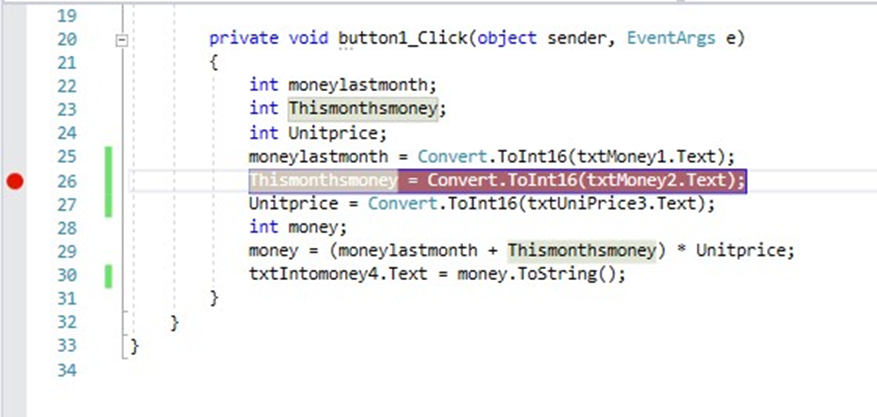 After setting Breakpoints, we start running the program under Debug mode by pressing F5. The program will run normally until you see a breakpoint as shown below.
 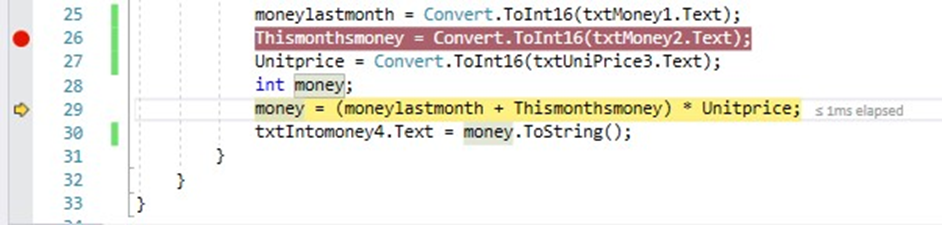 You will now use the buttons on the Debug toolbar to run step by step.
Basic Debug control buttons:
You will now use the buttons on the Debug toolbar to run step by step.
Basic Debug control buttons: - Step Over (F10): run the commands one by one, but will not go into the child function but just skim.
- Step Into (F11): run the commands one after another and enter the sub function.
- Step Out (Shift + F11): Surf through the current sub function to return to the previous function. It can also be used to jump over the next breakpoint.
Watch windows.
 Debug toolbar: provides command buttons for you to execute Debug program.
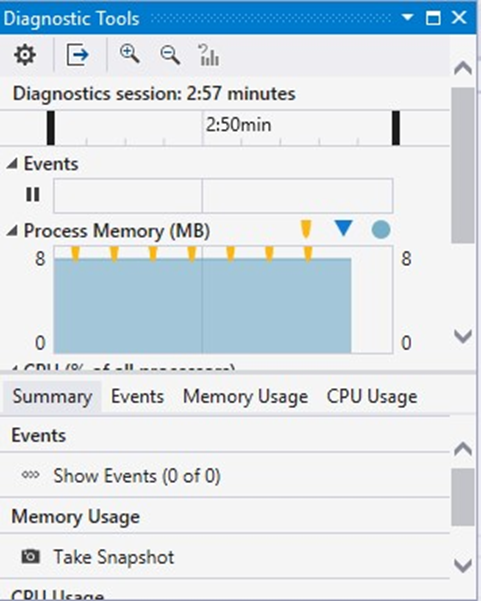
  Call Stack window: Contains the function call in the stack. If only debugging on a basic level, it is not necessary to care about this window. Diagnostic Tool window: Contains advanced diagnostic tools. Provide memory real-time graph, CPU, ... that the program uses. In addition, it also displays captured events and catch times.
 Coding Standards
I. Basic understanding of coding standards
Coding Standards
I. Basic understanding of coding standards
- Naming convention
- Pascal Case
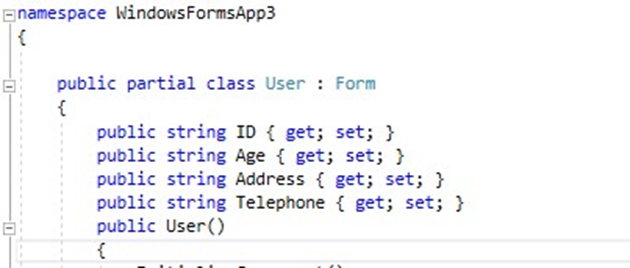
The first letter in the identifier and the first letter of each following word must be capitalized. Use Pascal Case to name a name with 3 or more characters.
For example:
- Namespace is also Pascal case.
- Method : Pascal case - Camel Case
The first letter in the identifier is lowercase and the first letter of the following terminology must be capitalized.
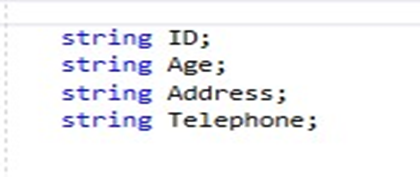
- Uppercase
- Namespace is also Pascal case.
- Method: Pascal case
 All characters in the identifier must be capitalized. Use this rule for identifiers with 2 or fewer characters.
For example:
System.IO
System.Web.IO
All characters in the identifier must be capitalized. Use this rule for identifiers with 2 or fewer characters.
For example:
System.IO
System.Web.IO
- Commenting Conventions
- Do not use the same names (only distinguish uppercase or lowercase letters) It is difficult to identify identifiers especially when in the same context and only distinguish identifiers in uppercase / lowercase letters.
- Do not create 2 namespaces with the same name and differ only in writing style (uppercase / lowercase)
- Do not build a method with parameters with the same name and only different typefaces - Insert one space between the comment delimiter (//) and the comment text, as shown in the following example.
 References
(Tung Doan Trung , 2018 ) Unit 1 - Programming
References
(Tung Doan Trung , 2018 ) Unit 1 - Programming
https://www.dropbox.com/sh/98x6llx329vi804/AADMnhhU7jWyJ0fnUeLsznwfa?dl=0&preview=Lecture +1+-+introduction.pptx#
Algorithm for flowcharts Source: https://www.google.com/search?q=v%C3%AD%20d%E1%BB%A5%20v%E1%BB%81%20thu%E1%BA%ADt%20to%C3%A1n%20l%E1%BA%ADp %20tr%C3%ACnh%20c%23&source=lnms&tbm=isch&sa=X&ved=0ahUKEwiLxe3h8e3gAhUOUd4KHatoDYcQ_AUIDygC&biw=1366&bih=657&fb clid=IwAR3S1X6VWle9aAfOjV0-1ys80aNzPZsebVcs8zIwQ8MTg1MrrfeJrDkJeWo#imgrc=6z2st8DwzVhLIM: