ROOTFastML is a fork of OpenFastML that converts the preprocessing and training to a ROOT-native workflow.
OpenEGammaCNN is a workflow that generates a QKeras model for proton and photon classification (the two classes are signal and background). The model is a lightweight FastML Quantised CNN, with a non-trainable symmetric pooling layer, a depthwise 2D convolutional layer, a ReLU activation, a dense layer, and then a sigmoid activation. The input to the model is shape (3, 3, 2), or (3 towers in EM and HAD)), with background and 1 corresponding to signal.
The first layer applies symmetric pooling using non-trainable convolutions. This applies three symmetric 3 x 3 convolution patterns in the eta-phi plane. The output shape is (1, 1, 2, 3), or (1, 1, 2 calorimeter layers, 3 symmetric pooling outputs). Then, this is passed to the dense depthwise 2D convolutional layer, which applies a fully connected matrix of shape (3, y) for each calorimeter, where y is the depth multiplicity, a tuneable hyperparameter. At this point, we have a shape (1, 1, 2*y). Then, we apply a ReLU activation function, which flattens it to pass it to a final dense layer of shape (24,1). The final output is passed to a sigmoid activation function, giving it a classifier score in
All the hyperparameters are tuned by a KerasTuner random search. Here are all the tuneable hyperparameters:
| Hyperparameter | Default Value |
|---|---|
depth_mult |
|
conv_precision |
|
dense_precision |
|
learning_rate |
The training setup consists of 45 epochs, a Binary Cross Entropy loss function, and an Adam optimizer.
There are four sub-workflows in this repository: /Original, /Root, /Hybrid, and /Root_single. The Original workflow is an exact copy of OpenFastML: the preprocessing pulls the .root data with uproot, does the preprocessing with AwkwardArray, and then saves the processed data as train.parquet and val.parquet. The ROOT workflow pulls the .root data with RDataFrame, does the preprocessing with RDataFrame, and then snapshots the processed data as train.root and val.root. The Hybrid workflow does the preprocessing the same as the Original workflow, but uses ak.to_rdataframe to convert the final arrays to RDataFrame. Then, it snapshots to train.root and val.root. The ROOT_single workflow does the preprocessing the same as the ROOT workflow, but doesn't do the train-test-split, and instead saves it as just processed.root. The training scripts in each workflow reflect the output formats of their respective preprocessing scripts.
To run ROOTFastML, first cd into the outer directory (likely OpenFastML). Then, there are two options: pip and conda. For each, just run the relevant setup script, e.g., source setup_pip.sh.
To run the preprocessing script, run the relevant script from the outer directory, e.g., python Original/Preprocessing/trainingdataloader.py. NOTE: the training script requires raw open data, that is too large to fit on GitHub. To run the preprocessing, there must be a raw_data folder in the workflow folder, containing a zee and jz folder, each containing at least events0k_10k.root and events0k_10k_noPU.root. The preprocessing script generates processed data in the Data folder, and this processed data is already there by default. WARNING: rerunning the preprocessing script will overwrite your data, lest you pass a different file path as the save_path argument(s).
To run the training script, again run the relevant script from the outer directory, e.g., python Original/Training/train_qcnn.py. The training script generates a model in the Models folder, and the baseline model is already there by default. WARNING: rerunning the training script will overwrite your data, lest you pass a different file path as the save_path argument. By default, the model will be saved to Models/model_{batchsize}.keras. Furthermore, the default seed argument is that which produced the best results in the seed tuning.
All benchmarks are located in the Benchmarks/ folder. The test_models.ipynb notebook has all benchmarks that present our plots. Make sure to establish your notebook is in the correct environment before running it! Some benchmarks require the use of models. For these, there's a cell that defines the two models that will be compared in the benchmarks. Furthermore, some benchmarks require the use of pregenerated analysis data. This data is present in the Data folder, but to recreate it, run the analysis packages from the outer directory (e.g., python -m Benchmarks.preprocessing_time). WARNING: running the analysis scripts will overwrite the data, lest you pass a different file path as the save_path argument.
NOTE: Unless otherwise specified, these curves compare the Original workflow with the Root workflow, using the default parameters in each workflow's trainingdataloader.py and train_qcnn.py files. This includes optimized seeds.
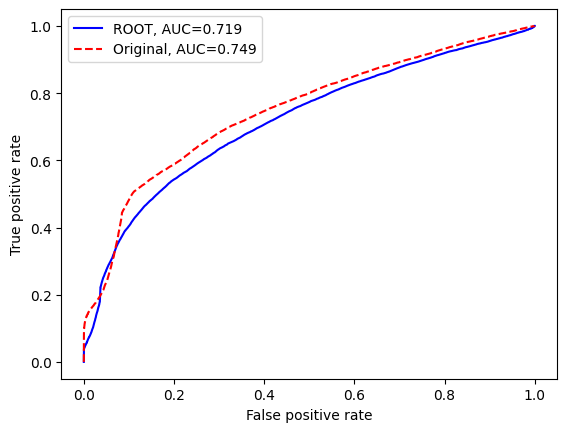
Here's the receiver operating characteristic (ROC) curve, comparing the two models.
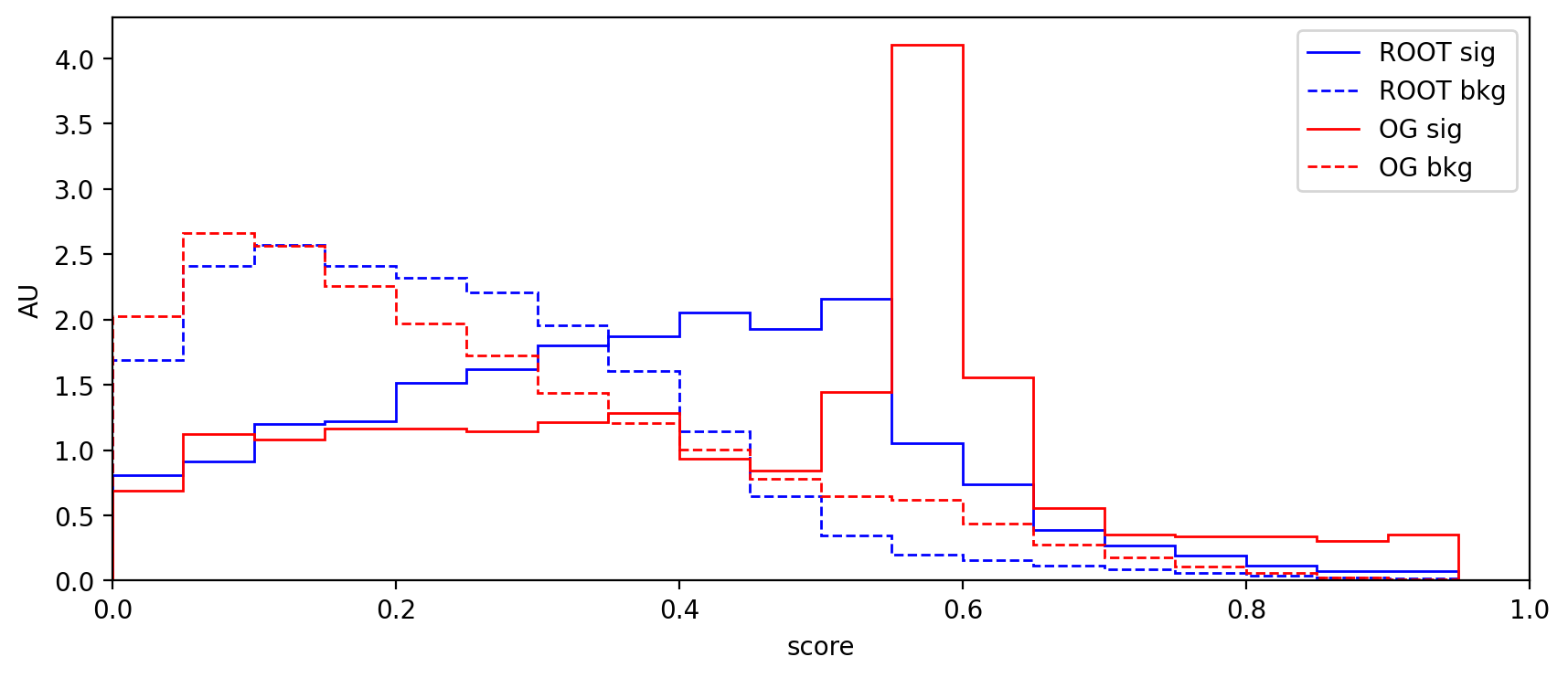
Here's the AU curve, comparing signal and background efficiency. (An event near 0 suggests the model is confident the event is background, whereas an event near 1 suggests the model is confident the event is signal).
Here's a table documenting each workflow's preprocessing time and 100-trains time:
| Workflow | 100 Training runs (s) | Preprocessing |
|---|---|---|
| Original | 600.501 | 3m28.43s |
| Root | 278.216 | 4m51.80s |
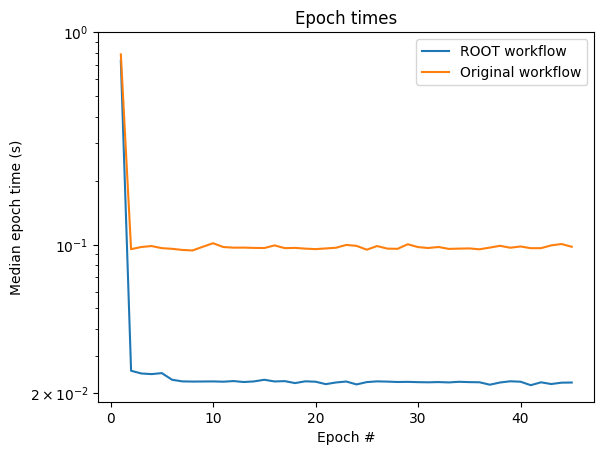
Here's how long each training epoch took each model. Since the individual epochs are very variable, these are the averages of 50 full trainings of each model. Note that for both models, the first epoch takes much longer than the rest.