


Dev-only floating inspector for Next.js + React 18/19. Hover or click any DOM element to see which source file (with line number) rendered it, open it straight in your editor, view live props and store state, reverse-lookup i18n keys from rendered text, flash component re-renders, and copy the whole context for your AI assistant.
Zero runtime dependencies. Never ships to production when gated correctly (see Production safety).
- Features
- Requirements
- Quick start
- Production safety (dead-code elimination)
- Controls
- True re-render flashes (optional hook)
- Copy for AI
- Configuration
- API reference
- How it works
- Limitations
- Troubleshooting
- Demo app
- Development
- Project status
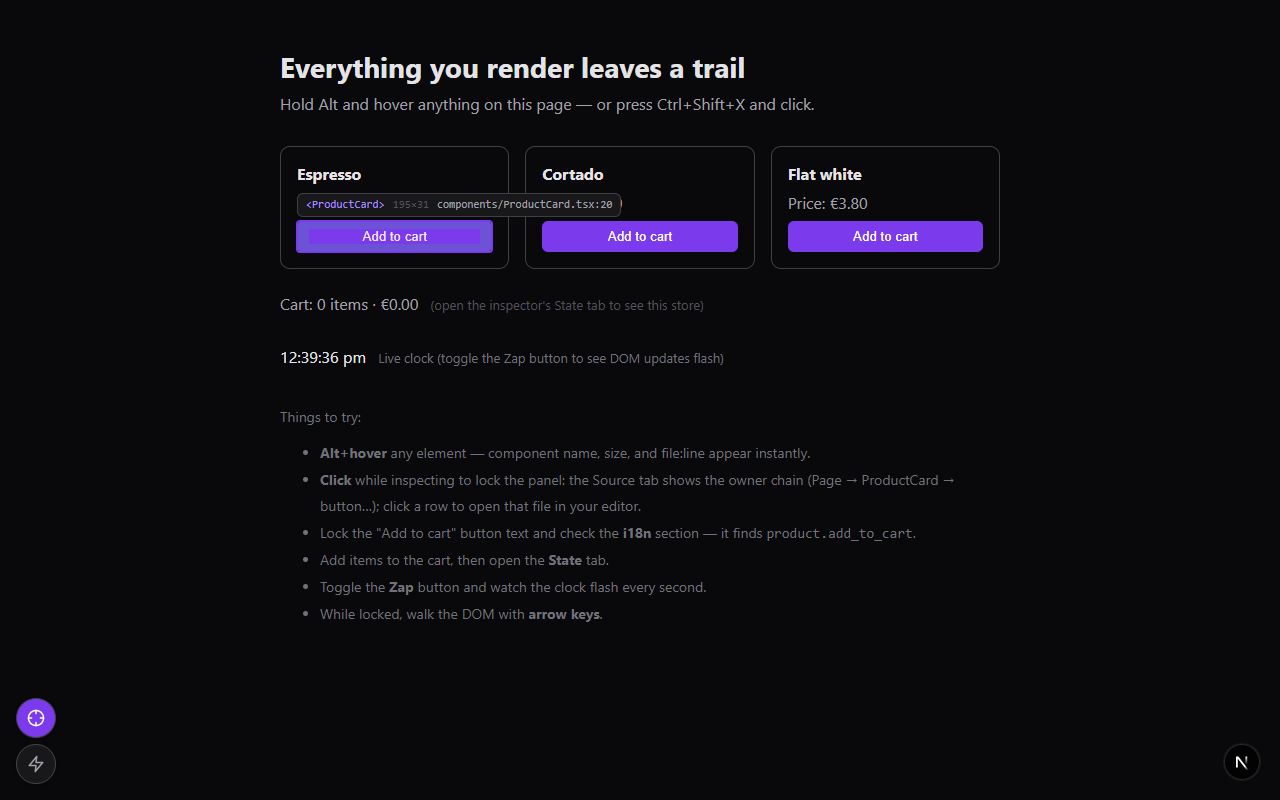
Find the source
- Hover highlight with a
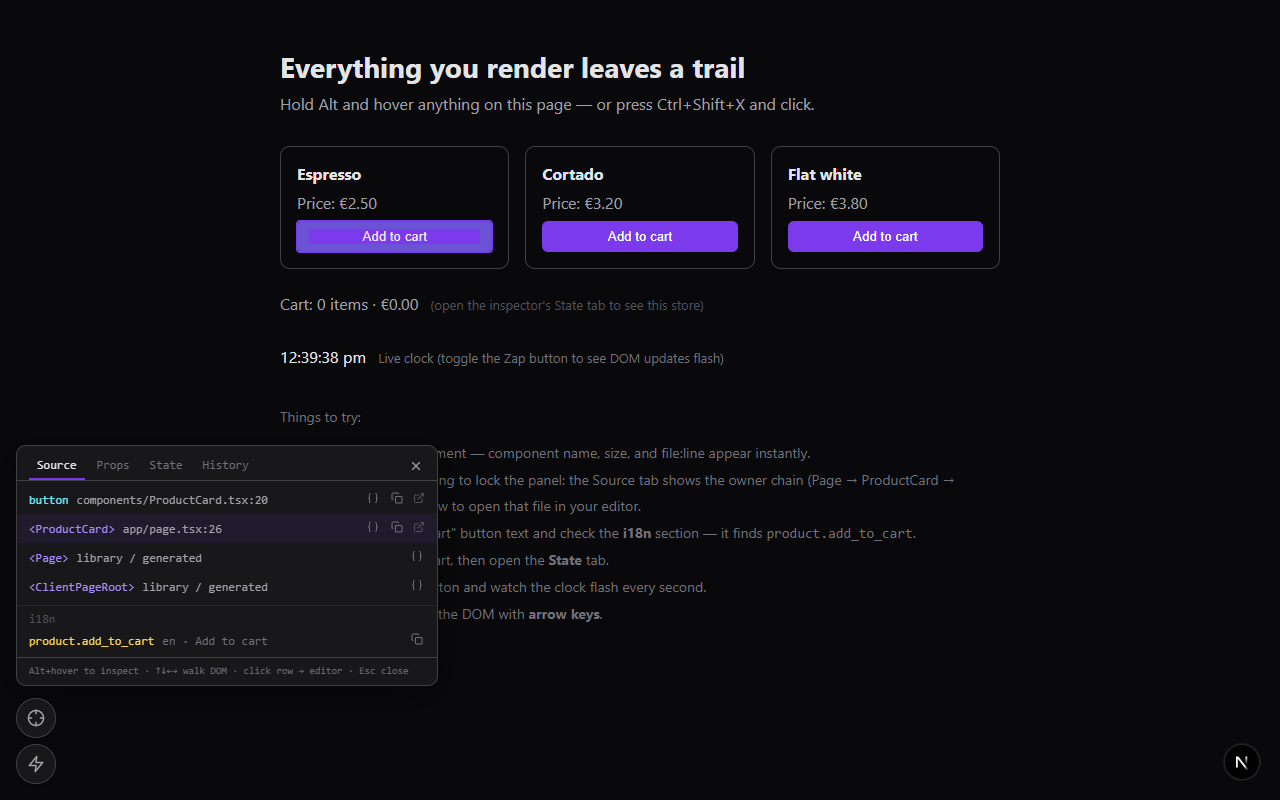
<Component> · file.tsx:42chip and element dimensions - Click to lock the full owner-component chain, each entry with
file:line - Click any entry to open that file in your editor at the exact line
- Box-model overlay (margin/padding bands) like browser devtools
Understand the state
- Props tab — live props of any component in the chain (compact JSON tree)
- State tab — snapshot of your store; Redux, Zustand, Jotai, anything — you supply the getter
- i18n reverse lookup — which translation key produced this rendered text (i18next-shaped resources)
- History tab — revisit the last 8 inspected elements
See it move
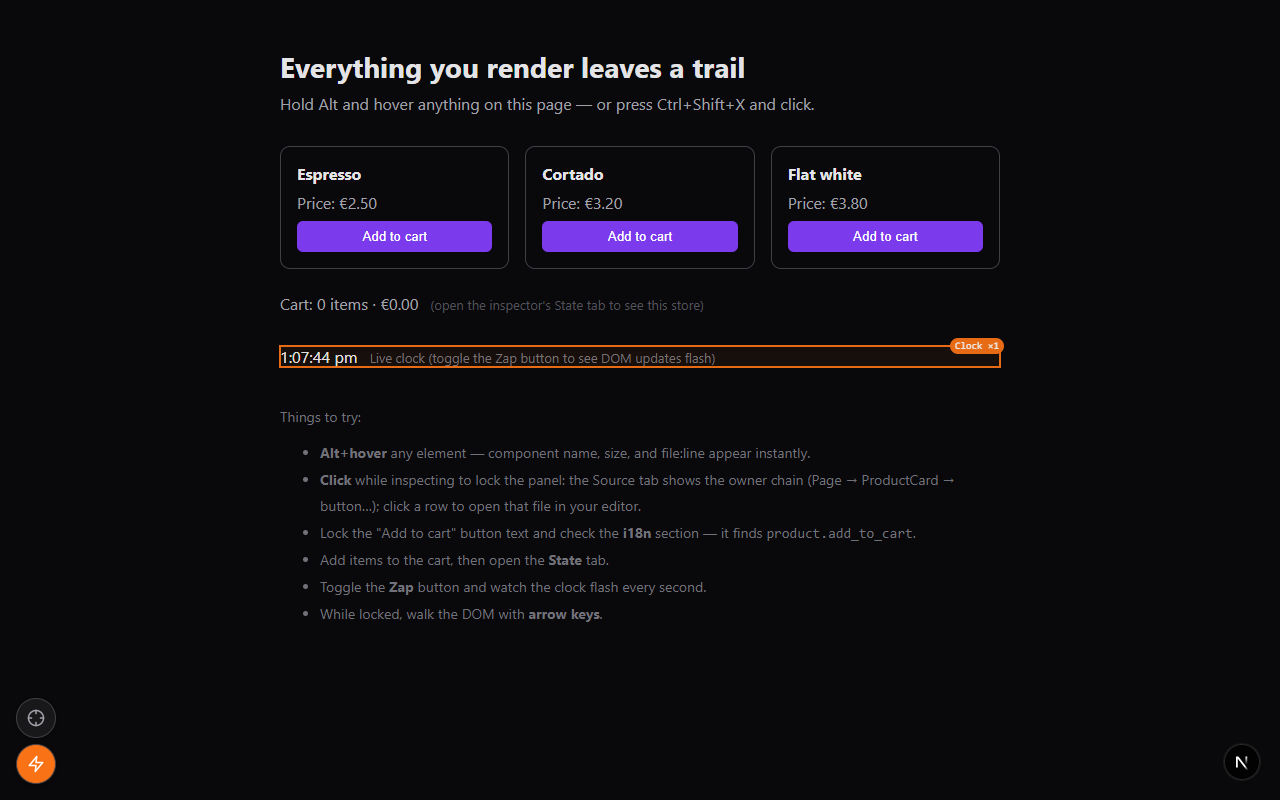
- Re-render flasher — with the optional early hook,
outlines components as they re-render, labeled
Clock ×3; without it, falls back to flashing raw DOM mutations
Work fast
- Copy for AI — one click copies chain + paths + props + i18n keys, ready to paste into Claude Code, Cursor, or any coding assistant
- Alt+hover quick inspect, arrow-key DOM walking, configurable hotkeys
- Single draggable launcher button that expands into the action menu, position persisted to
localStorage
| React / ReactDOM | >= 18 (peer deps); best on 19 |
| Next.js | next dev — Turbopack and webpack (--webpack) both verified |
| Environment | Development builds only — relies on React's dev-only fiber internals |
| Runtime deps | None |
npm i -D next-dev-inspectorMount it anywhere in your client tree:
import DevInspector from "next-dev-inspector";

<DevInspector />
Then hold Alt and hover anything — or press Ctrl+Shift+X and click. For real projects, use the env-gated mount below so the package never reaches production bundles.
The inspector reads React's dev-only fiber internals (_debugStack,
_debugOwner), so it only works in development — and it should be compiled
out of production bundles. Gate it on constants your bundler can statically
evaluate:
// app/dev-inspector.tsx
"use client";
import dynamic from "next/dynamic";

const Inspector = dynamic(() => import("next-dev-inspector"), { ssr: false });

export function DevInspectorMount() {
  if (
    process.env.NODE_ENV !== "development" ||
    process.env.NEXT_PUBLIC_DEV_INSPECTOR !== "true"
  ) {
    return null;
  }
  return <Inspector />;
}
Render <DevInspectorMount /> at the end of your root layout's <body>.
// pages/_app.tsx
import dynamic from "next/dynamic";

const DevInspector =
  process.env.NODE_ENV === "development" &&
  process.env.NEXT_PUBLIC_DEV_INSPECTOR === "true"
    ? dynamic(() => import("next-dev-inspector"), { ssr: false })
    : null;

export default function App({ Component, pageProps }) {
  return (
    <>
      <Component {...pageProps} />
      {DevInspector && <DevInspector />}
    </>
  );
}
Run with the flag:
NEXT_PUBLIC_DEV_INSPECTOR=true next devBecause both conditions are build-time constants, the import() — and the
whole package — is eliminated from production output.
| Action | Effect |
|---|---|
| Ctrl+Shift+X | Arm / disarm the inspector (configurable via hotkey) |
| Alt + hover | Quick inspect without arming (configurable via hoverModifier) |
| Click (while inspecting) | Lock the details panel on that element |
| ↑ ↓ ← → | Walk the DOM (parent / first child / siblings) while locked |
| Esc | Close panel, disarm |
| Wrench button | Open / close the action menu — also the drag handle |
| Crosshair button (in menu) | Arm / disarm the inspector |
| Zap button (in menu) | Toggle the re-render / DOM-update flasher |
| Source row click | Open that file in your editor |
{ } icon on a row |
Jump to that entry's Props tab |
By default the Zap button flashes DOM mutations — a memoized re-render that changes no DOM stays invisible. For true re-render tracking, React must see a DevTools hook before it loads, which a widget rendered by React cannot provide. So the package ships one as an inline script you mount yourself:
// App Router — top of app/layout.tsx's <body> (it's a server-safe component)
import { DevInspectorHook } from "next-dev-inspector/hook";

<body>
  <DevInspectorHook />   {/* renders nothing in production */}
  {children}
</body>
// Pages Router — pages/_document.tsx, inside <Head>
import { devInspectorHookScript } from "next-dev-inspector/hook";
{process.env.NODE_ENV === "development" && (
<script dangerouslySetInnerHTML={{ __html: devInspectorHookScript }} />
)}With the hook installed, flashes carry component names (Clock ×3) and fire
per re-render — the widget detects it automatically. If the real React
DevTools extension is present, the script piggybacks on its hook instead of
replacing it.
The locked panel's footer has a Copy for AI button that puts a compact, paste-ready context block on the clipboard:
Inspected element (via next-dev-inspector):

Component chain (innermost first):
1. button — components/ProductCard.tsx:20
2. <ProductCard> — app/page.tsx:26
3. <Page> — (library / generated)

Props of <ProductCard>:
{ name: "Espresso", price: 2.5 }

i18n matches:
- product.add_to_cart (en) = "Add to cart"
Paste it into your AI assistant and it knows exactly which file and component
you're talking about. (buildAiContext / serializeValue are also exported
if you want the same block programmatically.)
All props are optional:
<DevInspector
  enabled={true}
  hotkey="ctrl+shift+x"
  hoverModifier="alt"
  storageKey="dev-inspector-pos"
  zIndex={2147483000}
  colors={{ accent: "#7c3aed", accentLight: "#a78bfa", flash: "#f97316" }}
  editorEndpoint="/__nextjs_launch-editor"
  stackFramesEndpoint="/__nextjs_original-stack-frames"
  getI18nData={() => ({ data: i18n.store.data, language: i18n.language })}
  getStateSnapshot={() => store.getState()}
  stateLabel="Redux store"
/>| Prop | Type | Default | Description |
|---|---|---|---|
enabled |
boolean |
true |
Render nothing when false (combine with env gating for DCE) |
hotkey |
string |
"ctrl+shift+x" |
Arm/disarm combo — modifiers + key joined with + |
hoverModifier |
"alt" | "ctrl" | "meta" | "shift" | "none" |
"alt" |
Held key that enables hover-inspect without arming; "none" disables |
storageKey |
string |
"dev-inspector-pos" |
localStorage key for the launcher-button position |
zIndex |
number |
2147483000 |
Base z-index for all overlay layers |
colors |
{ accent?, accentLight?, flash? } |
violet / orange | Palette overrides, hex #rrggbb |
editorEndpoint |
string |
"/__nextjs_launch-editor" |
GET endpoint that opens file/line1/column1 in the editor |
editor |
"vscode" | "vscode-insiders" | "cursor" | "windsurf" |
— | Force an editor via its URL scheme instead of the dev server (see below) |
projectRoot |
string |
— | Absolute project root; needed by editor to absolutize relative source paths |
stackFramesEndpoint |
string | null |
"/__nextjs_original-stack-frames" |
POST fallback resolver for webpack-dev frames; null disables |
getI18nData |
() => { data, language? } | null |
— | Enables i18n reverse lookup (see below) |
getStateSnapshot |
() => unknown | Promise<unknown> |
— | Enables the State tab (see below) |
stateLabel |
string |
"Store" |
Heading shown in the State tab |
The State tab appears only when you pass a getter. Any store works — sync or async:
// Redux (dynamic import keeps the store out of the widget's graph)
getStateSnapshot={async () => (await import("@/lib/redux/store")).store.getState()}

// Zustand
getStateSnapshot={() => useBoundStore.getState()}

// Jotai (with a store instance)
getStateSnapshot={() => Object.fromEntries(myAtoms.map(a => [a.debugLabel, store.get(a)]))}Pass i18next-shaped resources ({ [lng]: { [namespace]: nestedTree } }) and
the current language:
getI18nData={() => ({ data: i18n.store.data, language: i18n.language })}When you lock an element, the Source tab lists translation keys whose value
matches its rendered text — exact matches first, then {{interpolated}}
values matched by static prefix.
By default, clicking a source row asks the Next dev server to open the file,
and Next's launch-editor guesses the editor from running processes. Two ways
to pin it:
-
Env var (no code) — set
REACT_EDITORwhen starting the dev server; Next's launch-editor respects it:REACT_EDITOR=code next dev
-
editorprop — bypass the dev server entirely and open the editor's own URL scheme (vscode://file/…:line:col) from the browser. Relative source paths (Turbopack/webpack) need an absoluteprojectRoot, which you can inline at build time:// next.config.mjs const nextConfig = { env: { NEXT_PUBLIC_PROJECT_ROOT: process.cwd() }, };
<DevInspector
  editor="vscode" // or "vscode-insiders" | "cursor" | "windsurf"
  projectRoot={process.env.NEXT_PUBLIC_PROJECT_ROOT}
/>
If a path can't be made absolute, the click falls back to the dev-server endpoint, so this is safe to leave on.
editorEndpoint and stackFramesEndpoint exist so non-Next dev servers can
be targeted (e.g. Vite's /__open-in-editor, with
stackFramesEndpoint={null}) — but Vite serves different source-map URLs and
this is untested territory. The package is Next-first.
| Export | Kind | Purpose |
|---|---|---|
DevInspector (also default) |
component | The inspector widget |
buildAiContext(input) |
function | The "Copy for AI" text, programmatically |
serializeValue(value) |
function | The compact, cycle-safe value renderer it uses |
DevInspectorProps, DevInspectorColors, HoverModifier, AiContextInput, InspectedEntry, ResolvedLocation, ResolverOptions, RawStackFrame, I18nMatch, FlashEvent, BoxModel, BoxEdges, SourceMapPayload, OriginalPosition |
types | Public types |
| Export | Kind | Purpose |
|---|---|---|
DevInspectorHook (also default) |
component | Server-safe inline <script> mount; renders nothing outside development |
devInspectorHookScript |
string | The raw script, for _document or custom injection |
The main bundle is marked "use client"; the hook bundle is not, so it can
be imported from server components.
- React 19 removed
_debugSource. Source locations are recovered from the dev-only fiber_debugStack— anErrorcaptured at each JSX callsite — walking the_debugOwnerchain. This exists only in development React. - Turbopack (
next dev): the widget fetches the chunk's sibling<chunk>.js.mapand decodes it client-side (index maps withsections[],file:///sources). The dev server'sPOST /__nextjs_original-stack-framesresolver is not used for browser chunk frames — it hangs onhttp://file URLs and returns identity mappings. - webpack (
next dev):webpack-internal:///frames fall back to the server resolver endpoint. - Open in editor uses
GET /__nextjs_launch-editor?file=&line1=&column1=, which acceptsfile://URLs, absolute paths, and project-relative paths. - Re-render hook: the inline script installs a minimal
__REACT_DEVTOOLS_GLOBAL_HOOK__before React loads and walks each commit as a diff against the alternate fiber tree, pruning subtrees whose child pointer is unchanged (the way React DevTools does) —PerformedWorkflags alone are stale on fibers React reused without re-cloning.
- Development only — production React builds carry none of the fiber debug data this relies on. Gate the mount so bundlers strip it entirely.
- Fiber internals are not public API. They have been stable across React 18/19 dev builds, but a future React release could move them.
- Without the hook, the flasher shows DOM mutations, not re-renders; a memoized re-render that changes no DOM won't flash.
- Library components resolve to the caller's JSX callsite (the first app-owned frame) — usually what you want anyway.
- Editor opening goes through the Next dev server; it opens whatever editor the server's launch-editor detection finds (VS Code, etc.).
| Symptom | Likely cause / fix |
|---|---|
Every entry says library / generated |
Source maps unreachable — make sure you're on next dev (not a production build) and same-origin |
| Rows never resolve on webpack dev | The fallback POSTs to stackFramesEndpoint; check it isn't disabled and the dev server is current |
| Clicking a row doesn't open the editor | The dev server's launch-editor couldn't find an editor — try opening a file from a Next error overlay to verify |
| Flashes have no component names | The early hook isn't installed — see the hook section; it must render before React loads |
| Hotkey does nothing | Another extension/app owns the combo — change the hotkey prop |
| Widget visible in production | Your gating isn't statically analyzable — both conditions must be literal process.env checks |
A runnable demo lives in demo/:
cd demo
npm install
npm run dev
Open the printed URL and follow the "Things to try" list on the page: Alt+hover anything, click to lock the source chain, open files in your editor, check the i18n and State tabs, toggle the Zap button while the on-page clock ticks, and try Copy for AI.
npm install
npm run test        # vitest — stack parsing, VLQ source maps, i18n lookup, hook script, AI context
npm run typecheck
npm run build       # tsup → dist/ (ESM + CJS + d.ts, two entries: index + hook)
CI runs all three on Node 20 and 22 for every push and PR. Releases are
tag-triggered: bump the version, update CHANGELOG.md, then
git tag vX.Y.Z && git push origin vX.Y.Z — the release workflow publishes
to npm with provenance via trusted publishing.
Layout: src/ widget + pure modules · tests/ vitest suites ·
demo/ runnable Next 16 demo · docs/ README screenshots.
Pre-1.0. Verified against Next 16 + React 19, on both Turbopack and webpack dev servers. Issue reports welcome.