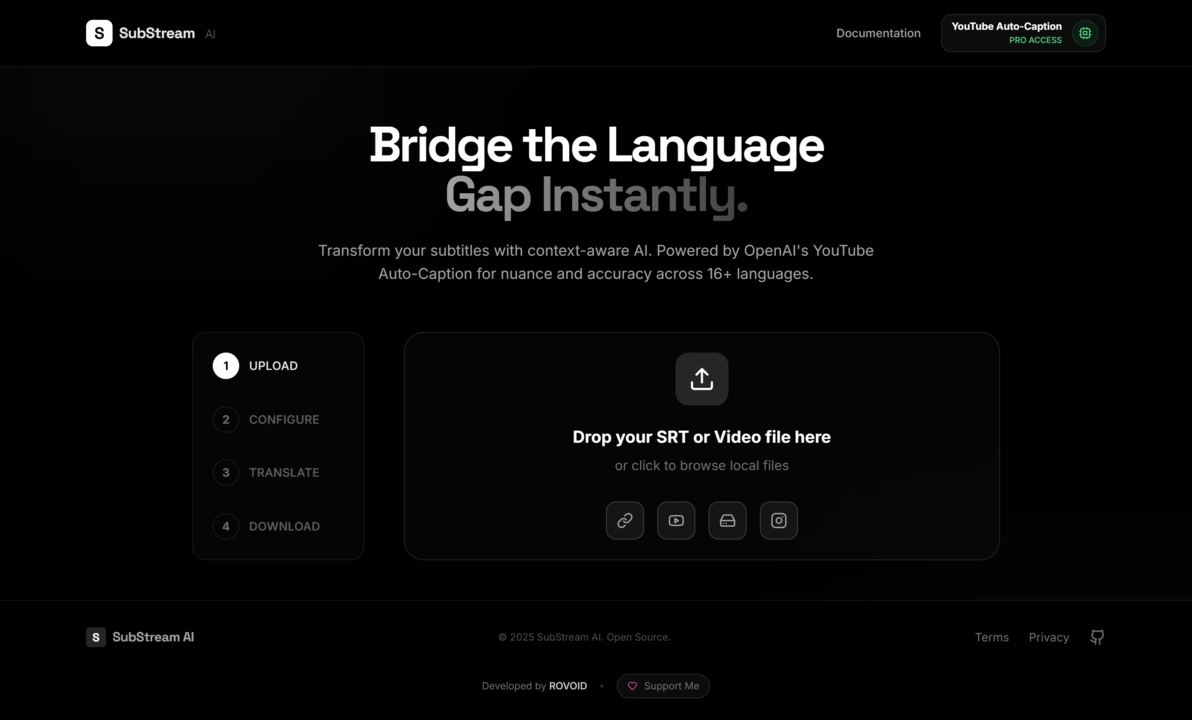
Private, browser-first media processing & AI subtitle intelligence.





A high-performance subtitle extraction, speech-to-text transcription, and video muxing suite for Gemini, OpenAI, and Claude.
Quick Start · Key Features · Architecture · Tech Stack · Environment Setup · License
- Overview
- Key Features
- Architecture Overview
- Tech Stack & Exact Versions
- Core Technologies & Methodologies
- Project Structure
- Getting Started & Local Development
- Environment Configuration
- Deployment
- License
- Context-Aware Batch Translation: Intelligently batches subtitle segments to preserve narrative continuity, conversational flow, grammatical gender, and tone across line breaks.
- Multimodal AI Speech-to-Text: Directly transcribes audio streams into synchronized SRT subtitle segments using Google Gemini multimodal audio prompts or OpenAI Whisper.
- Multi-Provider AI Support: Seamless switching between Google Gemini (Gemini 2.5 Flash, Gemini 3 Pro), OpenAI (GPT-4o, GPT-4o-mini, Whisper-1), and Anthropic Claude (Claude 3.5 Sonnet, Claude 3.5 Haiku, Claude 3.7 Sonnet).
- Dynamic Model Catalog Synchronization: Automatically synchronizes available text models and pricing data in real-time from OpenRouter and LiteLLM APIs with localStorage fallback caching.
- Client-Side Media Engine (Wasm FFmpeg): Performs audio extraction, subtitle extraction, and video remuxing directly inside the browser using WebAssembly without uploading video files to intermediate servers.
- Cloud & Media Import: Direct media extraction from YouTube URLs, user-authenticated YouTube account uploads/downloads via OAuth 2.0, and Google Drive picker integration.
- Resilient Proxy & Streaming Backend: Companion Express proxy featuring automated Windows registry and local port proxy detection, automated public proxy pool rotation, Range-header media streaming, and AES-256-CBC encrypted cookie management.
- Interactive Video Player & Subtitle Editor: Integrated Video.js player with real-time subtitle overlay, live dual-pane text editing, search, and synchronized playback previews.
- Rate-Limiting & Quota Management: Built-in sliding window rate limiters and exponential backoff retry algorithms to handle API quota caps and HTTP 429 responses smoothly.
SubStream AI is designed around a privacy-first, dual-layer architecture:
- Frontend Client (Browser): Handles the user interface, video playback, WebAssembly FFmpeg media processing, SRT parsing, state orchestration, and direct communication with AI providers whenever possible.
- Backend Companion Server (Node.js/Express): Manages heavy tasks requiring native tools (
yt-dlp,ffmpeg-static), bypasses cross-origin restrictions (CORS), proxies Google Drive/YouTube media streams with HTTP Range support, and acts as an optional transparent fallback proxy for AI APIs in restricted network environments.
flowchart TD
    subgraph Browser ["Frontend Client (React + Vite + Wasm)"]
        UI["UI Components & Video.js Player"]
        Workflow["useMediaWorkflow State Machine"]
        WasmFFmpeg["@ffmpeg/ffmpeg (WebAssembly)"]
        SRTUtils["SRT Engine & Timing Repair"]
        ModelSync["Model Sync Service (OpenRouter / LiteLLM)"]
        AIRouter["AI Service Router & Rate Limiter"]
    end

    subgraph Backend ["Backend Proxy Server (Node.js + Express)"]
        YtDlp["yt-dlp Engine & Binary Manager"]
        ProxyPool["Proxy Pool & Auto-Rotation Engine"]
        CookieMgr["AES-256 Encrypted Cookie Manager"]
        StreamProxy["HTTP Range Stream & Media Proxy"]
        AIProxy["AI Reverse Proxy Forwarders"]
    end

    subgraph External ["External Services & APIs"]
        GoogleAI["Google Gemini API"]
        OpenAI["OpenAI API"]
        Anthropic["Anthropic Claude API"]
        YouTubeAPI["YouTube Data API v3"]
        DriveAPI["Google Drive API v3"]
    end

    UI --> Workflow
    Workflow --> WasmFFmpeg
    Workflow --> SRTUtils
    Workflow --> AIRouter

    AIRouter -. Direct API Calls .-> GoogleAI
    AIRouter -. Direct API Calls .-> OpenAI
    AIRouter -. Direct API Calls .-> Anthropic
    AIRouter -. Fallback Proxy .-> AIProxy

    AIProxy --> GoogleAI
    AIProxy --> OpenAI
    AIProxy --> Anthropic

    Workflow --> StreamProxy
    StreamProxy --> YtDlp
    StreamProxy --> DriveAPI
    StreamProxy --> YouTubeAPI
    YtDlp --> ProxyPool
    YtDlp --> CookieMgr
    ModelSync --> External
| Technology / Library | Exact Version | Link | Purpose / Description |
|---|---|---|---|
| React | ^18.2.0 |
react.dev | Core UI framework for component hierarchy and reactive state management. |
| React DOM | ^18.2.0 |
npmjs.com/package/react-dom | DOM rendering layer for React. |
| TypeScript | ^5.2.2 |
typescriptlang.org | Strongly-typed JavaScript superset for compile-time safety across data structures. |
| Vite | ^5.1.5 |
vitejs.dev | Next-generation frontend build tooling and development server. |
| @vitejs/plugin-react | ^4.2.1 |
npmjs.com/package/@vitejs/plugin-react | Babel/Fast-Refresh plugin for React in Vite. |
| Tailwind CSS | ^3.4.1 |
tailwindcss.com | Utility-first CSS framework for glassmorphism styling and responsive dark UI. |
| PostCSS | ^8.4.35 |
postcss.org | CSS transformation engine for autoprefixing and Tailwind processing. |
| Autoprefixer | ^10.4.18 |
npmjs.com/package/autoprefixer | PostCSS plugin to parse CSS and add vendor prefixes. |
| @ffmpeg/ffmpeg | ^0.12.10 |
ffmpegwasm.netlify.app | Client-side WebAssembly port of FFmpeg for audio/video decoding, conversion, and muxing. |
| @ffmpeg/util | ^0.12.1 |
npmjs.com/package/@ffmpeg/util | Utilities for @ffmpeg/ffmpeg (file-to-blob, buffer conversions). |
| @google/genai | ^1.30.0 |
npmjs.com/package/@google/genai | Official SDK for Google Gemini models and multimodal inference. |
| openai | ^4.52.7 |
npmjs.com/package/openai | Official OpenAI client library for Whisper STT and GPT chat completions. |
| @react-oauth/google | ^0.12.1 |
npmjs.com/package/@react-oauth/google | Google Identity Services OAuth 2.0 authorization for YouTube & Drive scopes. |
| video.js | ^8.24.0 |
videojs.com | HTML5 video player framework with support for custom subtitle tracks and stream controls. |
| @types/video.js | ^7.3.58 |
npmjs.com/package/@types/video.js | TypeScript definitions for Video.js. |
| Lucide React | ^0.344.0 |
lucide.dev | Clean and modern icon suite for UI controls and indicators. |
| @types/node | ^20.19.25 |
npmjs.com/package/@types/node | TypeScript typings for Node.js APIs in Vite environment. |
| @types/react | ^18.2.64 |
npmjs.com/package/@types/react | TypeScript definitions for React. |
| @types/react-dom | ^18.2.21 |
npmjs.com/package/@types/react-dom | TypeScript definitions for React DOM. |
| Technology / Library | Exact Version | Link | Purpose / Description |
|---|---|---|---|
| Express | ^4.18.3 |
expressjs.com | Fast, unopinionated web framework for Node.js REST routes and proxy streaming. |
| tsx | ^4.7.1 |
npmjs.com/package/tsx | TypeScript execute and live watch engine for Node.js. |
| TypeScript (Server) | ^5.3.3 |
typescriptlang.org | Type-safe development for backend routes and proxy utilities. |
| yt-dlp-wrap | ^2.3.12 |
npmjs.com/package/yt-dlp-wrap | Node.js wrapper for yt-dlp executable download, execution, and metadata extraction. |
| ffmpeg-static | ^5.2.0 |
npmjs.com/package/ffmpeg-static | Static FFmpeg binaries packaged for seamless server-side media processing and remuxing. |
| axios | ^1.6.7 |
axios-http.com | Promise-based HTTP client with custom agents, retry interceptors, and stream handling. |
| https-proxy-agent | ^7.0.4 |
npmjs.com/package/https-proxy-agent | HTTP/HTTPS outbound proxy agent for Axios requests through proxy pools. |
| cors | ^2.8.5 |
npmjs.com/package/cors | Express middleware for enabling Cross-Origin Resource Sharing. |
| dotenv | ^17.4.2 |
npmjs.com/package/dotenv | Environment variable configuration loader from .env files. |
| @types/express | ^4.17.21 |
npmjs.com/package/@types/express | TypeScript definitions for Express. |
| @types/cors | ^2.8.17 |
npmjs.com/package/@types/cors | TypeScript definitions for CORS middleware. |
| @types/node (Server) | ^20.11.24 |
npmjs.com/package/@types/node | TypeScript typings for Node runtime on server. |
SubStream AI features a specialized subtitle manipulation engine located in src/utils/srtUtils.ts and src/services/ai/geminiService.ts:
- SRT Parsing & Standardization: Ingests raw
.srtor.vtttext, validates standardHH:MM:SS,mmmtimestamp syntax, normalizes line endings (\r\nto\n), strips HTML styling tags, and produces normalizedSubtitleNodedata structures. - Intelligent Segment Splitting (
splitLongSegment): Subtitle segments longer than 55 characters are intelligently divided across word boundaries. Time spans are partitioned proportionally based on character count to ensure comfortable reading speeds. - Timestamp Collision & Overlap Repair (
fixTimestampIssues): Sorts subtitle nodes chronologically and scans for overlapping start/end intervals. If a segment end timestamp exceeds the next segment's start timestamp, the end is adjusted (nextStartMs - 50ms) with a minimum 300ms display floor to prevent flashing text. - Batch Processing & Rate Limiting (
translateBatch,rateLimiter.ts): Subtitle arrays are partitioned into chunks of 10 (BATCH_SIZE = 10). Outbound calls pass through a configurable sliding window token-bucket rate limiter. If a provider returns HTTP 429 or quota exhaustion, an adaptive backoff mechanism parses server retry hints or backs off exponentially up to 3 retry attempts.
SubStream AI abstracts communication across AI providers while allowing granular configuration:
- Google Gemini API (
@google/genai):- Transcription: Extracts audio into 16kHz mono WAV format using FFmpeg Wasm, converts the binary buffer to Base64, and sends it directly to Gemini multimodal models with custom system prompts enforcing synchronized short-segment JSON structures.
- Translation: Transmits subtitle batches formatted as JSON arrays with strict instructions to preserve dialogue nuance, speaker tone, and segment IDs.
- Direct vs. Proxy Fallback: Direct browser requests are attempted first. If cross-origin or network certificate errors occur, calls automatically route through the backend proxy (
/api/proxy/ai/google).
- OpenAI API (
openai):- Transcription: Utilizes OpenAI's
whisper-1model via multipart audio upload to produce accurate initial transcripts. - Translation: Interacts with
gpt-4oandgpt-4o-miniwithresponse_format: { type: "json_object" }to ensure deterministic JSON parsing.
- Transcription: Utilizes OpenAI's
- Anthropic Claude API:
- Uses
claude-3-5-sonnet,claude-3-5-haiku, orclaude-3-7-sonnetmodels with system prompt isolation and JSON array return constraints.
- Uses
SubStream AI maintains an auto-refreshing AI model registry (src/services/models/modelSyncService.ts):
- Primary Source (OpenRouter): Queries
https://openrouter.ai/api/v1/modelsto discover active text models, context lengths, and model pricing. - Fallback Source (LiteLLM): In case OpenRouter is unreachable, retrieves definitions from BerriAI's official LiteLLM model catalog (
model_prices_and_context_window.json). - Caching & Merging: Results are merged with system preset models (including YouTube native models) and cached in
localStoragewith a 24-hour TTL (CACHE_TTL_MS = 86400000).
By using @ffmpeg/ffmpeg compiled to WebAssembly with web worker acceleration, SubStream AI keeps video data entirely on the user's device:
- Probing & Track Extraction: Analyzes video containers (
.mp4,.mkv,.webm) to extract embedded subtitle streams (e.g.,Stream #0:s:0) and video dimensions. - Audio Extraction: Runs
-vn -af aresample=async=1 -acodec pcm_s16le -ar 16000 -ac 1 output.wavto produce 16kHz 16-bit mono PCM audio optimized for AI speech recognition models. - Lossless Subtitle Muxing: Combines original or translated
.srttracks into video files using-c:v copy -c:a copy -c:s srtfor instantaneous output generation without quality loss or re-encoding overhead.
- YouTube Data API v3:
- Supports OAuth 2.0 authorization with
@react-oauth/google. - Enables resumable video uploads to user channels with custom title, description, and privacy flags.
- Fetches native and auto-generated subtitle tracks from user-owned or public videos.
- Supports OAuth 2.0 authorization with
- Google Drive API v3:
- Integrated cloud file picker to select stored media files.
- Streams media files via backend proxy support with range headers to enable instant video playback.
Located in server/src/, the proxy server acts as a resilient gateway:
yt-dlpDynamic Management (binaryManager.ts,ytDlpRunner.ts): Automatically downloads and verifies platform-specificyt-dlpbinaries, executing video metadata extraction and subtitle downloads with retry handling.- Automated Proxy Discovery & Rotation (
proxy.ts,proxyFetcher.ts):- Reads active Windows Registry proxy configurations (
HKCU\Software\Microsoft\Windows\CurrentVersion\Internet Settings). - Scans common local proxy ports (
12334,10809,7890,7897,10808,1080,8080). - Fetches and verifies public HTTP/HTTPS proxies dynamically from public proxy lists.
- Provides a sticky proxy pool with automatic rotation on HTTP 403/429 or connection failure.
- Reads active Windows Registry proxy configurations (
- Encrypted YouTube Cookie Engine (
cookieManager.ts):- Supports loading Netscape or JSON cookies via environment variables (
YOUTUBE_COOKIES_BASE64). - Decrypts AES-256-CBC encrypted cookie files (
server/cookies/*.enc) usingCOOKIE_SECRET_KEYto bypass YouTube bot detection safely.
- Supports loading Netscape or JSON cookies via environment variables (
- HTTP Range & Seeking Proxy (
proxyHealth.ts): ForwardsRange: bytes=start-endheaders to origin video streams, allowing Video.js to seek smoothly within remote files.
SubStream-AI/
├── .agent/                    # Agent skills and automation configurations
├── .agents/                   # Specialized agent prompt rules
├── public/                    # Static assets (icons/, images/, fonts/)
├── server/                    # Node.js Companion Proxy Server
│   ├── cookies/               # Encrypted/plaintext cookie storage
│   ├── src/
│   │   ├── routes/
│   │   │   ├── media/         # Media download and subtitle extraction endpoints
│   │   │   │   ├── mediaDownload.ts
│   │   │   │   └── mediaSubtitle.ts
│   │   │   ├── proxy/         # Stream proxy, file upload, and AI forwarders
│   │   │   │   ├── aiProxy.ts
│   │   │   │   ├── proxyHealth.ts
│   │   │   │   └── proxyUpload.ts
│   │   │   ├── mediaRoutes.ts # Aggregated media route handler
│   │   │   └── proxyRoutes.ts # Aggregated proxy route handler
│   │   ├── binaryManager.ts   # yt-dlp binary downloader and validator
│   │   ├── cacheManager.ts    # In-memory LRU metadata and caption cache
│   │   ├── config.ts          # Server port, directory, and env configuration
│   │   ├── cookieManager.ts   # AES-256-CBC cookie decryptor and header builder
│   │   ├── index.ts           # Express server entry point
│   │   ├── proxy.ts           # System proxy detector, Axios clients, and rotator
│   │   ├── proxyFetcher.ts    # Auto proxy scraper and connectivity tester
│   │   ├── selfCheck.ts       # Startup diagnostics and health checks
│   │   ├── subtitleHelper.ts  # VTT-to-SRT converter and direct fetcher
│   │   ├── types.ts           # Server-side TypeScript interfaces
│   │   └── ytDlpRunner.ts     # Process executor for yt-dlp commands
│   ├── package.json           # Server package manifest and dependencies
│   └── tsconfig.json          # Server TypeScript compilation config
├── src/                       # Frontend React Application
│   ├── components/
│   │   ├── app/               # Core application layout and workflow views
│   │   │   ├── AuthCallbackView.tsx
│   │   │   ├── ErrorBanner.tsx
│   │   │   ├── Footer.tsx
│   │   │   ├── HeaderBar.tsx
│   │   │   ├── HeroSection.tsx
│   │   │   ├── LegalModals.tsx
│   │   │   ├── LivePreviewSection.tsx
│   │   │   ├── MediaUploadSection.tsx
│   │   │   ├── ProcessingProgress.tsx
│   │   │   ├── SelectedMediaHeader.tsx
│   │   │   ├── SettingsDrawer.tsx
│   │   │   ├── SubtitleGeneratorPanel.tsx
│   │   │   ├── WorkflowSection.tsx
│   │   │   └── WorkflowSteps.tsx
│   │   ├── common/            # Shared UI controls (Button, Modal, ComboBox)
│   │   ├── docs/              # In-app interactive documentation components
│   │   ├── modals/            # URL import and Google Drive cloud modals
│   │   ├── player/            # Video.js player and subtitle overlay components
│   │   ├── subtitle/          # Subtitle card editors and track selectors
│   │   └── workflow/          # Step progress indicator
│   ├── constants/             # Supported languages and default AI models
│   ├── seo/                   # SEO config and robots.txt / sitemap.xml / manifest generators
│   ├── hooks/                 # Custom React hooks
│   │   ├── useAppSettings.ts  # Settings state, API keys, and theme persistence
│   │   ├── useDragAndDrop.ts  # Drag-and-drop media upload handler
│   │   ├── useMediaWorkflow.ts# Main state machine for transcription & translation
│   │   └── useToast.ts        # Notification toast hook
│   ├── services/              # AI and media service layer
│   │   ├── ai/                # Provider implementations (Gemini, OpenAI, Anthropic)
│   │   ├── cloud/             # Google Drive service logic
│   │   ├── media/             # FFmpeg Wasm and YouTube API service wrappers
│   │   ├── models/            # Model catalog sync (OpenRouter / LiteLLM)
│   │   └── aiService.ts       # Unified AI dispatch and batching facade
│   ├── types/                 # Frontend TypeScript definitions and interfaces
│   ├── utils/                 # Subtitle parser, cookie helpers, OAuth utilities
│   ├── App.tsx                # Main application component
│   └── index.tsx              # React DOM mounting entry point
├── index.html                 # Main HTML template
├── package.json               # Frontend package manifest and dependencies
├── tailwind.config.js         # Tailwind CSS styling and theme configuration
├── tsconfig.json              # TypeScript root configuration
└── vite.config.ts             # Vite build configuration
- Node.js: Version
18.0.0or higher - npm: Version
9.0.0or higher
-
Clone the repository:
git clone https://github.com/IMROVOID/SubStream-AI.git cd SubStream-AI -
Install frontend dependencies:
npm install
-
Install backend server dependencies:
cd server
npm install
cd ..
To start the Vite development server:
npm run devThe application will be accessible at http://localhost:5173.
To start the companion proxy server (with live reload via tsx):
npm run serverThe proxy server will run on http://localhost:4000.
Create a .env file in the project root to configure client-side options:
# Optional Google OAuth Client ID for YouTube & Google Drive Integrations
VITE_GOOGLE_CLIENT_ID="your-google-client-id.apps.googleusercontent.com"Create a server/.env file to customize proxy and authentication settings:
# Server Port (Default: 4000)
PORT=4000

# Proxy configuration (comma-separated list of custom proxies)
PROXY_POOL="http://127.0.0.1:7890,http://127.0.0.1:10808"

# YouTube Cookies (Base64-encoded Netscape/JSON format)
YOUTUBE_COOKIES_BASE64="your_base64_encoded_cookies"

# Secret key for decrypting server/cookies/*.enc files (AES-256-CBC)
COOKIE_SECRET_KEY="your-encryption-secret-key"To create an optimized production bundle:
npm run buildThe output files will be generated in the dist/ directory.
The production site is served from Netlify at https://substream-ai.netlify.app/ and is served from the site root, so no custom base path is required.
-
Build the project (or let Netlify run the build):
npm run build
-
Deploy the
dist/folder to Netlify via the Netlify dashboard, CLI (netlify deploy --prod --dir=dist), or a Git-based continuous deployment setup.
The Vite dev server is pre-configured to allow the substream-ai.netlify.app host, and robots.txt, sitemap.xml, and manifest.webmanifest are generated automatically into dist/ at build time by the SEO plugin defined in src/seo/.
This project is open-source and licensed under the GNU General Public License v3.0 (GPL-3.0).
The GPL-3.0 is a strong copyleft license that ensures the software remains free. If you use, modify, or distribute this code, you must adhere to the following:
- Disclose Source: You must make the source code available when you distribute the software.
- License & Copyright Notice: You must include a copy of the license and the original author's copyright notice.
- Same License (Copyleft): Any modifications or derived works must also be licensed under GPL-3.0.
- State Changes: You must clearly indicate if you have modified the original files.
- No Warranty: This software is provided "as is" without any warranty of any kind.
This program is free software: you can redistribute it and/or modify it under the terms of the GNU General Public License as published by the Free Software Foundation, either version 3 of the License, or (at your option) any later version.
This program is distributed in the hope that it will be useful, but WITHOUT ANY WARRANTY; without even the implied warranty of MERCHANTABILITY or FITNESS FOR A PARTICULAR PURPOSE.
For full details, please refer to the LICENSE file in this repository.