

📺 EngPlayer - Modern IPTV and Media Center
EngPlayer is a modern, fast, and lightweight media player developed with Python and GTK4 (LibAdwaita) for Linux and Windows.
It is not just an IPTV player; it is a user-friendly entertainment hub that brings your local media library, VOD content, and live streams under one roof. It combines the power of GStreamer and the flexibility of FFmpeg with a stylish interface.
🚀 Recommendation for Full Experience: To utilize all features efficiently (Movie posters, plots, cast info, and auto-subtitle downloading), it is recommended to enter your TMDb API and OpenSubtitles API keys in the settings menu.
✨ Key Features 📡 Advanced IPTV and Broadcasting Support Multi-Profile Support: Easy switching between Xtream Codes API and M3U (URL/File) playlists.
Smart Match & Cleanup: Automatically cleans unnecessary tags (e.g., |TR|, [FHD], (Backup)) from channel names. It scans externally loaded logo folders or EPG files and uses Fuzzy Logic technology to match channels with the correct logos and program guides, even if the names do not match 100%.
Smart EPG (Electronic Program Guide): XMLTV support, real-time program tracking, and past broadcast information.
Catch-up (Archive) Support: Ability to watch past broadcasts on supported channels (Automatic detection).
Channel Management: Create favorite lists, move and sort channels.
Security: Lock private channels or adult-content bouquets with a PIN code.
🎬 VOD and Series Integration Cinematic Interface: Posters, descriptions, cast, and rating information for Movies and Series.
TMDb Integration: Automatically fetches content metadata (Posters, Plots, Trailers, etc.) via TheMovieDB.
Trakt.tv Synchronization: Automatically processes watched movies and series to your Trakt profile (Scrobbling).
Smart Search: Finds the most accurate results among contents using "Fuzzy Logic".
🛠 Powerful Player and Tools Advanced Playback: GStreamer-based, hardware-accelerated smooth 4K/1080p playback.
Recording (PVR): Record live broadcasts instantly or schedule them for a later date via the Scheduler. (Works in the background via a system service even when the app is closed).
Picture-in-Picture (PiP): Continue watching the stream in a small window while working on other tasks.
Audio Control: 10-Band Equalizer and preset audio profiles (Rock, Pop, Jazz, etc.).
Subtitle Support: Embedded subtitles, external file loading, and automatic download via OpenSubtitles.
Podcast Support: Added full podcast integration that remembers your playback position (resume) and marks episodes as played.
Video Settings: Added controls to adjust Brightness, Contrast, and Saturation during playback.
External Stream Playback: Added support to play external URLs directly.
📂 Local Media Library Scans Video, Music, and Picture folders on your computer to create a library.
Smart Resume: Never lose your spot. Automatically saves playback progress for Movies, TV Series, and Local Media files. You can resume watching exactly where you left off.
Album art and metadata support for music files.
Slideshow mode for pictures.
⚙️ Technical Requirements EngPlayer uses modern Linux technologies. To compile or run, your system needs the following components:
System Components Python: 3.10 or higher
Interface: GTK4 4.10+ and LibAdwaita
Media Engine: GStreamer (with Base, Good, Bad, Ugly, and LibAV plugins)
GStreamer Python bindings (gst-python): Required for DVB subtitles on GStreamer 1.28 and newer
Recording Engine: FFmpeg (Mandatory for recording features)
Python Libraries Basic modules required for the application to run (available in requirements.txt):
PyGObject
requests
yt-dlp
mutagen
thefuzz (or fuzzywuzzy)
python-Levenshtein
guessit
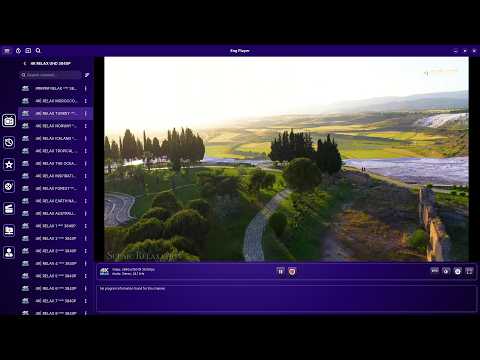
📸 Screenshots


🚀 Installation
- Install System Dependencies Debian / Ubuntu / Mint:
sudo apt install -y \
    python3-dev python3-venv python3-pip python3-gi python3-gi-cairo \
    gcc pkg-config libcairo2-dev libgirepository-2.0-dev \
    gir1.2-gtk-4.0 gir1.2-adw-1 gettext \
    gir1.2-gstreamer-1.0 gstreamer1.0-gtk4 \
    ffmpeg \
    gstreamer1.0-plugins-base gstreamer1.0-plugins-good \
    gstreamer1.0-plugins-bad gstreamer1.0-plugins-ugly \
    gstreamer1.0-libav gstreamer1.0-tools gstreamer1.0-vaapi \
    python3-gst-1.0
Arch Linux / Manjaro:
sudo pacman -S --needed \
    base-devel git python python-pip \
    gtk4 libadwaita python-gobject gettext \
    ffmpeg \
    gstreamer gst-plugins-base gst-plugins-good \
    gst-plugins-bad gst-plugins-ugly gst-libav \
    gst-plugin-gtk4 gstreamer-vaapi gst-python
Fedora Workstation:
⚖️ Legal Notice: Enabling RPM Fusion allows the installation of non-free codecs (like H.264/HEVC). Ensuring compliance with local laws is your responsibility.
sudo dnf install -y https://mirrors.rpmfusion.org/free/fedora/rpmfusion-free-release-$(rpm -E %fedora).noarch.rpm https://mirrors.rpmfusion.org/nonfree/fedora/rpmfusion-nonfree-release-$(rpm -E %fedora).noarch.rpmsudo dnf install -y python3-devel gcc pkg-config \
gtk4-devel libadwaita-devel gobject-introspection-devel \
cairo-gobject-devel cairo-devel \
python3-gobject gettext \
ffmpeg \
gstreamer1-plugins-base gstreamer1-plugins-good \
gstreamer1-plugins-bad-free gstreamer1-plugins-ugly-free \
gstreamer1-libav gstreamer1-vaapi gstreamer1-plugin-gtk4 \
python3-gstreamer1sudo dnf install -y intel-media-driver libva-intel-driversudo dnf swap -y mesa-va-drivers mesa-va-drivers-freeworld
sudo dnf swap -y mesa-vdpau-drivers mesa-vdpau-drivers-freeworld🚀 Installation
You can install it in user mode by opening a terminal in the project directory (requires make and dependencies installed):
make install-manualThis command installs the application to ~/.local/share/engplayer, sets up an isolated Python virtual environment, and adds the menu shortcut.
Uninstall To completely remove the application, stop the background service, and clean up all data:
make uninstallWarning: This command will also delete your user configuration, databases, and cached images.
📜 License
EngPlayer is free software: you can redistribute it and/or modify it under the terms of the GNU General Public License as published by the Free Software Foundation, either version 3 of the License, or (at your option) any later version. See the LICENSE file for the full text.
Copyright (C) 2025-2026 Engin Eren
EngPlayer is distributed in the hope that it will be useful, but WITHOUT ANY WARRANTY; without even the implied warranty of MERCHANTABILITY or FITNESS FOR A PARTICULAR PURPOSE. See the GNU General Public License for more details.
✅ You are free to use, study, share and modify EngPlayer. If you distribute a modified version, it must stay under the same license and you must make its source code available.
🏷️ Name and logo: The license covers the code, not the brand. The name "EngPlayer", the EngPlayer logo and the application icon may not be used for modified versions. Forks must use their own name and icon. See ADDITIONAL-TERMS.md (GNU GPL v3, Section 7).
📦 Third-party components: The Windows and Linux builds include third-party libraries (GTK, GStreamer, FFmpeg and others) under their own licenses. See THIRD-PARTY-NOTICES.md.
Versions released before 0.1.8 were distributed under the previous "EngPlayer Software License Agreement". Starting with 0.1.8, EngPlayer is licensed under the GNU GPL v3 or later.
⚖️ Legal Disclaimer EngPlayer is a media player software. It does not provide, include, or distribute any playlists, IPTV channels, video streams, or digital content. Providing content is solely the user's responsibility. The developer assumes no liability for the content viewed by the user.
📢 Acknowledgments

This product uses the TMDb API but is not endorsed or certified by TMDb.
Developed by Engin Eren