
Delivering packages, empowering connections, enhancing experiences.


Built with the tools and technologies:


ExpressParcel is a delivery management system designed to streamline package tracking and courier operations. The application consists of a Spring Boot API with a MySQL database, and two frontend applications built with React.js and Bootstrap.
- Implements Controller-Service-Repository architecture.
- Manages couriers and packages with CRUD operations.
- Uses SMTP to send automatic confirmation emails upon package delivery.
- Connects to a MySQL database for persistent storage.
- Authentication: Couriers can register and log in.
- Manage Couriers: Add, update, or remove couriers.
- Manage Packages: Create, update, delete, and assign packages to couriers.
- Delivery System: Deliver packages and send email confirmations to recipients.
- Manager Updates: Update the manager assigned to a courier.
- Track Packages: Search packages by AWB (Air Waybill).
- Manager Insights: View data on managers, including the number of packages delivered.
- Find Couriers: Check available couriers with no pending packages and contact them.
- Java 17+
- Node.js & npm
- MySQL database
- Clone the repository:
git clone https://github.com/BogdanBargaoanu/delivery.git cd delivery - Configure your
application.properties:spring.datasource.url = jdbc:mysql://localhost:3306/packagetracking?createDatabaseIfNotExist=true spring.datasource.username=root spring.datasource.password=yourpassword
- Configure the
SMTPsettings in theMailConfigclass:JavaMailSenderImpl mailSender = new JavaMailSenderImpl(); mailSender.setHost("yoursmtphost"); mailSender.setPort(587); mailSender.setUsername("youremail@domain.com"); mailSender.setPassword("yourpassword");
- Run the application:
mvn spring-boot:run
- Install dependencies for each frontend application:
cd admin-app
npm install #or npm install --legacy-peer-deps
npm start
cd client-app
npm install #or npm install --legacy-peer-deps
npm start
| Method | Endpoint | Description |
|---|---|---|
POST |
/couriers/login |
Login as a courier |
PUT |
/packages/deliver/{id} |
Mark a package as delivered & send email |
GET |
/packages/find?awb={awb} |
Track package by AWB |
GET |
/couriers/delivered-by-managers |
Get the list of managers and delivered packages |
PUT |
/couriers?courierId={courierId}&managerId={managerId} |
Set a manager for a courier |
For a more extensive use of the API, check the full endpoint config in the code.
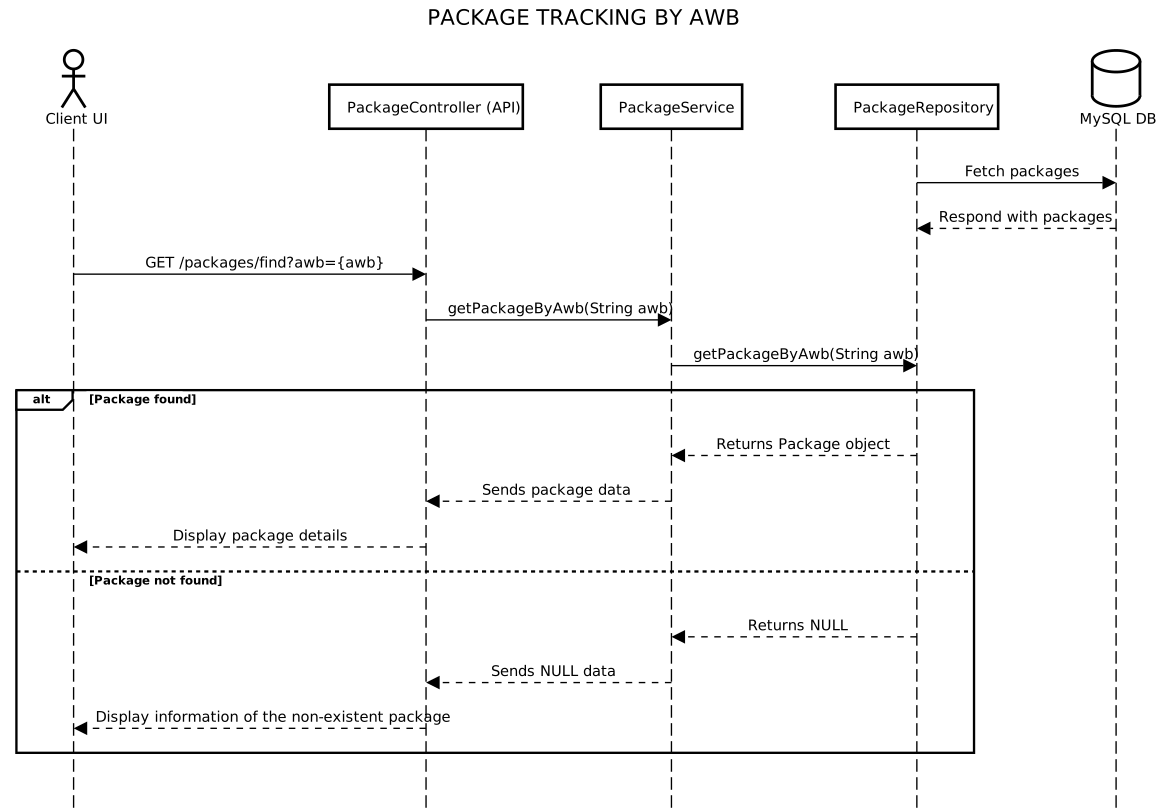
For more diagrams and documentation, check the documentation folder of the repository.
Feel free to contribute by opening an issue or submitting a pull request.