Native EmDash CMS integration for OpenAnalytics, by Black Swamp AI.
Native connection validation, public-site tracker installation, and an analytics overview inside EmDash. The admin page uses EmDash Block Kit controls, metric cards, notices, a timeseries chart, Top Pages, and Traffic Sources. Private credentials stay on the server.
Requires EmDash 1.0.1 or later in the 1.x series and Node.js 22.16 or later.
- Run
pnpm add @blackswampai/emdash-plugin-openanalyticsin your EmDash site. - Register
openAnalytics()in the EmDashpluginsarray inastro.config.mjs. - Ensure your public layout renders
<EmDashHead page={page} />inside<head>. - Deploy the site and set
EMDASH_ENCRYPTION_KEYon its server. - Create an OpenAnalytics private read key and save it in this plugin's settings.
- Open OpenAnalytics in plugin navigation; it validates once automatically, then loads the overview. Revisit or choose a date range to see reports.
Install the package after the first public npm release is available:
No OpenAnalytics credential is needed to install or register this plugin. Do not put your
oa_sk_...private read key in the npm install command,astro.config.mjs, or source code. Add it after installation through OpenAnalytics plugin settings in EmDash. EmDash encrypts secret settings usingEMDASH_ENCRYPTION_KEY. Keep it out of browser code and public environment variables.
pnpm add @blackswampai/emdash-plugin-openanalyticsRegister the native plugin in astro.config.mjs:
import { defineConfig } from "astro/config";
import emdash from "emdash/astro";
import { openAnalytics } from "@blackswampai/emdash-plugin-openanalytics";

export default defineConfig({
	integrations: [
		emdash({
			// Include your site's existing database, storage, and other configuration.
			plugins: [openAnalytics()],
		}),
	],
});
Native plugins install as trusted site dependencies and require a deployment.
This plugin belongs in plugins, and needs the native-only page:fragments hook.
Your public layout must render <EmDashHead page={page} /> inside <head>, using
a context created with createPublicPageContext from emdash/page.
Import EmDashHead from emdash/ui. Layouts without that insertion point cannot
render the tracker. See EmDash's page fragment guide.
- Set
EMDASH_ENCRYPTION_KEYon the EmDash server before saving a secret. See EmDash's secrets and key management guide. - In OpenAnalytics, create a private read key with
site:readandanalytics:read. The first scope validates the site; the second allows the overview and reports. - In EmDash, open Plugins and the OpenAnalytics settings. Set the API URL,
private read key, tracking switch, and IANA analytics timezone (for example,
America/New_York; the default is UTC). Save settings. - Open OpenAnalytics in plugin navigation. With no matching saved snapshot, the page validates once and then loads the overview. It shows the connected site, tracking readiness, API URL, and last validation time.
- If automatic validation fails, use Retry connection. The same failed configuration will not trigger another automatic attempt. Changing settings permits a fresh attempt. For an established connection, Refresh connection validates separately from the date range control.
These captures use real EmDash with synthetic analytics data.
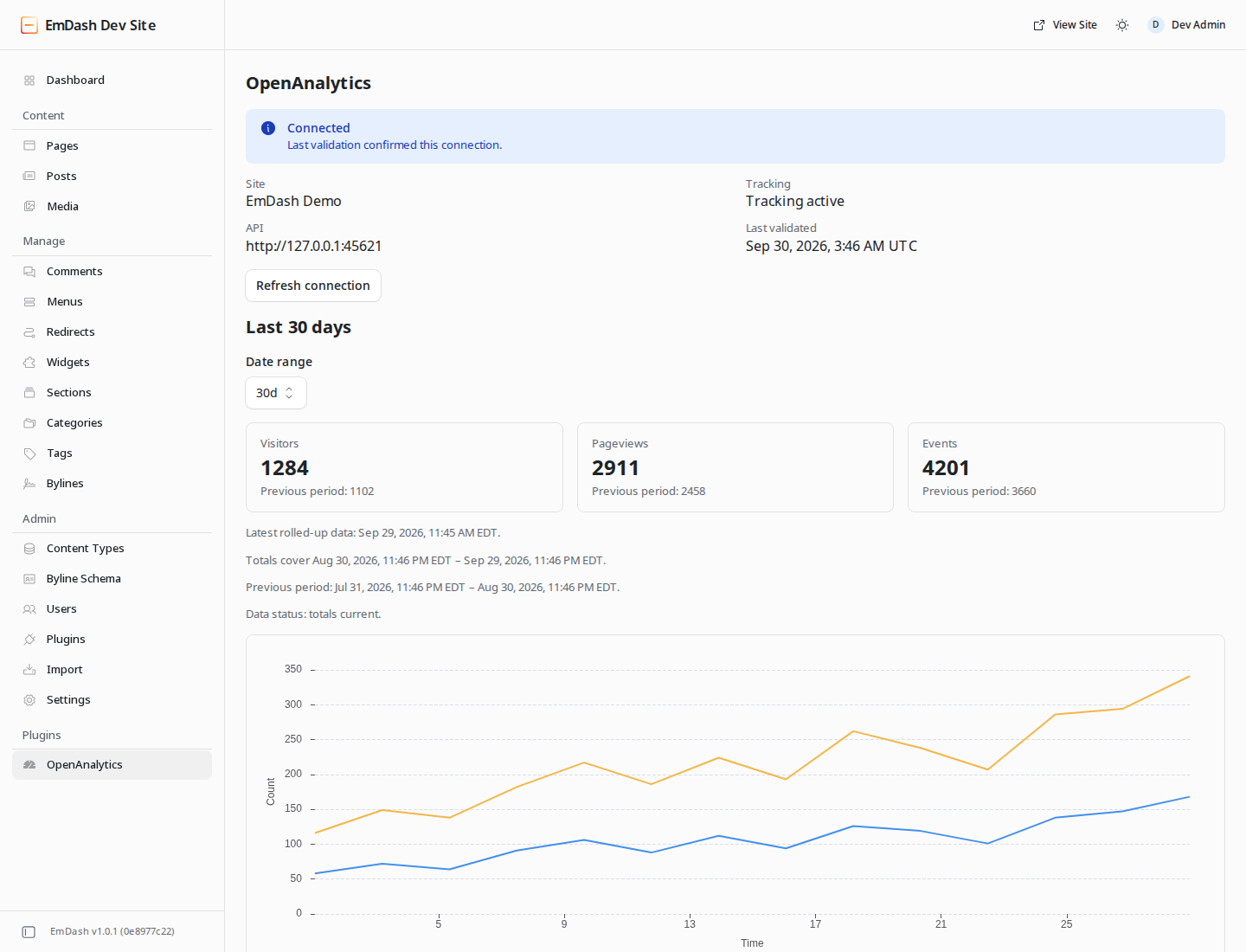
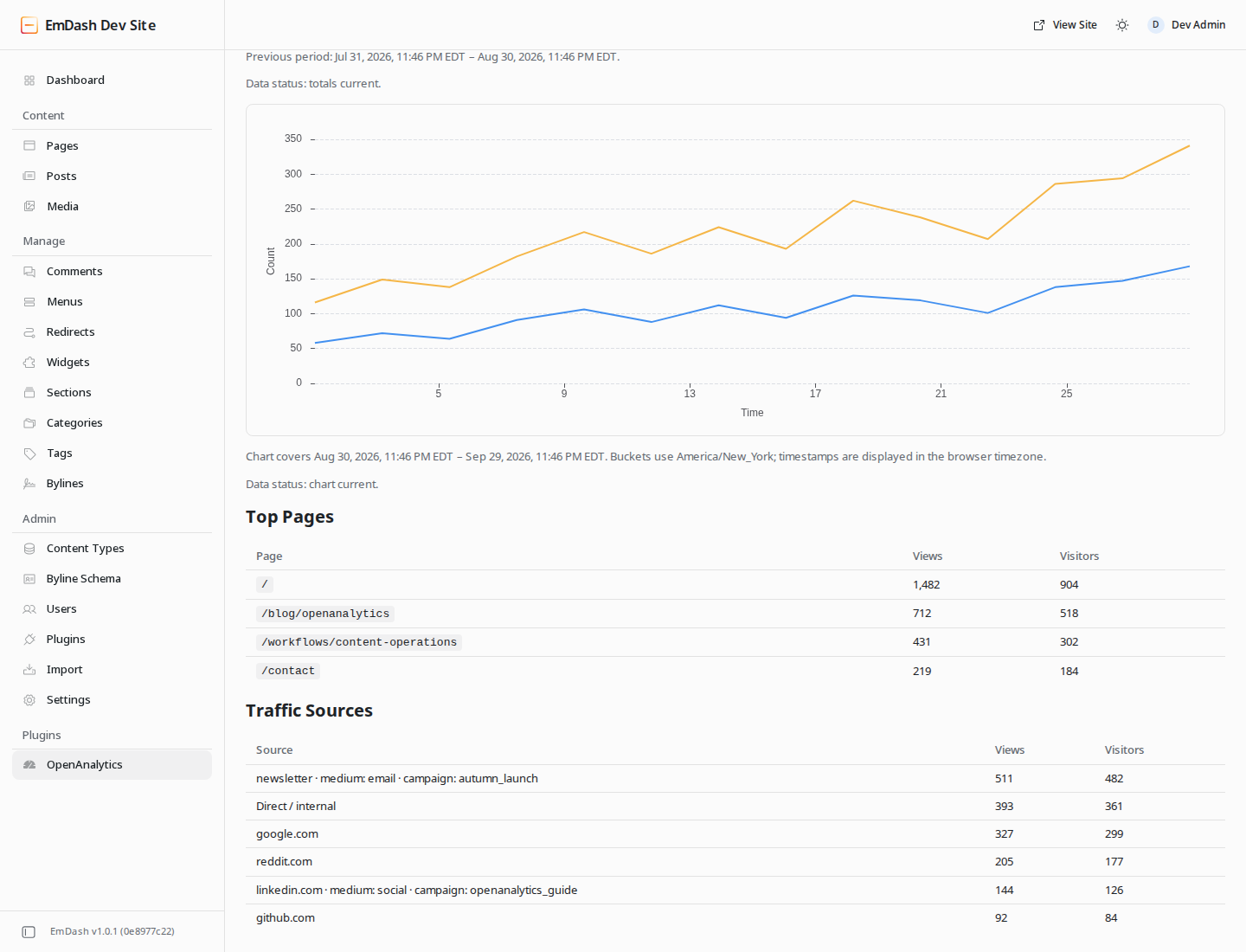
The OpenAnalytics page shows visitors, pageviews, and events from the aggregate overview response, plus visitors and pageviews over time. Choose Last 24 hours, Last 7 days, Last 30 days (default), or Last 90 days. Requests send explicit UTC bounds and the configured IANA timezone. Overview totals use hourly rollups; the chart uses hourly buckets for 24 hours or daily buckets for longer ranges. Visitor buckets are displayed as returned, never summed into the aggregate visitor metric.
Metric cards show previous-period totals when supplied by OpenAnalytics. These are server-provided aggregate comparisons; the plugin does not calculate percentages or infer comparisons from chart buckets.
OpenAnalytics can snap bounds down to available rollup boundaries; the page shows the effective queried periods. Chart buckets follow the configured timezone, while native chart tick labels and tooltips use the browser timezone.
Freshness information shows the latest rolled-up data and pipeline status. Stale, degraded, imported, or partial results receive notices so temporarily low numbers are easier to interpret. Missing freshness is shown as unavailable. Authentication failures, missing analytics scope, suspended service, rate limits, and unavailable upstream service have safe messages and validation/retry controls.
Top Pages shows the first ten pages ranked by views, with views and visitors. Traffic Sources shows the first ten attribution groups ranked by views, with views and visitors. Campaign source, medium, and campaign values appear when recorded; rows with the same referrer can represent different campaigns. Untagged rows with an empty referrer are shown as Direct / internal. Tagged rows keep their recorded UTM source. These are per-row visitor counts and should not be summed into the overview. Empty reports have their own messages. A failed report leaves other successful sections visible, and each section reports its own data caveats.
Opening the page or changing its range makes four server-side reads: overview,
timeseries, pages, and sources. All reuse one requested interval and timezone.
Revalidation first reads site metadata and refreshes the installation
snapshot. There is no polling, automatic retry, or shared analytics cache. The
private admin route requires plugins:manage and EmDash's CSRF protection.
Validation saves the returned public installation configuration. Public page requests use this saved configuration without calling the OpenAnalytics read API. The snapshot is bound to the exact normalized API URL and private key. A different configuration suppresses tracking; restoring the exact validated configuration makes its matching snapshot usable again. Removing the private key or turning tracking off suppresses injection immediately.
Temporary network failures, timeouts, rate limits, and service errors during revalidation preserve a matching last-known-good snapshot. The admin shows the error while tracking continues from that snapshot. Rejected credentials and invalid installation responses invalidate the connection. Successful validation replaces the saved snapshot. A snapshot never enables tracking for a different API URL or credential.
oa_sk_… is private and server-only. Never put it in astro.config.mjs, source
code, browser code, or public environment variables. Enter it only in the
OpenAnalytics plugin settings after configuring the host's EMDASH_ENCRYPTION_KEY.
EmDash's secret setting encrypts it at
rest and presents a write-only admin input; the plugin never puts it in public
HTML, validation results, or logs. Keep the EmDash encryption key available and
back it up according to the host's secret management practices.
oa_pk_… is the public browser tracking key. The plugin retrieves it
automatically from OpenAnalytics and puts it in page HTML. The plugin
uses EmDash's structured external-script fragment, which escapes attributes and
deduplicates the tracker by a stable fragment key.
The API client rejects redirects and uses a five-second timeout. API response bodies and transport exceptions are not echoed into errors. The administrator controls the API and tracker origins: configure endpoints you trust. HTTP works for local self-hosted deployments. With a remote HTTP endpoint, the private key travels without encryption; use HTTPS in production. The admin page warns when the configured API URL uses remote HTTP.
The API URL defaults to the officially documented https://api.getopen.so and
is editable. A custom base URL may include a deployment path prefix. The plugin
retrieves tracking_key, script_url, and collector_url from /v1/read/site;
it has no hard-coded hosted tracker or collector URL.
If any installation field is null, the connection can still validate, but no
script is emitted. Configure your OpenAnalytics deployment's COLLECTOR_BASE_URL
and a live public tracking key, then validate again. The plugin does not add
manual tracker URL overrides.
- The summary is intentionally small: no pagination, custom filters, geography, devices, sessions browser, individual visitors, custom-event reports, funnels, revenue, web vitals, editor analytics, or realtime polling. OAuth and account or site creation are also outside this plugin's current scope.
- Refresh the connection after tracker rotation or a collector URL change. Saved installation metadata has no automatic expiry; private-key revocation is detected on validation.
- Pre-release installations using the old
emdash-openanalyticsplugin ID must re-enter their OpenAnalytics settings once after updating. - Static pages receive the snapshot available when they are rendered. Rebuild those pages after changing the connection or tracking switch.
- The tracker independently fetches OpenAnalytics's browser configuration. A suspended site may validate successfully and still have its tracker installed; collection and analytics access follow OpenAnalytics's suspension policy.
- Duplicate protection covers EmDash fragments in a placement. Remove any tracker tag already installed manually in the theme.
pnpm install --frozen-lockfile
pnpm check
check runs typechecking, linting, formatting checks, tests, build, and package
verification. CI runs the same checks. No npm publication is performed.
Run pnpm exec playwright install chromium, then pnpm screenshot to generate
three screenshots from a local EmDash admin instance using synthetic analytics.
See the demo instructions for the authentication, fixture,
artifact safety checks, and screenshot locations. CI also runs this workflow.
Source boundaries are the native plugin entry, settings/configuration, the server-side OpenAnalytics client, saved connection state, tracker fragments, and native admin page. See verified upstream contracts for versions and the native-plugin/security decisions and implementation footprint for the comparison with the n8n integration. MIT licensed; no OpenAnalytics source is bundled.