Releases: Awetspoon/SpriteFactory
Release list
Update Notes

Sprite Factory 1.2.4 makes linked-page discovery easier to understand and standardizes the public product identity across the app and release.
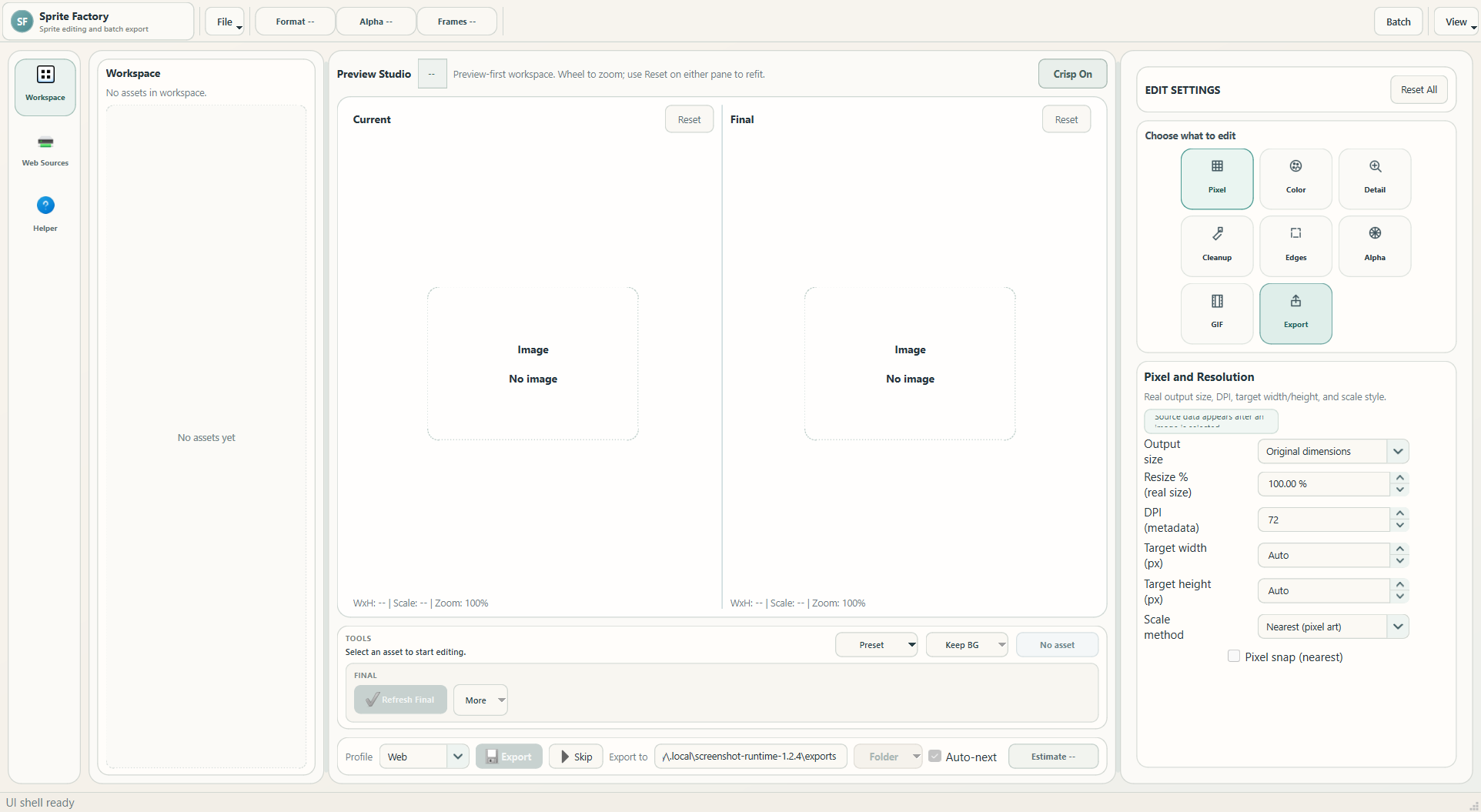
Clearer Linked-Page Scanning
- Index or category page now accepts either a pasted URL or a page chosen from entered and saved sources.
- Find Linked Pages only discovers links from that source; it does not scan files or download anything.
- Filter found pages is clearly separated and becomes useful after links have been discovered.
- Discovered pages are no longer selected automatically. Choose the pages you want, then use Scan Selected Pages.
- The in-app Helper now explains the same order shown in the interface.
Consistent Product Identity
- The app title, shell name, executable metadata, icon paths, README, screenshots, and release documentation now use Sprite Factory.
- Obsolete icon aliases and superseded screenshots have been removed.
- GitHub displays one Update Notes title, followed directly by the update details without a repeated heading.
Reliability
- Added regression tests for direct linked-page URLs and explicit page selection.
- The complete automated suite, structure audit, release metadata checks, executable build, packaged icon check, and frozen-app startup test must pass before publishing.
Download
Download SpriteFactory-v1.2.4-win64.exe from the Assets section below. It runs on 64-bit Windows 10 or Windows 11 and does not require Python.
Windows may show a SmartScreen warning because this community release is not code-signed. Only continue if the file came from the official Awetspoon/SpriteFactory release page.
Update Notes
Sprite Factory 1.2.3 completes the clean editor rebuild and makes repeat web scanning much easier with the new Saved Library.

Saved Library
- Websites now act as library folders containing every page saved from that host.
- Save pasted pages directly, or save selected pages discovered from an index page while keeping their useful names.
- Check one page, several pages, a whole website, or pages from different websites and scan them together.
- Duplicate page URLs are ignored and existing saved libraries migrate automatically.
Scan Checkednow processes exactly the checked pages instead of silently falling back to a highlighted row.
Editing And Preview
- Current remains the imported source while Final shows the controls or preset that will be exported.
- Detected size, DPI, transparency, animation, and GIF playback data provide a neutral starting baseline.
- Control and preset changes rebuild Final without stacking hidden edits.
- Per-control reset actions restore individual values, while Reset All restores the complete detected baseline.
- Static and animated assets use the same frame-processing rules for preview, Batch, and export.
Presets, Batch, And Export
- Workspace, Preset Studio, recommendations, and Batch share one compatibility-aware preset library.
- User presets can be created from the active asset's changed controls and reused across compatible formats.
- Batch works on isolated copies so queue edits do not alter the live workspace.
- Interactive and Batch exports share format, resize, naming, animation, and encoding behavior.
- Supported output formats include PNG, WEBP, JPG, GIF, ICO, TIFF, and BMP.
Interface And Reliability
- The preview-first shell, control dock, export bar, settings panel, Batch Manager, and Preset Studio now use one consistent visual system.
- Startup, imports, editing, presets, Web Sources, Batch, persistence, and export have explicit service boundaries.
- Retired V3 scaffolding, duplicate coordinators, old mockups, copied state paths, and superseded processing helpers were removed.
- The Helper and public documentation now match the actual application.
Download
Download SpriteFactory-v1.2.3-win64.exe from the Assets section below. It runs on 64-bit Windows 10 or Windows 11 and does not require Python.
Windows may show a SmartScreen warning because this community release is not code-signed. Confirm that the publisher is unknown only if you downloaded the file from this official GitHub repository.
Verification
The release pipeline compiles the package, runs the complete automated suite, checks repository and release metadata, builds the Windows executable, verifies its embedded version and icon, and launches the frozen application in smoke-test mode.
Update Notes
Sprite Factory 1.2.2 completes the staged rebuild of the editor while preserving the real sprite, image, GIF, preset, web scanning, batch, and export workflows.
Editing And Preview
- Current always represents the imported source, while Final shows the controls or preset that will be exported.
- Imported assets receive detected format, transparency, animation, and baseline settings before editing begins.
- Presets replace edits from that detected baseline instead of stacking hidden changes.
- Reset All restores the selected asset's detected baseline; pane Reset buttons only restore preview zoom.
- Static and animated previews share the same size, cleanup, detail, color, edge, and background-removal rules used by export.
Presets, Batch, And Export
- Workspace, Preset Studio, recommendations, and Batch now use one validated system-and-user preset catalog.
- Advanced users can create presets from active controls or maintain a settings delta in Preset Studio.
- Batch preparation runs on copied assets in a separate cache, so queue edits cannot alter the live workspace or Final preview.
- Interactive Export and Batch use the same output format, filename, collision, resize, animation, and encoding decisions.
- Animated GIFs retain frames, timing, looping, transparency, palette, and dithering through preview and export.
Web Sources
- Scan one page, a manual page list, saved pages from different websites, or selected links discovered from an index page.
- Found files accumulate across successful scans instead of disappearing when another page is scanned.
- Format, search, and hidden-word filters narrow large result sets without changing the stored scan results.
- Scan limits, retries, cancellation, partial failures, and clear network messages make large or unreliable sites safer to use.
Interface And Reliability
- The preview-first shell now uses responsive splitters, bounded side panels, consistent control geometry, and matching Batch and Preset dialogs.
- Startup, persistence, imports, edits, presets, Web Sources, Batch, and export have clear service boundaries instead of duplicate UI-owned logic.
- Obsolete replacement modules, copied state adapters, dead tests, old screenshots, and superseded processing helpers were removed.
Download
Download SpriteFactory-v1.2.2-win64.exe from the GitHub release assets. Python is not required.
Verification
The release process runs the complete automated suite, compilation, repository audit, version checks, packaging checks, and a frozen-app launch test before producing the Windows artifact.
Update Notes
Sprite Factory 1.2.1 is a polish and reliability update focused on the redesigned editor shell, Web Sources, workspace handling, batch processing, presets, GIF behavior, and release readiness.
Highlights
- Refined the main UI geometry so the toolbar, preview studio, workflow dock, export bar, and edit settings panel line up more consistently.
- Reworked Web Sources with saved-page scanning, manual page URL lists, clearer filtering, scan caps, and warnings for very large scan batches.
- Cleaned workspace paging and import presentation so large workspaces remain easier to browse without duplicate import surfaces.
- Improved batch export isolation so copied edits, chosen presets, background overrides, smart preset rules, and file naming behave more predictably.
- Tightened preset handling for mixed sprite/photo/GIF assets and kept preview/export behavior easier to verify before committing changes.
- Restored app icon preference for packaged/runtime launch and refreshed helper guidance to match the current app.
Notes
- Runtime/build folders remain ignored so the repository stays clean for GitHub.
- Use
docs/RELEASE_CHECKLIST.mdfor the practical Windows release pass.
Update Notes
Highlights
- Rebuilt the shell into a cleaner preview-first studio layout.
- Added
Compare View,Current Only, andFinal Only, withReset Shellrestoring the full compare layout. - Added per-pane preview reset so both preview panels can return to fit view quickly.
- Tightened controls, reduced duplicate UI, and removed dead or confusing preset/navigation surfaces.
- Refreshed the helper text so it explains the app as it works today.
Editing And Preview
- Preset picks now refresh the final preview so changes can be judged before export.
Reset Editsis now clearly separated fromReset View.- Animated GIF preview/export behavior was rebuilt so animation survives edits and export more reliably.
- Animated assets now only surface animation-safe presets in quick pickers and batch tools.
- Background detection is clearer, and transparent content is easier to judge in preview.
Batch And Export
- Batch processing now runs on isolated clones instead of mutating live workspace assets.
- Mixed-format batch export was hardened across PNG, JPG, WEBP, BMP, TIFF, ICO, sprite sheets, and GIFs.
- Batch wording and failure reporting were cleaned up so runs are easier to understand.
- One-file Windows packaging is now aligned for a cleaner GitHub release flow.
Presets And Advanced Use
- Preset compatibility is stricter so obviously bad matches are filtered out.
- The preset manager is clearer for advanced users:
- duplicate a system template
- edit the JSON delta
- save your own user preset
Toolbar Cleanup
- Removed the old toolbar performance mode because the app's current processing path does not need a user-selectable backend.
- Kept
FMT,Alpha, andFramesas real active-asset readouts so users can quickly see format, transparency, and animation state.