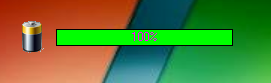
Windows laptop battery monitor with real-time charge display, system tray integration, customizable audio and message alerts, discharge time estimation, and persistent INI configuration. Originally named "StanBaterii."
- Real-time battery gauge -- displays current charge percentage using a
TCGaugeprogress indicator, updated by a periodic timer pollingGetSystemPowerStatus() - Charging animation -- a secondary progress bar animates while the system is connected to AC power (charging state detected via
BatteryFlag & 8) - System tray integration -- minimizes to the Windows notification area with a
TTrayIconcomponent; icon switches between charging and discharging states via anImageList - Customizable sound alerts -- plays a user-selected WAV file when battery drops below a configurable percentage threshold
- Low-battery message dialog -- displays a custom warning message (default: "Bateria na wyczerpaniu") at an independently configurable threshold
- Discharge time estimation -- estimates remaining battery life using linear approximation based on observed discharge rate over time
- Always-on-top option -- optionally keeps the monitor window above all other windows (
fsStayOnTop) - Draggable borderless window -- supports moving the window by clicking and dragging anywhere on the form surface
- Persistent INI configuration -- saves and restores all settings (window position, size, alert thresholds, sound file path, startup preferences) to an INI file alongside the executable
- Settings dialog -- a dedicated settings form (
TForm2) exposes all configurable options: always-on-top, start with Windows, sound alerts, alert thresholds, sound file path, and custom warning message
| Dependency | Purpose |
|---|---|
| C++ Builder 6.0 | IDE and compiler |
| VCL (Visual Component Library) | GUI framework |
CGAUGES component |
Circular/linear gauge widget |
trayicon component |
System tray icon integration |
Windows API (GetSystemPowerStatus) |
Battery status polling |
IniFiles.hpp |
INI file read/write |
- Open
StanBaterii.bprin Borland C++ Builder 6.0. - Ensure the
CGAUGESandtrayiconthird-party components are installed in the IDE. - Build the project (Ctrl+F9) or run directly (F9).
StanBaterii/
  StanBaterii.bpr       # C++ Builder project file
  StanBaterii.cpp       # WinMain entry point -- initializes Form1 and Form2
  StanBaterii.res       # Compiled resource file
  StanBaterii.INI       # Configuration file (window position, alert settings)
  Unit1.cpp             # Main form -- battery polling, gauge update, tray icon, alerts
  Unit1.h               # Main form header -- TForm1 class declaration
  Unit1.dfm             # Main form layout
  ustawienia.cpp        # Settings dialog -- threshold sliders, sound file picker
  ustawienia.h          # Settings dialog header -- TForm2 class declaration
  ustawienia.dfm        # Settings dialog layout
The application stores all settings in StanBaterii.INI:
| Key | Type | Description |
|---|---|---|
left, top |
Integer | Window position |
height, width |
Integer | Window dimensions |
ontop |
Boolean | Always-on-top mode |
winstart |
Boolean | Launch at Windows startup |
playsound |
Boolean | Enable low-battery sound alert |
percenttoplay |
Integer | Battery % threshold for sound alert |
playfile |
String | Path to WAV file for sound alert |
showinfo |
Boolean | Enable low-battery message dialog |
percenttoshowinfo |
Integer | Battery % threshold for message dialog |
message |
String | Custom warning message text |