





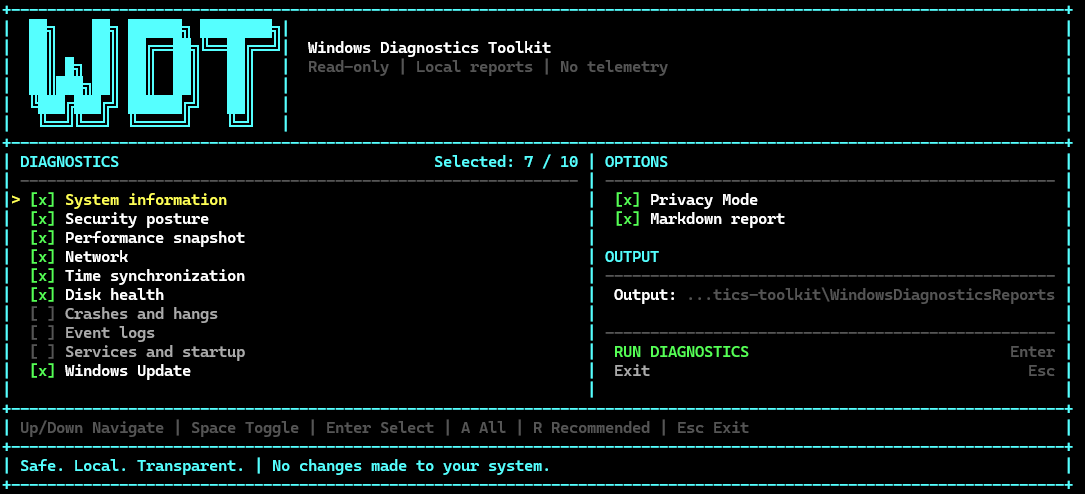
One command. One local Windows support report. No automatic fixes, telemetry, or report uploads.
Windows Diagnostics Toolkit (WDT) is an open-source PowerShell toolkit for the first-pass diagnosis of Windows 10 and Windows 11 systems. It collects high-signal system, security, performance, network, storage, crash, service, Event Log, time-sync, and Windows Update context into a readable local report.
WDT is useful when you need to:
- collect consistent diagnostic context before troubleshooting;
- prepare a report for a system administrator or support engineer;
- compare several Windows machines using the same checks;
- gather evidence without installing an agent or changing system settings;
- share a redacted report through Privacy Mode.
Project website · Usage guide · Anonymized report example · v0.1.0-beta release · Report a problem
| Property | What it means |
|---|---|
| Read-only by design | Production diagnostics collect state; they do not repair or reconfigure Windows |
| Local-first | Reports stay on the machine unless you choose to share them |
| Findings summary | Results are grouped as OK, WARN, or ERROR before the detailed evidence |
| No installation | No installer, service, agent, or third-party PowerShell module is required |
| Shareable output | TXT output is built in; Markdown and Privacy Mode are available |
| Broad compatibility | Windows PowerShell 5.1 and PowerShell 7 are supported |
v0.1.0-beta is available as a public prerelease.
irm https://wdt.digital/run.ps1 | iexThe fixed-release bootstrap downloads only the v0.1.0-beta ZIP and its .sha256 file from the GitHub prerelease. It verifies the ZIP before extraction; if the hash does not match, nothing is extracted or executed. The toolkit runs from a temporary directory and is not installed permanently.
To inspect the bootstrap before running it:
irm https://wdt.digital/run.ps1 -OutFile .\wdt-run.ps1
notepad .\wdt-run.ps1
.\wdt-run.ps1
SHA-256 verification protects the downloaded release ZIP, not run.ps1. The irm | iex form still requires trust in the bootstrap served by GitHub Pages. Inspect it first on sensitive systems.
git clone https://github.com/0x0bug/windows-diagnostics-toolkit.git
cd windows-diagnostics-toolkit
.\Invoke-WindowsDiagnostics.ps1
Running without switches opens the interactive TUI. Recommended diagnostics, Privacy Mode, and Markdown export are enabled by default.
If Windows PowerShell reports that script execution is disabled, use this process-only launch command:
powershell.exe -NoProfile -ExecutionPolicy Bypass `
  -File .\Invoke-WindowsDiagnostics.ps1
The one-run execution-policy bypass applies only to the new PowerShell process. It does not change the machine-wide or current-user execution policy.
If PowerShell reports that pwsh is not recognized, PowerShell 7 is not installed or is not available on PATH; installing PowerShell 7 is optional because WDT supports the built-in Windows PowerShell 5.1 command above.
- WDT discovers the reviewed built-in diagnostic modules.
- Each selected module runs in a separate child PowerShell process with an independent timeout.
- Results are normalized into a combined findings summary and detailed evidence sections.
- WDT writes the report locally and displays its path and completion status.
Default output depends on launch mode:
| Mode | Default report directory |
|---|---|
| Interactive TUI | .\WindowsDiagnosticsReports |
| Command-line mode | Current working directory |
Use -OutputDirectory to override the default in either mode.
Generated filenames:
WindowsDiagnosticsReport-YYYYMMDD-HHMMSS.txt
WindowsDiagnosticsReport-YYYYMMDD-HHMMSS.md
When report generation succeeds, WDT writes TXT even if some selected modules are partial or unavailable. Markdown export is optional in command-line mode and enabled by default in the interactive TUI.
| Area | Diagnostic context |
|---|---|
| System | Windows version, CPU, memory, GPU, uptime, and system drive |
| Security | Microsoft Defender, Windows Firewall, Secure Boot, TPM, and BitLocker status |
| Performance | Memory, short CPU samples, pagefile, and process activity snapshots |
| Network | Adapters, routes, gateway, DNS, proxy context, TCP reachability, and optional ICMP |
| Time | Windows Time service, timezone, clock, source, status, and optional events |
| Storage | Windows-reported storage state, available reliability counters, and free space |
| Crashes | Application crashes, hangs, WER, BugChecks, Reliability Monitor, and dump metadata |
| Event Log | Grouped recent high-signal System and Application events |
| Services | Services, startup entries, and scheduled tasks with conservative classification |
| Windows Update | Installed updates, reboot indicators, services, and grouped failures |
The Network module can perform external DNS, TCP, and ICMP probes against the configured targets. It does not upload the report or send an HTTP request. Use -NoExternalNetworkTests to disable external probes while retaining local adapter, route, gateway, and proxy collection.
WDT does not treat every stopped service or every Critical/Error event as proof of a fault. Findings are created only where the available evidence meets the module's documented classification rules.
The dashboard lets you select diagnostics, toggle Privacy Mode and Markdown export, choose an output directory, run collection, and return to the menu without restarting the script.
| Key | Action |
|---|---|
Up / Down |
Move through menu items |
Space |
Toggle the selected diagnostic or option |
Enter |
Run the highlighted action |
A |
Select all diagnostics |
R |
Restore the recommended selection |
Esc |
Exit |
The interface adapts to the terminal size and preserves the current selection:
| Layout | Minimum terminal size | Behavior |
|---|---|---|
| Wide | 110x28 |
Full two-column dashboard and large logo |
| WideShort | 110x22 |
Two columns with a compact header |
| Normal | 60x25 |
Single-column interface |
| Compact | 40x18 |
Scrollable viewport |
| TooSmall | below 40x18 |
Resize prompt |
A terminal around 120x30 or larger is recommended for the full dashboard.
In automatic mode, the Wide dashboard uses the Unicode block logo when output is interactive and UTF-8. PowerShell sessions using an OEM encoding such as cp866, redirected output, and unsupported hosts receive the printable ASCII fallback.
Override the logo selection for the current PowerShell process:
$env:WDT_TUI_LOGO = 'auto'
$env:WDT_TUI_LOGO = 'unicode'
$env:WDT_TUI_LOGO = 'ascii'
unicode is still blocked for redirected output. Remove the override with:
Remove-Item Env:WDT_TUI_LOGO -ErrorAction SilentlyContinueAfter collection completes, WDT shows the elapsed time, report paths, collection completeness, and the number of WARN and ERROR findings.

A WARN means the toolkit found a condition worth reviewing. It does not mean the collection failed. Module execution failures and diagnostic findings are reported separately.
Use -All, -Module, or individual module switches to skip the TUI:
.\Invoke-WindowsDiagnostics.ps1 -All -PrivacyMode -ExportMarkdown
.\Invoke-WindowsDiagnostics.ps1 -Module System,Network
.\Invoke-WindowsDiagnostics.ps1 -Module Events,Updates
.\Invoke-WindowsDiagnostics.ps1 -System -Security -Network
.\Invoke-WindowsDiagnostics.ps1 -Network -NoExternalNetworkTests
-Module accepts built-in manifest IDs without regard to case. Duplicate IDs are removed, and modules execute in registry order. It can be combined with the individual compatibility switches.
With -All, -Module, or one or more legacy module switches it runs directly in command-line mode.
Windows PowerShell 5.1 non-interactive example:
powershell.exe -NoProfile -ExecutionPolicy Bypass `
  -File .\Invoke-WindowsDiagnostics.ps1 -All -PrivacyMode -ExportMarkdown
Choose a report directory explicitly when needed:
.\Invoke-WindowsDiagnostics.ps1 -System -Network -Disk `
  -OutputDirectory .\reports
Each module has an independent 180-second timeout by default. Change it with -ModuleTimeoutSeconds. A timed-out or failed module is reported as partial or unavailable while results from other modules are preserved.
See the usage guide for all parameters, standalone module commands, classification semantics, and troubleshooting.
Enable Privacy Mode before attaching a report to an issue, forum post, chat, or support request:
.\Invoke-WindowsDiagnostics.ps1 -All -PrivacyMode -ExportMarkdownPrivacy Mode replaces identifying values with stable per-report tokens such as:
<HOST-1>
<USER-1>
<IP-1>
<MAC-1>
<ID-1>
Process, application, and dump-file names remain visible because they are diagnostically useful. Proxy credentials and sensitive URL query values are removed from combined reports even when Privacy Mode is disabled.
Review every report before publishing it. Privacy Mode cannot guarantee removal of arbitrary sensitive text embedded in Windows Event Log messages. Standalone module output is raw and local; Privacy Mode applies to combined reports generated by Invoke-WindowsDiagnostics.ps1.
Diagnostic modules do not modify Windows configuration: network settings, disks or volumes, registry, services, scheduled tasks, Windows Update, firewall, DNS, routing, or power settings. WDT does write report files to the selected output directory. The bootstrap also creates a temporary package directory and removes it through a finally cleanup path when the bootstrap finishes.
Repository validation includes:
- strict module manifest and package-containment checks;
- PowerShell parser validation;
- an AST-based guard against dangerous or mutating commands in package scripts;
- narrow allowlists for reviewed diagnostic-only native process calls;
- checks for generated reports, logs, temporary files, and backups left in the repository;
- tests in PowerShell 7 and Windows PowerShell 5.1.
These controls reduce accidental scope expansion; they are not a formal proof of safety. Review the source before running any administrative tool on a sensitive machine.
- Windows 10 or Windows 11
- Windows PowerShell 5.1 or PowerShell 7+
- No third-party runtime dependencies
- Administrator rights are optional
Some Windows data sources expose less detail without elevation. WDT records unavailable data and continues where possible. Standard-user execution is not itself a failure.
WDT is a collection and triage tool, not a repair utility, antivirus product, complete SMART/NVMe diagnostic, packet capture system, or substitute for expert incident response.
Run repository validation with PowerShell 7:
pwsh -NoProfile -File .\scripts\validate.ps1Or with Windows PowerShell 5.1:
powershell.exe -NoProfile -ExecutionPolicy Bypass -File .\scripts\validate.ps1GitHub Actions runs validation, dependency-free tests, and a live report smoke test on pull requests and pushes to main.
Contributor documentation:
MIT. See LICENSE.