NSFW moderation for GIFs, videos, and images using local HuggingFace models and/or AWS Rekognition.
PyFrame uses temporal segmentation to avoid moderating every frame: it splits an animation into equal time buckets and extracts the most significant frame from each, capturing diverse scene coverage at a fraction of the cost. It also offers an optional two-stage cascade (--prescreen): a free local model soft-screens densely, and only the flagged time windows get escalated to the precise (e.g. AWS) backend. See the pipeline diagram for a visual of the approach.






pip install "pyframe-gif-video-image-moderation[local]"   # free local HuggingFace backend
pip install "pyframe-gif-video-image-moderation[aws]"      # AWS Rekognition backend
pip install "pyframe-gif-video-image-moderation[all]"      # everything (local + aws + video)
Or with uv:
uv add "pyframe-gif-video-image-moderation[local]"
# or, ad-hoc:  uv pip install "pyframe-gif-video-image-moderation[local]"
The base install is intentionally light (just opencv-python-headless, numpy, Pillow); the heavy backends (boto3, transformers/torch, moviepy) are optional extras you only pull in if you use them.
Pipe is the high-level facade: build it, call run().
from pyframe import Pipe

result = Pipe("clip.gif", backend="local").run()

print(result.verdict)   # clean
print(result.is_nsfw)   # False
Swap the backend, or turn on the two-pass cascade:
Pipe("clip.gif", backend="aws").run()                  # AWS Rekognition
Pipe("clip.gif", backend="aws", prescreen=True).run()  # local screens, AWS confirms
Scan raw bytes (e.g. a download) with no disk touched at all:
from pyframe import scan_bytes

result = scan_bytes(gif_bytes, backend="local") # GIF/image decoded in memoryEvery knob is a Pipe param with a sensible default:
Pipe(
    "clip.gif",
    backend="aws",            # precise backend used on escalation
    prescreen=True,           # two-pass cascade on
    escalate_threshold=0.15,  # escalate on the faintest local signal (lower = more recall, more cost)
    max_escalations=2,        # hard cap on AWS calls per file
    frames_per_batch=2,       # frames merged into each grid sent to AWS
    screen_fps=2.0,           # soft-screen sample rate
    min_confidence=0.5,       # NSFW threshold (defaults to the backend's recall-safe value)
).run()The same pipeline as a command, no script to edit:
pyframe clip.gif                                   # auto backend, prints a verdict
pyframe clip.gif --backend local                   # free local model
pyframe clip.gif --backend aws --region us-east-1  # AWS Rekognition
pyframe clip.gif --prescreen --backend aws         # cascade: local gate then AWS
pyframe a.gif b.gif c.png --json                   # batch, machine-readable
Exit code: 0 clean, 1 NSFW (per --fail-on), 2 bad input, 3 backend not installed, so it drops straight into a shell gate: pyframe upload.gif || reject. Equivalent module form: python -m pyframe clip.gif.
| Flag | Default | Meaning |
|---|---|---|
--backend |
auto |
local, aws, or local:<model-id> |
--model |
model default | HuggingFace model id (local backend) |
--region |
us-east-1 |
AWS region (aws backend) |
--max-frames |
10 |
frames to extract from a GIF/video |
--min-confidence |
backend default | NSFW threshold (0-1); 0.5 local, 0.8 aws |
--sampler |
motion |
motion (bucketing) or dense (uniform) |
--prescreen |
off | enable the two-stage cascade |
--escalate-threshold |
0.15 |
cascade gate (low = recall-safe) |
--max-escalations |
2 |
hard cap on precise (AWS) calls per file |
--screen-fps |
2.0 |
soft-screen sample rate |
--use-merged / --frames-per-batch |
off / 2 |
merge frames into a grid before classifying |
--json / --fail-on |
off / nsfw |
output format / exit-code policy |
Pipe- facade you construct (mirrors the old main.py flow)Scanner- engine: single-pass, or the two-stage cascadeBackend- local (HuggingFace) or aws (Rekognition), normalized resultsSampler- motion bucketing, dense uniform, or suspicion
Single-pass (default): extract max_frames via motion bucketing, then classify each with one backend.
Cascade (--prescreen): a free local model densely soft-screens the whole clip; if any frame scores above --escalate-threshold (a deliberately low recall gate), the most-suspicious frames are merged into grids and sent to the precise backend, capped at --max-escalations calls per file (default 2) so a heavily-flagged clip can never cost more than a single-pass scan. Clean media short-circuits to ~$0 and never hits the expensive backend. Because the soft-screen looks at content (not motion), it won't discard a unique suspicious frame the way motion bucketing can, and it fails open: a decode/inference error escalates rather than silently clearing.
AWS Rekognition bills ~$1.00 / 1,000 images. A 150-frame GIF costs $0.15 to moderate every frame; PyFrame's 10-bucket extraction drops that to ~$0.01 (a ~93% reduction). With --prescreen, clean clips cost $0 (local only) and flagged clips incur at most --max-escalations AWS calls (default 2), so the cascade never costs more than a single-pass scan.
Tune the cascade on labeled data before relying on it: the local gate's recall bounds the system's recall. Keep
--escalate-thresholdlow (catch anything potentially NSFW) and sample densely enough (--screen-fps) that brief events don't fall between samples.
A 150-frame GIF flows through temporal segmentation down to a handful of extracted frames, optionally merged into grids, then sent to the backend:
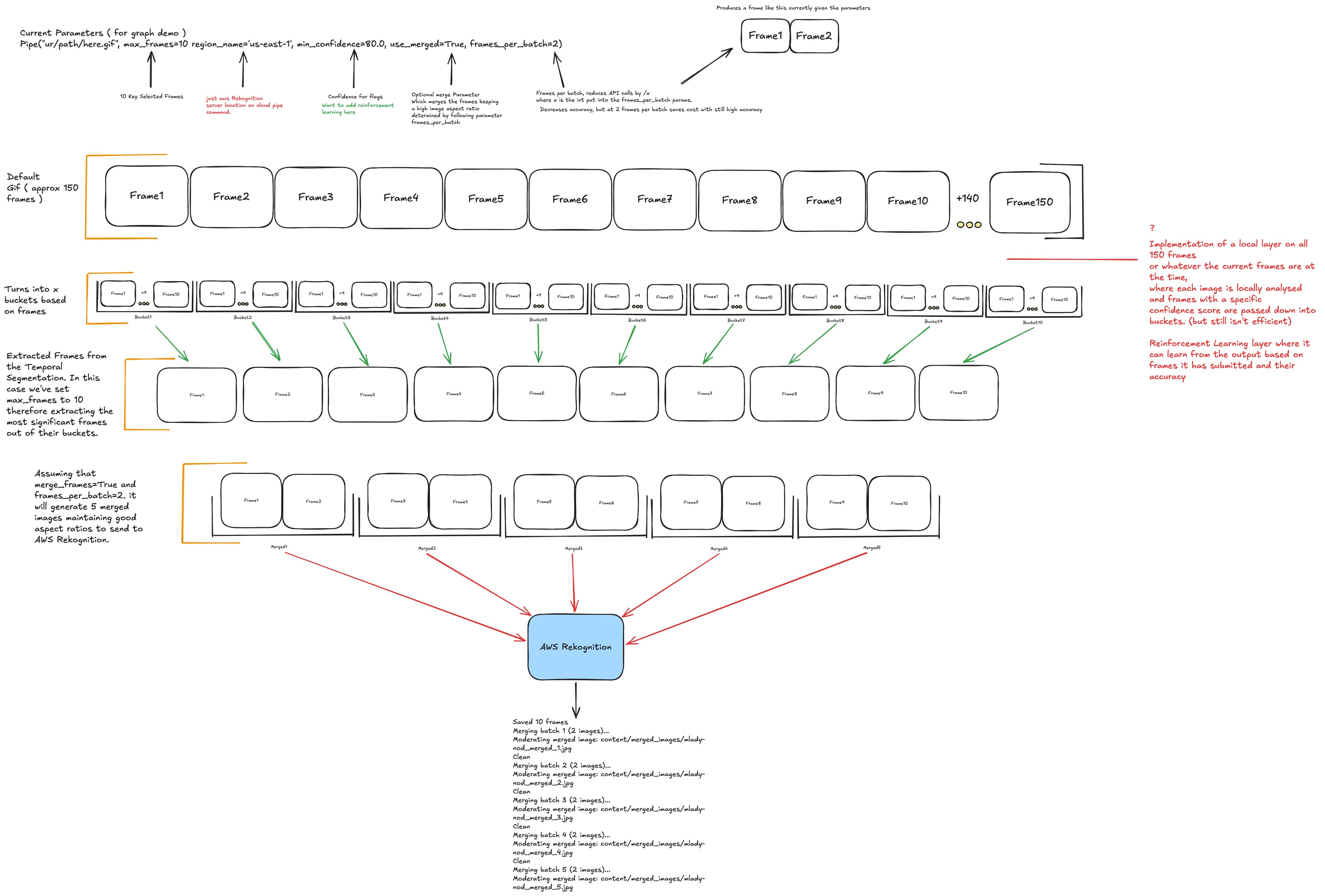
A short, annotated live version of this diagram is at eden.report/docs.
The documentation home is eden.report/docs: the fullest guides plus a short annotated live diagram of the pipeline.
Reference docs also live in docs/; start with the output reference for the complete JSON / ScanResult schema.
PyFrame's temporal sampling design is informed by the temporal action segmentation survey of Ding, Sener, and Yao (arXiv:2210.10352). Full citation and BibTeX: docs/README.md.
- The
awsbackend needs credentials: install withpip install "pyframe-gif-video-image-moderation[aws]", then runaws configure(or setAWS_ACCESS_KEY_ID,AWS_SECRET_ACCESS_KEY, andAWS_DEFAULT_REGION). [video](video to GIF) needsmoviepy, which requires a system ffmpeg (brew install ffmpeg).- HuggingFace model weights have their own licenses, separate from this package's MIT license.
uv pip install -e ".[dev]"   # or: pip install -e ".[dev]"
pytest
python -m build              # or: uv build
twine check dist/*           # or: uv publish  (to PyPI)