Web analytics program: three tiers of autonomy
Why
A first-time user cannot say what "activation" is. They also cannot say which
events matter. It's too abstract.
And if they can't identify this, they cannot comprehend self-driving. We need to
walk them through the loop.
So the wizard must not ask them up front. It must show them, one layer at a
time, and let them stop at any layer.
Each layer is a step up in autonomy. Each layer earns the next one.
- Observe. Install the SDK. Turn on autocapture. Report which events this
product will produce, and where they come from in the code.
- Report. Build the insights, funnels, conversion goal, and alerts the
user picked from tier 1's proposal. Add a capture where a picked goal needs
one.
- Act. Build the scouts the user picked from tier 2's proposal. The scouts
watch those metrics and act on them. Add a capture where a picked scout needs
one.
The user can stop after any tier. The user can return later and continue. A
rerun starts at the first tier that is not done.
Product shape
Tier 1 changes code, and only to install and initialize. It does not add
capture calls. It relies on autocapture, and it names the autocapture events
each important surface will produce. The diff stays small, and the tier-1
promise stays honest: "we instrumented, we did not guess".
Tier 2 and tier 3 change PostHog. They also add captures where a goal needs one.
Autocapture cannot reach every goal — a server-side conversion, a value on the
event, a step that never touches the DOM. When the user picks a goal that
autocapture cannot measure, the tier adds the capture call that supports it.
Every code change after tier 1 traces back to a goal the user selected on a
pick screen, and the run says which goal it serves.
The screens
pick-analytics — after the observe run. The top half is the loop's first
turn made concrete: here is what we turned on, and here is what it will send.
The bottom half is the second turn: here is what those events can tell you.
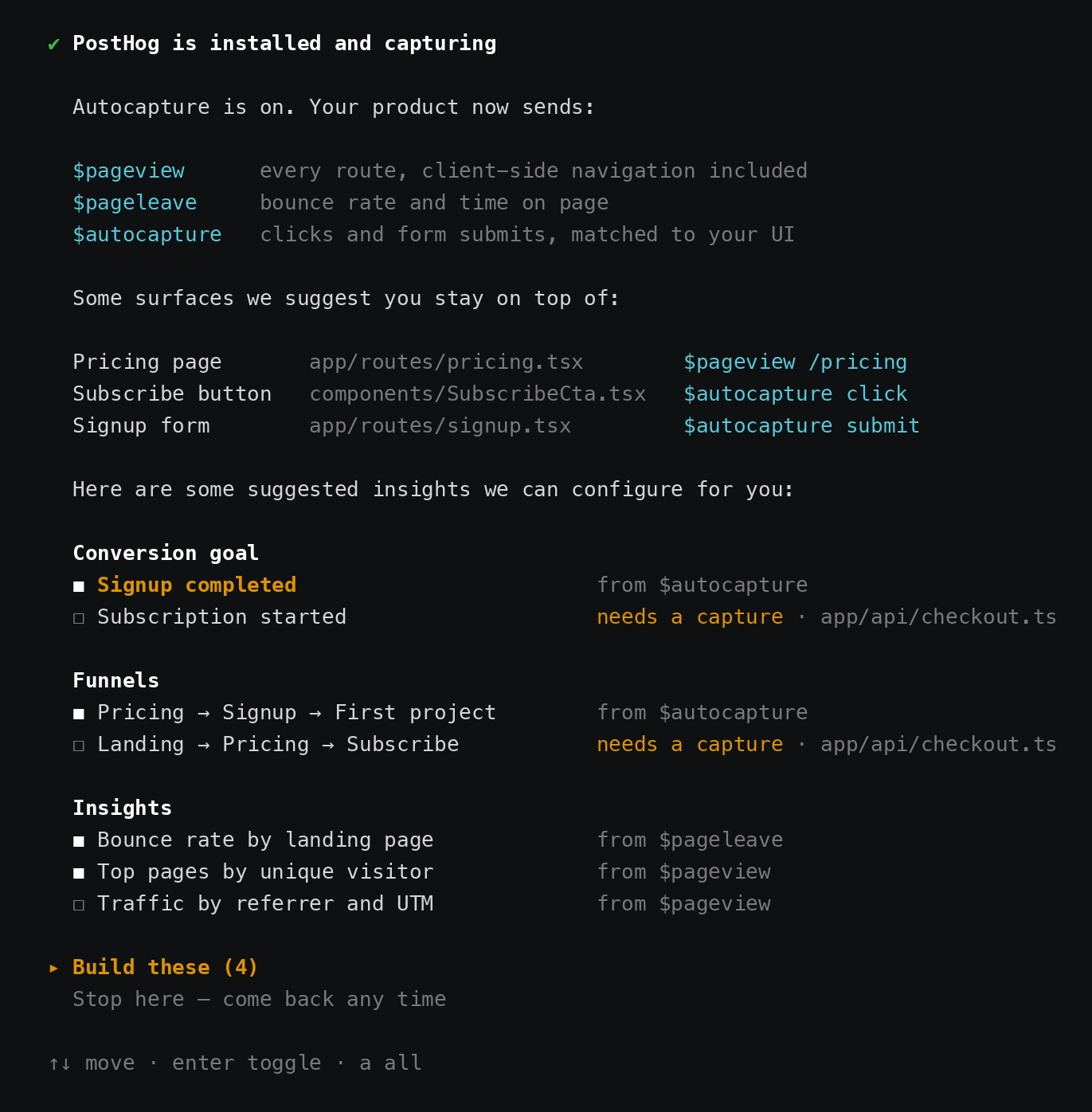
A row marked needs a capture is the one place tier 2 touches code. The file
is named on the row, so the user agrees to the edit before it happens.
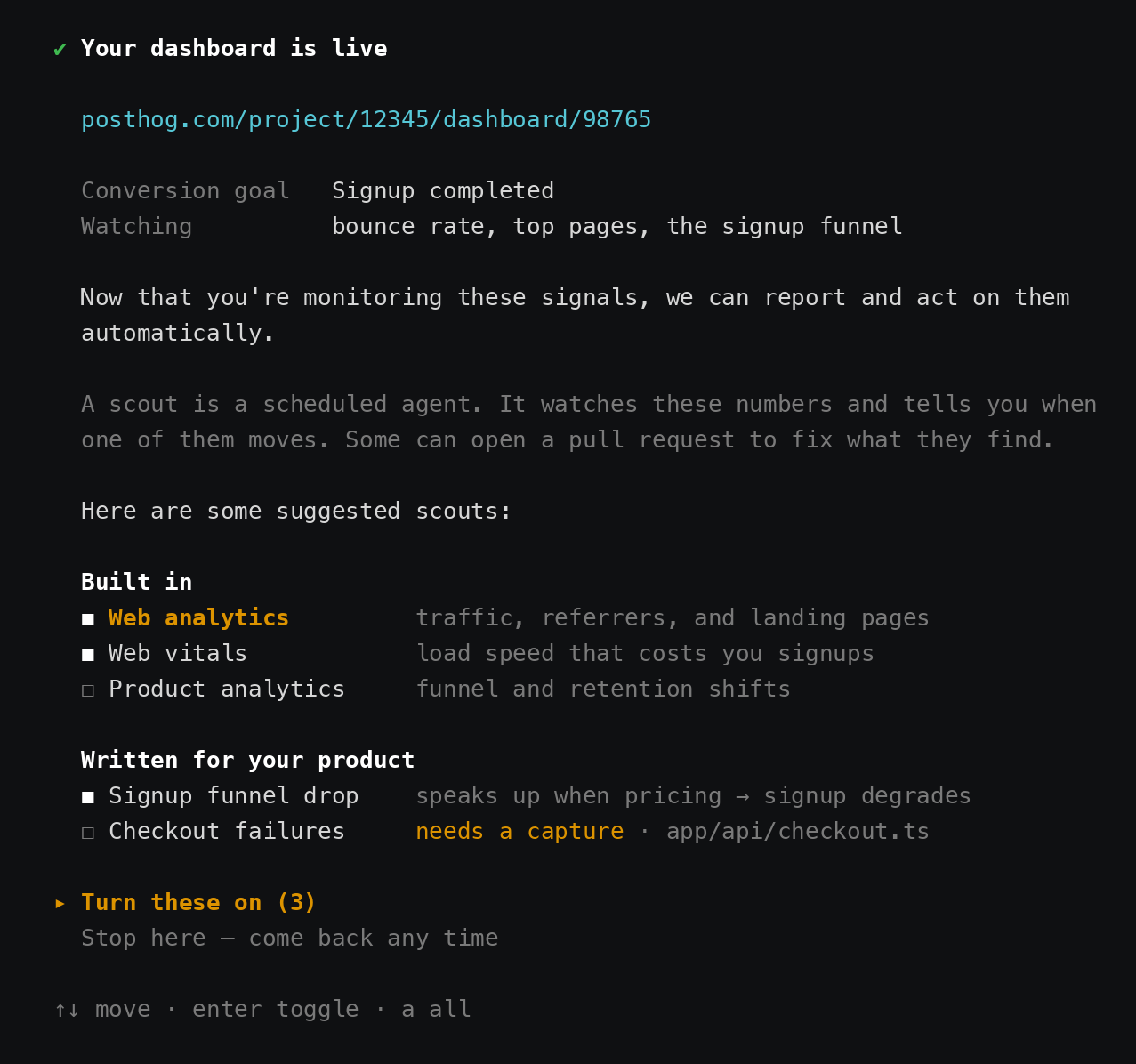
pick-scouts — after the report run. The numbers are real by now, so the
scout pitch is concrete: these are the metrics, and this is who would watch
them.
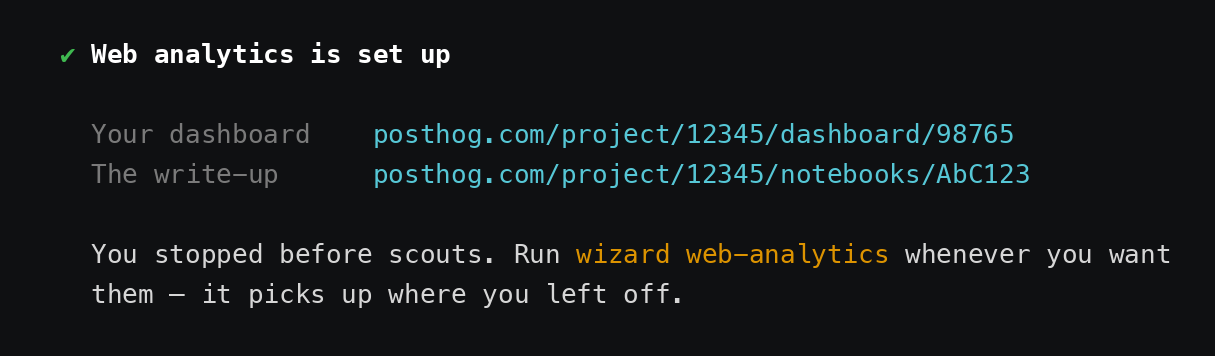
outro, after a stop — the exit has to make returning feel normal, not
like abandoned setup.
Program shape
One program and one command in the wizard. Three separate orchestrator agent
flows. Wizard screens between them.
Each tier is its own orchestrator call, with its own seed, its own queue, and
its own sink. Between two calls the wizard owns the screen: it shows what the
last run found, and the user picks what the next run builds.
- Program id:
web-analytics. Command: wizard web-analytics.
- Top-level
wizard web-analytics is free. The doctor sits at
wizard audit web-analytics through parentCommand: 'audit'
(src/lib/programs/web-analytics-doctor/index.ts:32).
The doctor is the audit path. This program is the setup path. Both stay.
- Three agent flows in context-mill:
web-analytics-observe,
web-analytics-report, web-analytics-act.
The words, briefly
The wizard side and the context-mill side use different nouns. They meet at the
flow.
Wizard side:
- Command — what the user types.
wizard web-analytics. Declared by
ProgramConfig.command. A parentCommand nests it, so
wizard audit web-analytics is a command too.
- Program — one run of the wizard. An ordered list of steps plus a run
definition. Registered once in PROGRAM_REGISTRY, and identified by a
ProgramId. This issue adds exactly one.
- Step — the unit a program is made of. A step can own a screen, own agent
work, or be headless. See ProgramStep in
src/lib/programs/program-step.ts.
- Screen — the TUI view a step owns, through
screenId.
- Sequence — how a step's agent work runs.
linear is one agent with one
prompt. orchestrator is a planner that seeds a task queue and an executor
that drains it, one fresh agent per task. The switchboard resolves it.
- Harness — what runs the agent loop underneath,
pi or anthropic. The
switchboard resolves this too.
Context-mill side:
- Agent flow — one folder of agent prompts,
context/agents/<flow>/. An
orchestrator run loads exactly one flow. ProgramConfig.agentFlow names it,
and defaults to the program id.
- Agent prompt — one
<flow>/<type>.md file, and one task type. The
what. Its frontmatter carries the model, the skills, the tools, and the
tasks it depends on. One prompt per flow is seed: true, the planner. One is
sink: true, and runs last.
- Skill — the how. A folder under
context/skills/. The wizard installs
it for the tasks that name it, and the agent reads it.
- Handoff — the structured result a task leaves behind, through
complete_task. Later tasks read it with read_handoffs.
So: one command, one program, ten steps, three of which are orchestrator runs.
Each of those three loads its own agent flow. Adding a task means adding a
markdown file to a flow, not changing the wizard.
How the user picks
A run ends with a proposal in its handoff. The wizard renders that proposal on
its own screen. The user picks there. The next run reads the picks and builds
them.
wizard_ask belongs inside a flow, for a question an agent must ask to finish
its own task.
Step list
self-driving already composes two run steps with a real screen between them
(src/lib/programs/self-driving/steps.ts).
Copy that shape.
| Step |
Kind |
What happens |
detect |
headless |
Validate the dir. Check whether PostHog is present. |
intro |
screen |
|
health-check |
shared |
HEALTH_CHECK_STEP |
auth |
screen |
|
observe-run |
run |
Orchestrator, flow web-analytics-observe. |
pick-analytics |
screen |
Show the captured events and the proposed insights, funnels, and conversion goal. Mark the ones that need a capture added. The user selects. |
report-run |
run |
Orchestrator, flow web-analytics-report. |
pick-scouts |
screen |
Explain what a scout is. Show the proposed scouts. Mark the ones that need a capture added. The user selects. |
act-run |
run |
Orchestrator, flow web-analytics-act. |
outro |
screen |
|
Each pick screen offers "stop here". A stop ends the run at the outro. The next
wizard web-analytics resumes at the tier that is not done.
SelfDrivingHandoffScreen
(src/ui/tui/screen-registry.tsx:105) is the
model for the pick screens. Register the new screens in
src/ui/tui/screen-sequences.ts and
src/ui/tui/screen-registry.tsx.
Glyphs are the wizard's own — Icons.squareFilled / Icons.squareOpen for the
checkboxes, Icons.triangleSmallRight for focus
(src/ui/tui/styles.ts:26). Both pick screens are
GroupedPickerMenu
(src/ui/tui/primitives/GroupedPickerMenu.tsx):
multi-select with category headers, arrow keys to move, enter to toggle, a for
all, and a Confirm button below the list.
The three flows
web-analytics-observe — tier 1. Installs and initializes. No captures.
| Task |
What it does |
plan-observe (seed) |
Read the repo and the PostHog project. Queue only what is missing. |
install |
Add the SDK to the manifest. Reuse skill integration-v2-install. |
init |
Initialize with autocapture, $pageview, and $pageleave on. Reuse integration-v2-init. Client-side routing must still send pageviews. |
identify |
Wire user identification, so every event and error carries who the user is. Reuse integration-v2-identify. Depends on install and init. |
map-surfaces |
Read the repo. Name the surfaces that matter — pricing page, subscribe button, signup form. For each one, state the autocapture event it will produce and the file it lives in. |
propose-analytics (sink) |
Turn the surface map into proposed insights, funnels, a conversion goal, and bounce-rate views. Mark each proposal that autocapture cannot measure, and name the capture it would need. Emit the proposal for the pick screen. |
web-analytics-report — tier 2. Changes PostHog. Adds a capture when a
picked goal needs one.
| Task |
What it does |
plan-report (seed) |
Read the user's picks. Queue one build task per pick. Queue add-captures only when a pick is marked as needing one. |
add-captures |
Add the capture calls the picked goals need, and nothing else. Reuse integration-v2-capture. Runs before the build tasks, so the insights point at events that exist. |
build-insights |
Create the picked insights over MCP. Reuse integration-v2-insight. |
build-dashboard |
Create the dashboard. Set the conversion goal. Reuse integration-v2-dashboard. |
build-alerts |
Create alerts on the conversion goal and on bounce rate. |
propose-scouts (sink) |
Propose built-in and custom scouts against the metrics just built. Mark any scout that needs an event the project does not send yet. Emit the proposal for the pick screen. Write the notebook. |
web-analytics-act — tier 3. Changes PostHog. Adds a capture when a picked
scout needs one.
| Task |
What it does |
plan-act (seed) |
Read the user's picks. Queue the scout work. Queue add-captures only when a picked scout needs an event that does not exist. |
add-captures |
Add the capture calls those scouts need. Reuse integration-v2-capture. |
enable-scouts |
Enable the picked built-in scouts. |
build-scouts |
Create the picked custom scouts. |
report (sink) |
Amend the notebook. Record every capture this run added, and the goal each one serves. |
A capture task edits code, so its frontmatter grants Read, Edit, Glob,
and Grep. Every other tier-2 and tier-3 task is read-only plus
posthog_exec.
Wizard-side work
1. Register the program
2. One program id, three flows
runOrchestrator reads the flow from programConfig.agentFlow
(orchestrator-runner.ts:391).
Each run step calls runAgent with a spread of the same config and a different
flow:
run: (session) =>
  runAgent({ ...webAnalyticsConfig, agentFlow: 'web-analytics-report' }, session, { ... }),
The program id stays web-analytics, so bindings, flags, and stage overrides
resolve once for all three runs.
3. Let a non-terminal orchestrator run stay an orchestrator run
This is the one real code change.
composed currently means two things at once:
- Not the terminal run — skip the outro and the analytics shutdown, so the
shared client survives (linear.ts:316).
- Nested inside another run — clamp the sequence to linear
(composedClampMw, switchboard/sequence.ts:66).
Three sequential runs need meaning 1 without meaning 2. They are siblings, not
nests. Two edits:
- Split the two meanings.
composedClampMw must clamp only on real nesting. A
sibling run keeps its orchestrator sequence.
runOrchestrator currently ignores the flag — sequence.ts passes it as
_composed (switchboard/sequence.ts:50)
— and always ends with getUI().outro() plus analytics.shutdown('success')
(orchestrator-runner.ts:1187).
It must honour the flag and skip both, exactly as the linear runner does.
Without this, run 1 tears down analytics and prints the outro, and runs 2 and 3
silently fall back to linear.
4. Carry a proposal from a run to a pick screen
The pick screens need structured data, not prose. The handoff schema
(HANDOFF_SHAPE,
queue-tools.ts)
carries prose strings only.
Recommended: a new wizard tool that a sink calls with its proposal. The wizard
stores it on the session, and the pick screen renders it. Additive, session
scoped, nothing written to the repo.
Alternative: the sink writes a JSON file at a known path and the screen reads
it. web-analytics-doctor already emits posthog-web-analytics-findings.json,
so there is precedent. Simpler, but it litters the repo.
Pick one before tier 2 starts.
Context-mill work
Agent prompts
Three new folders under context/agents/. Read context/agents/README.md
first: the folder name must match the frontmatter flow, and the build rejects
a mismatch.
Copy the frontmatter shape from context/agents/replay-vision/. Keep each body
as intent only. The wizard injects the project context and the reporting
contract.
Skills
Reuse, do not rewrite:
integration-v2-install, integration-v2-init — tier 1 code work.integration-v2-capture — the add-captures task in tier 2 and tier 3.integration-v2-insight, integration-v2-dashboard, integration-v2-mcp —
tier 2 building.integration-v2-notebook — the notebook.self-driving references 6-scouts.md and 6b-tailor-scouts.md — tier 3.
They already hold the troop ceiling, the run budget, and the gap analysis.
Extract the shared part. Take the troop sizing and the gap analysis; the
pick screen owns the selection.
New skills:
web-analytics-surfaces — how to read a web app and predict the autocapture
events each surface produces. Start from
context/skills/audit-autocapture/references/.web-analytics-goals — how to pick a conversion goal, and how bounce rate
relates to it.
The existing context/skills/web-analytics group belongs to the doctor. Leave
it alone.
Rerun and state
The seed of each flow reads state from PostHog and from the repo. It does not
read a local state file. Evidence beats bookkeeping, and a local file goes stale
as soon as someone changes something in the PostHog UI.
Each seed answers the questions its own tier depends on:
- Is the SDK in the repo, and does
init turn on autocapture?
- Does the project receive
$pageview and $pageleave events?
- Do the insights, dashboard, and conversion goal exist?
- Are the scouts enabled?
The program then starts at the first tier that is not done, and skips the
screens for the tiers that are.
The notebook is the durable record. Tier 2 writes it. Tier 3 amends it. One
project keeps one notebook across reruns. integration-v2 writes no report
file and hands off a notebook URL
(src/lib/programs/posthog-integration/handoff.ts).
Open question. Finding the earlier notebook by title is weak. A rename
breaks it. The PostHog-side table below is the stronger answer.
Out of scope, and next
- Store the tier state and the proposals in PostHog, in a table keyed by
project. Read it on rerun. Pitch the next tier in the app. This removes the
notebook title lookup.
- Mobile and server-side web analytics. This program is for web.
Suggested PR split
- Wizard: split
composed into "not terminal" and "nested". Make
runOrchestrator honour it. Tests only — no new program yet.
- Wizard: the proposal channel from a sink to the session.
- Wizard: register the program, the binding, the three run steps, and the two
pick screens. Flows can be stubs.
- Context-mill:
web-analytics-observe and the two new skills.
- Context-mill:
web-analytics-report.
- Context-mill:
web-analytics-act. Extract the shared scout guidance from
self-driving.
Open decisions
- How a proposal reaches the pick screen — new wizard tool, or a JSON
artifact in the repo. See wizard-side item 4.
- Command name.
wizard web-analytics reads well, but the doctor answers
to wizard audit web-analytics. Two similar names may confuse.
- Does tier 1 show its surface map before tier 2, or only inside the
proposal? A separate "here is what we will capture" screen is the honest
version of the trust ladder. It is also one more screen.
Web analytics program: three tiers of autonomy
Why
A first-time user cannot say what "activation" is. They also cannot say which
events matter. It's too abstract.
And if they can't identify this, they cannot comprehend self-driving. We need to
walk them through the loop.
So the wizard must not ask them up front. It must show them, one layer at a
time, and let them stop at any layer.
Each layer is a step up in autonomy. Each layer earns the next one.
product will produce, and where they come from in the code.
user picked from tier 1's proposal. Add a capture where a picked goal needs
one.
watch those metrics and act on them. Add a capture where a picked scout needs
one.
The user can stop after any tier. The user can return later and continue. A
rerun starts at the first tier that is not done.
Product shape
Tier 1 changes code, and only to install and initialize. It does not add
capture calls. It relies on autocapture, and it names the autocapture events
each important surface will produce. The diff stays small, and the tier-1
promise stays honest: "we instrumented, we did not guess".
Tier 2 and tier 3 change PostHog. They also add captures where a goal needs one.
Autocapture cannot reach every goal — a server-side conversion, a value on the
event, a step that never touches the DOM. When the user picks a goal that
autocapture cannot measure, the tier adds the capture call that supports it.
Every code change after tier 1 traces back to a goal the user selected on a
pick screen, and the run says which goal it serves.
The screens
pick-analytics— after the observe run. The top half is the loop's firstturn made concrete: here is what we turned on, and here is what it will send.
The bottom half is the second turn: here is what those events can tell you.
A row marked
needs a captureis the one place tier 2 touches code. The fileis named on the row, so the user agrees to the edit before it happens.
pick-scouts— after the report run. The numbers are real by now, so thescout pitch is concrete: these are the metrics, and this is who would watch
them.
outro, after a stop — the exit has to make returning feel normal, notlike abandoned setup.
Program shape
One program and one command in the wizard. Three separate orchestrator agent
flows. Wizard screens between them.
Each tier is its own orchestrator call, with its own seed, its own queue, and
its own sink. Between two calls the wizard owns the screen: it shows what the
last run found, and the user picks what the next run builds.
web-analytics. Command:wizard web-analytics.wizard web-analyticsis free. The doctor sits atwizard audit web-analyticsthroughparentCommand: 'audit'(src/lib/programs/web-analytics-doctor/index.ts:32).
The doctor is the audit path. This program is the setup path. Both stay.
web-analytics-observe,web-analytics-report,web-analytics-act.The words, briefly
The wizard side and the context-mill side use different nouns. They meet at the
flow.
Wizard side:
wizard web-analytics. Declared byProgramConfig.command. AparentCommandnests it, sowizard audit web-analyticsis a command too.definition. Registered once in
PROGRAM_REGISTRY, and identified by aProgramId. This issue adds exactly one.work, or be headless. See
ProgramStepinsrc/lib/programs/program-step.ts.
screenId.linearis one agent with oneprompt.
orchestratoris a planner that seeds a task queue and an executorthat drains it, one fresh agent per task. The switchboard resolves it.
pioranthropic. Theswitchboard resolves this too.
Context-mill side:
context/agents/<flow>/. Anorchestrator run loads exactly one flow.
ProgramConfig.agentFlownames it,and defaults to the program id.
<flow>/<type>.mdfile, and one task type. Thewhat. Its frontmatter carries the model, the skills, the tools, and the
tasks it depends on. One prompt per flow is
seed: true, the planner. One issink: true, and runs last.context/skills/. The wizard installsit for the tasks that name it, and the agent reads it.
complete_task. Later tasks read it withread_handoffs.So: one command, one program, ten steps, three of which are orchestrator runs.
Each of those three loads its own agent flow. Adding a task means adding a
markdown file to a flow, not changing the wizard.
How the user picks
A run ends with a proposal in its handoff. The wizard renders that proposal on
its own screen. The user picks there. The next run reads the picks and builds
them.
wizard_askbelongs inside a flow, for a question an agent must ask to finishits own task.
Step list
self-drivingalready composes two run steps with a real screen between them(src/lib/programs/self-driving/steps.ts).
Copy that shape.
detectintrohealth-checkHEALTH_CHECK_STEPauthobserve-runweb-analytics-observe.pick-analyticsreport-runweb-analytics-report.pick-scoutsact-runweb-analytics-act.outroEach pick screen offers "stop here". A stop ends the run at the outro. The next
wizard web-analyticsresumes at the tier that is not done.SelfDrivingHandoffScreen(src/ui/tui/screen-registry.tsx:105) is the
model for the pick screens. Register the new screens in
src/ui/tui/screen-sequences.ts and
src/ui/tui/screen-registry.tsx.
Glyphs are the wizard's own —
Icons.squareFilled/Icons.squareOpenfor thecheckboxes,
Icons.triangleSmallRightfor focus(src/ui/tui/styles.ts:26). Both pick screens are
GroupedPickerMenu(src/ui/tui/primitives/GroupedPickerMenu.tsx):
multi-select with category headers, arrow keys to move, enter to toggle,
aforall, and a Confirm button below the list.
The three flows
web-analytics-observe— tier 1. Installs and initializes. No captures.plan-observe(seed)installintegration-v2-install.init$pageview, and$pageleaveon. Reuseintegration-v2-init. Client-side routing must still send pageviews.identifyintegration-v2-identify. Depends oninstallandinit.map-surfacespropose-analytics(sink)web-analytics-report— tier 2. Changes PostHog. Adds a capture when apicked goal needs one.
plan-report(seed)add-capturesonly when a pick is marked as needing one.add-capturesintegration-v2-capture. Runs before the build tasks, so the insights point at events that exist.build-insightsintegration-v2-insight.build-dashboardintegration-v2-dashboard.build-alertspropose-scouts(sink)web-analytics-act— tier 3. Changes PostHog. Adds a capture when a pickedscout needs one.
plan-act(seed)add-capturesonly when a picked scout needs an event that does not exist.add-capturesintegration-v2-capture.enable-scoutsbuild-scoutsreport(sink)A capture task edits code, so its frontmatter grants
Read,Edit,Glob,and
Grep. Every other tier-2 and tier-3 task is read-only plusposthog_exec.Wizard-side work
1. Register the program
src/lib/programs/web-analytics/index.ts. Model the config onsrc/lib/programs/metrics/index.ts.
PROGRAM_REGISTRYandPrograminsrc/lib/programs/program-registry.ts:68.
PROGRAM_BINDINGSinsrc/lib/agent/runner/switchboard/index.ts:123,
with
Sequence.orchestrator, asmetricsandreplay-visiondo. Models comefrom the prompt frontmatter, not from the binding.
2. One program id, three flows
runOrchestratorreads the flow fromprogramConfig.agentFlow(orchestrator-runner.ts:391).
Each run step calls
runAgentwith a spread of the same config and a differentflow:
The program id stays
web-analytics, so bindings, flags, and stage overridesresolve once for all three runs.
3. Let a non-terminal orchestrator run stay an orchestrator run
This is the one real code change.
composedcurrently means two things at once:shared client survives (linear.ts:316).
(
composedClampMw, switchboard/sequence.ts:66).Three sequential runs need meaning 1 without meaning 2. They are siblings, not
nests. Two edits:
composedClampMwmust clamp only on real nesting. Asibling run keeps its orchestrator sequence.
runOrchestratorcurrently ignores the flag —sequence.tspasses it as_composed(switchboard/sequence.ts:50)— and always ends with
getUI().outro()plusanalytics.shutdown('success')(orchestrator-runner.ts:1187).
It must honour the flag and skip both, exactly as the linear runner does.
Without this, run 1 tears down analytics and prints the outro, and runs 2 and 3
silently fall back to linear.
4. Carry a proposal from a run to a pick screen
The pick screens need structured data, not prose. The handoff schema
(
HANDOFF_SHAPE,queue-tools.ts)
carries prose strings only.
Recommended: a new wizard tool that a sink calls with its proposal. The wizard
stores it on the session, and the pick screen renders it. Additive, session
scoped, nothing written to the repo.
Alternative: the sink writes a JSON file at a known path and the screen reads
it.
web-analytics-doctoralready emitsposthog-web-analytics-findings.json,so there is precedent. Simpler, but it litters the repo.
Pick one before tier 2 starts.
Context-mill work
Agent prompts
Three new folders under
context/agents/. Readcontext/agents/README.mdfirst: the folder name must match the frontmatter
flow, and the build rejectsa mismatch.
Copy the frontmatter shape from
context/agents/replay-vision/. Keep each bodyas intent only. The wizard injects the project context and the reporting
contract.
Skills
Reuse, do not rewrite:
integration-v2-install,integration-v2-init— tier 1 code work.integration-v2-capture— theadd-capturestask in tier 2 and tier 3.integration-v2-insight,integration-v2-dashboard,integration-v2-mcp—tier 2 building.
integration-v2-notebook— the notebook.self-drivingreferences6-scouts.mdand6b-tailor-scouts.md— tier 3.They already hold the troop ceiling, the run budget, and the gap analysis.
Extract the shared part. Take the troop sizing and the gap analysis; the
pick screen owns the selection.
New skills:
web-analytics-surfaces— how to read a web app and predict the autocaptureevents each surface produces. Start from
context/skills/audit-autocapture/references/.web-analytics-goals— how to pick a conversion goal, and how bounce raterelates to it.
The existing
context/skills/web-analyticsgroup belongs to the doctor. Leaveit alone.
Rerun and state
The seed of each flow reads state from PostHog and from the repo. It does not
read a local state file. Evidence beats bookkeeping, and a local file goes stale
as soon as someone changes something in the PostHog UI.
Each seed answers the questions its own tier depends on:
initturn on autocapture?$pageviewand$pageleaveevents?The program then starts at the first tier that is not done, and skips the
screens for the tiers that are.
The notebook is the durable record. Tier 2 writes it. Tier 3 amends it. One
project keeps one notebook across reruns.
integration-v2writes no reportfile and hands off a notebook URL
(src/lib/programs/posthog-integration/handoff.ts).
Open question. Finding the earlier notebook by title is weak. A rename
breaks it. The PostHog-side table below is the stronger answer.
Out of scope, and next
project. Read it on rerun. Pitch the next tier in the app. This removes the
notebook title lookup.
Suggested PR split
composedinto "not terminal" and "nested". MakerunOrchestratorhonour it. Tests only — no new program yet.pick screens. Flows can be stubs.
web-analytics-observeand the two new skills.web-analytics-report.web-analytics-act. Extract the shared scout guidance fromself-driving.Open decisions
artifact in the repo. See wizard-side item 4.
wizard web-analyticsreads well, but the doctor answersto
wizard audit web-analytics. Two similar names may confuse.proposal? A separate "here is what we will capture" screen is the honest
version of the trust ladder. It is also one more screen.