First off, thank you for OpenTS. I played Tiberian Sun as a kid and still play it
regularly, and being able to build the engine myself and see my own changes running in
the actual game has honestly been a bit surreal. The build docs, the manual, and the
change records made it far easier to get productive in this codebase than I expected.
I'm submitting this because there have always been a few things that bothered me about
the skirmish setup: you can't pick your opponents, you can't pick starting locations,
you can't pick opponent colors, and you can't choose to play with a revealed map. Plus
one very minor annoyance that has hit me many times: Re-deployable MCV defaults to off
(why?!). So this is a proposal and a first pass at code changes that fix all of those,
and bring the setup more in line with modern RTS skirmish screens.
Why I think it fits the project
The README's "State and plans" lists extending Tiberian Sun with new features and
striving toward parity with ts-patches/Vinifera and Red Alert 2 as the third
development goal. Picking your opponents and starting positions is exactly what players
get today from the CnCNet client's lobby, and what RA2's own skirmish screen offered.
None of it is possible through game data, since opponent assignment is hard-coded in
Assign_Houses and Create_Units, so it seemed like the sort of de-hardcoding the
project exists to make possible. I also tried to follow the spirit of
docs/DIRECTION.md: everything is incremental and opt-in, every new choice defaults to
the original random behavior, and an untouched screen plays exactly as before.
That said, this is a UI rework plus new engine behavior rather than a reconstruction
fix, and it may step on plans you already have for the pre-game shell. So I wanted to
open a discussion before any PR, and I'm happy to split it up or rework it however
suits the project.
What the branch does
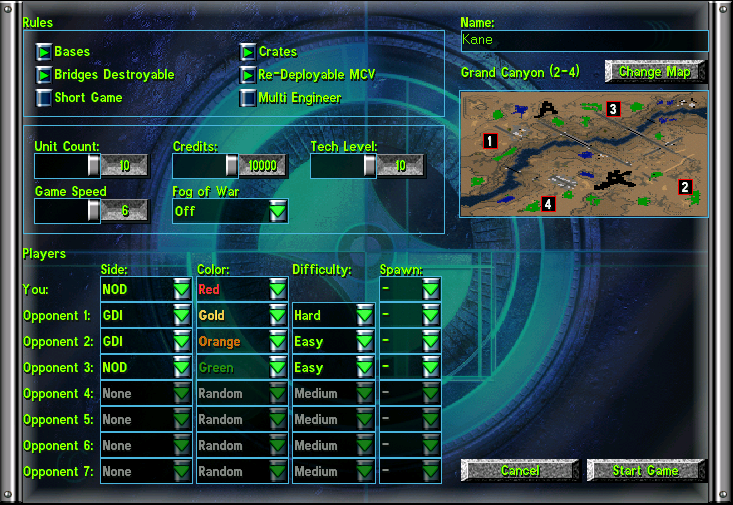
The setup screen is now a single panel: match rules at the top left, a player table
below them, and the map on the right.
- Per-opponent selection. Each computer opponent has its own row: side (offered
from the rules' IsMultiplay houses, so mod factions appear automatically), color,
difficulty (easy/medium/hard), and starting position. The AI Players and AI Level
sliders are gone. How many opponents play is simply how many rows name one, and each
house gets its own handicap where the slider applied one level to all.
- Starting position choice. The map preview numbers the map's start waypoints, and
the player and every opponent can take a numbered position or stay automatic. Chosen
spots are reserved before the classic random/furthest placement runs, so automatic
placement can't land on them and keeps its distance-seeking behavior for the rest.
- Map-aware rows. Rows beyond the selected map's start count are disabled, and
changing the map re-applies the limit and the spawn lists on the spot.
- Exclusive picks. A color or starting position one participant holds is not
offered to the others. A row set to None releases its claims, and a row's other
columns stay disabled until its side names an opponent.
- Fog of War dropdown. On / Off (default, as before) / Explored. Explored starts
the match revealed the way the reveal crate leaves it: terrain known, sight still
from your own units. In that mode reveal and shroud crates grant money instead, via
the same no-effect substitution other powerups already use.
- Presentation. The map preview fills its area's width at whatever height the map's
shape gives it, with the border following the picture's edge (the map selection
dialog's preview draws the same way), and the menu backdrop artwork scales up to
cover dialogs larger than itself. Owner-drawn combo boxes also now paint their closed
selection in the selected entry's color; the color picker previously showed your pick
only in the open list.
- Re-deployable MCV starts checked. It was never carried between sessions, so every
launch silently reset it to off. Happy to drop this one if it's contentious.
Compatibility and validation
- Everything defaults to the original behavior, and the new preferences are
machine-local and consulted only in skirmish. Assign_Houses and Create_Units are
gated on the session type because peers each run them, so honoring local-only choices
in LAN would desync. Network sessions are unaffected.
- Nothing was added to the save stream or the session-options exchange; new UI strings
are Language.dll string-table entries.
- Win32 Release and Debug build clean.
manage.py check passes, with five change
records under manual/changes/ and a classified duplicate INI read (the preview
re-reads [Map] Size to project start positions). Play-tested across the option
combinations: chosen sides, colors, difficulties, and spawns land correctly in game,
capping and exclusivity behave, and explored mode and its crate substitution are
verified. LAN behavior is verified by code inspection, not network play.
The branch
skirmish-modernization on my fork, five commits:
https://github.com/mikemeerschaert/OpenTS/tree/skirmish-modernization
- Draw a combo box selection in its item color
- Add opponent, spawn, and fog choices to skirmish setup
- Default the Re-deployable MCV option to on
- Lay the skirmish setup out as a single panel
- Offer each color and spawn to a single participant
A few ideas I deliberately left out for now: pre-formed AI teams and alliances in
setup, click-a-marker spawn picking on the preview, and persisting skirmish options
between sessions (the engine currently persists none of them, so that felt like its own
proposal).
Tell me how you'd like this shaped (one PR, several, different UI, behind an option)
and I'll do the legwork. Thanks for reading, and for the project.
First off, thank you for OpenTS. I played Tiberian Sun as a kid and still play it
regularly, and being able to build the engine myself and see my own changes running in
the actual game has honestly been a bit surreal. The build docs, the manual, and the
change records made it far easier to get productive in this codebase than I expected.
I'm submitting this because there have always been a few things that bothered me about
the skirmish setup: you can't pick your opponents, you can't pick starting locations,
you can't pick opponent colors, and you can't choose to play with a revealed map. Plus
one very minor annoyance that has hit me many times: Re-deployable MCV defaults to off
(why?!). So this is a proposal and a first pass at code changes that fix all of those,
and bring the setup more in line with modern RTS skirmish screens.
Why I think it fits the project
The README's "State and plans" lists extending Tiberian Sun with new features and
striving toward parity with ts-patches/Vinifera and Red Alert 2 as the third
development goal. Picking your opponents and starting positions is exactly what players
get today from the CnCNet client's lobby, and what RA2's own skirmish screen offered.
None of it is possible through game data, since opponent assignment is hard-coded in
Assign_HousesandCreate_Units, so it seemed like the sort of de-hardcoding theproject exists to make possible. I also tried to follow the spirit of
docs/DIRECTION.md: everything is incremental and opt-in, every new choice defaults tothe original random behavior, and an untouched screen plays exactly as before.
That said, this is a UI rework plus new engine behavior rather than a reconstruction
fix, and it may step on plans you already have for the pre-game shell. So I wanted to
open a discussion before any PR, and I'm happy to split it up or rework it however
suits the project.
What the branch does
The setup screen is now a single panel: match rules at the top left, a player table
below them, and the map on the right.
from the rules'
IsMultiplayhouses, so mod factions appear automatically), color,difficulty (easy/medium/hard), and starting position. The AI Players and AI Level
sliders are gone. How many opponents play is simply how many rows name one, and each
house gets its own handicap where the slider applied one level to all.
the player and every opponent can take a numbered position or stay automatic. Chosen
spots are reserved before the classic random/furthest placement runs, so automatic
placement can't land on them and keeps its distance-seeking behavior for the rest.
changing the map re-applies the limit and the spawn lists on the spot.
offered to the others. A row set to None releases its claims, and a row's other
columns stay disabled until its side names an opponent.
the match revealed the way the reveal crate leaves it: terrain known, sight still
from your own units. In that mode reveal and shroud crates grant money instead, via
the same no-effect substitution other powerups already use.
shape gives it, with the border following the picture's edge (the map selection
dialog's preview draws the same way), and the menu backdrop artwork scales up to
cover dialogs larger than itself. Owner-drawn combo boxes also now paint their closed
selection in the selected entry's color; the color picker previously showed your pick
only in the open list.
launch silently reset it to off. Happy to drop this one if it's contentious.
Compatibility and validation
machine-local and consulted only in skirmish.
Assign_HousesandCreate_Unitsaregated on the session type because peers each run them, so honoring local-only choices
in LAN would desync. Network sessions are unaffected.
are Language.dll string-table entries.
manage.py checkpasses, with five changerecords under
manual/changes/and a classified duplicate INI read (the previewre-reads
[Map] Sizeto project start positions). Play-tested across the optioncombinations: chosen sides, colors, difficulties, and spawns land correctly in game,
capping and exclusivity behave, and explored mode and its crate substitution are
verified. LAN behavior is verified by code inspection, not network play.
The branch
skirmish-modernizationon my fork, five commits:https://github.com/mikemeerschaert/OpenTS/tree/skirmish-modernization
A few ideas I deliberately left out for now: pre-formed AI teams and alliances in
setup, click-a-marker spawn picking on the preview, and persisting skirmish options
between sessions (the engine currently persists none of them, so that felt like its own
proposal).
Tell me how you'd like this shaped (one PR, several, different UI, behind an option)
and I'll do the legwork. Thanks for reading, and for the project.