
🚀 一行代码,搞定办公自动化
73 个开箱即用的 Skills,覆盖 PDF、Word、Excel、PPT、邮件、微信、图片、视频等全场景










python-office 是中文世界最受欢迎的 Python 办公自动化库。 一个库解决 90% 办公场景:PDF/Word/Excel/PPT 转换、图片处理、视频音频、微信机器人、邮件、文件管理、OCR、AI 工具…… 零基础也能上手——所有功能只需一行代码。
pip install python-officeimport office # 一行导入,所有功能立刻可用| 功能 | |
|---|---|
| 🎯 一行代码 | 90% 的功能只需 office.模块.方法(),零学习成本 |
| 🧩 73 个 Skills | 每个功能独立可调,按需使用,不冗余 |
| 🤖 AI 友好 | 每个 Skill 都有 SKILL.md + YAML 描述,Codex/Claude/Cursor 可直接识别 |
| 🌏 中文优先 | 全中文文档、视频教程、微信答疑群 |
| 🪶 轻量灵活 | 不需要的功能可以不安装:pip install popdf / poimage / poword |
| 🔄 持续更新 | 2020 起持续维护,73+ 功能仍在迭代 |
| 📦 一次安装 | import office 即引入全部能力;不想要也可单独 import |
| 🛡️ 稳定可靠 | 已被数千个项目使用,MIT 开源 |
🚧 展示区 —— 你可以替换为你自己的截图或 GIF 动图
| 图片处理 | PDF 处理 | 微信机器人 |
|---|---|---|
| 水印 / 词云 / 铅笔画 | 转 Word / 合并 / 加密 | 群发 / 智能聊天 |
| Excel 处理 | PPT 处理 | 视频/音频 |
|---|---|---|
| 模拟数据 / 合并 / 拆分 | 转 PDF / 转图 | 提取音频 / 字幕 |
| 想做什么? | 跳到 |
|---|---|
| 第一次使用 | 📦 安装 |
| 看 5 个例子感受一下 | 🚀 Quick Start |
| 找具体功能 | 🛠️ 功能分类 或 skills/README.md |
| 了解 Skill 体系 | ✨ Skills 体系 |
| 加群提问 | 💬 联系作者 |
| 给项目贡献代码 | 🤝 贡献 |
python-office 内置了一套 Skill 体系:把库里的 73 个方法封装成 73 个独立可调用的 Skill,每个 Skill 有自己的 SKILL.md 文档,可以单独 import,也可以整体使用。
💡 为什么是 Skill? 借助 Skill,Codex、Claude、Cursor 等 AI 工具可以自动识别你的需求并调用对应功能。
# 方式 1:直接调用具体 Skill
from skills.image import compress_image
compress_image(input_file='photo.jpg', output_file='photo_small.jpg', quality=30)

# 方式 2:按分类批量导入
from skills.pdf import pdf2docx
pdf2docx(input_file='report.pdf', output_file='report.docx')

# 方式 3:原始的 office 方式(兼容)
import office
office.image.compress_image(input_file='photo.jpg', output_file='photo_small.jpg', quality=30)| 分类 | Skill 数 | 典型 Skill |
|---|---|---|
| 📊 Excel | 7 | fake2excel / merge2excel / excel2pdf |
| 📁 File | 9 | replace4filename / get_files |
| 💰 Finance | 1 | t0(股票做 T 收益计算) |
| 🖼️ Image | 9 | compress_image / add_watermark / txt2wordcloud |
| 📝 Markdown | 1 | excel2markdown |
| 🔍 OCR | 1 | VatInvoiceOCR2Excel(增值税发票识别) |
| 13 | pdf2docx / pdf2imgs / merge2pdf / encrypt4pdf |
|
| 🎬 PPT | 3 | ppt2pdf / ppt2img / merge4ppt |
| 🛠️ Tools | 10 | transtools / qrcodetools / passwordtools |
| 🎥 Video | 4 | video2mp3 / audio2txt / txt2mp3 |
| 7 | send_message / chat_robot / receive_message |
|
| 📄 Word | 5 | docx2pdf / merge4docx / docx4imgs |
| 🏷️ Ruiming | 3 | screen_unmarked_image / change_label_in_xml |
👉 查看完整 Skill 索引:skills/README.md
# 一键安装(推荐)
pip install -i https://mirrors.aliyun.com/pypi/simple/ python-office -U

# 按需安装子库(更轻量)
pip install popdf      # 只用 PDF 处理
pip install poimage    # 只用图片处理
pip install poword     # 只用 Word 处理
pip install poexcel    # 只用 Excel 处理
Python 版本要求:Python 3.7+ 安装问题:📝 常见问题与故障排除
# 1. PDF 转 Word
from skills.pdf import pdf2docx
pdf2docx(input_file='report.pdf', output_file='report.docx')

# 2. 批量压缩图片
from skills.image import compress_image
compress_image(input_file='big.jpg', output_file='small.jpg', quality=30)

# 3. 给图片加水印
from skills.image import add_watermark
add_watermark(file='photo.jpg', mark='@python-office')

# 4. 文本生成词云
from skills.image import txt2wordcloud
txt2wordcloud(filename='article.txt', result_file='wordcloud.png')

# 5. 生成二维码
from skills.tools import qrcodetools
qrcodetools(url='https://www.python-office.com', output='qrcode.png')📊 Excel 处理(点击展开)
from skills.excel import fake2excel
fake2excel(columns=['name', 'phone'], rows=1000, path='test.xlsx')

from skills.excel import merge2excel
merge2excel(dir_path='./my_excels', output_file='all.xlsx')
📕 PDF 处理(点击展开)
from skills.pdf import pdf2docx       # PDF → Word
from skills.pdf import pdf2imgs        # PDF → 图片
from skills.pdf import merge2pdf       # 合并多个 PDF
from skills.pdf import split4pdf       # 拆分 PDF
from skills.pdf import encrypt4pdf     # 加密 PDF
from skills.pdf import add_watermark_by_parameters  # PDF 加水印
🖼️ Image 图像处理(点击展开)
from skills.image import compress_image       # 压缩图片
from skills.image import add_watermark        # 加水印
from skills.image import del_watermark        # 去水印
from skills.image import txt2wordcloud        # 生成词云
from skills.image import pencil4img           # 转铅笔画
from skills.image import img2Cartoon          # 转卡通风格
from skills.image import decode_qrcode        # 解析二维码
💬 微信机器人(点击展开)
from skills.wechat import send_message
send_message(who='文件传输助手', message='Hello!')

from skills.wechat import send_message_by_time
send_message_by_time(who='文件传输助手', message='早安', time='08:00:00')
🎬 Video 视频处理(点击展开)
from skills.video import video2mp3       # 视频 → MP3
from skills.video import audio2txt       # 音频 → 文字
from skills.video import txt2mp3         # 文字 → 语音
from skills.video import mark2video # 视频加文字水印python-office 适用于以下人群和场景:
| 👤 人群 | 🎯 场景 |
|---|---|
| 📊 职场白领 | 批量处理 PDF、Excel、Word、PPT,提高 10x 效率 |
| 🎓 学生 / 教师 | 论文排版、试卷批改、资料整理 |
| 👨💻 开发者 | 自动化脚本、爬虫数据处理、文件批处理 |
| 🤖 AI 玩家 | 让 AI 自动调用工具完成复杂办公任务 |
| 📷 运营 / 自媒体 | 图片批量处理、视频转音频、生成二维码 |
| 💼 财务 / HR | 发票 OCR、Excel 合并、文件整理 |
每个功能既支持传统的 import office 方式,也支持从 skills.xxx 单独调用。
| 模块 | 功能 | Skills 路径 |
|---|---|---|
| PyOfficeRobot | 微信机器人 | skills/wechat/ |
| poocr | 文字识别(发票、表格、图片) | skills/ocr/ |
| popdf | PDF 转 Word / 图片 / 拆分 / 合并 / 加密 | skills/pdf/ |
| poemail | 自动发邮件 | office/api/email.py |
| porobot | AI 机器人 | office/api/tools.py |
| poimage | 图片压缩 / 水印 / 词云 / 滤镜 | skills/image/ |
| poai | AI 工具集 | office/lib/ |
| poexcel | Excel 合并 / 拆分 / 模拟数据 | skills/excel/ |
| poword | Word 转 PDF / 提取图片 | skills/word/ |
| pofile | 文件批量重命名 / 整理 | skills/file/ |
| search4file | 文档搜索 | skills/file/ |
| poppt | PPT 转 PDF / 图片 | skills/ppt/ |
| wftools | 翻译 / 二维码 / 密码生成等小工具 | skills/tools/ |
| pofinance | 股票做 T 计算 | skills/finance/ |
| pohan | 中文编程 | - |
| povideo | 视频转音频 / 语音识别 | skills/video/ |
| potime | 时间工具 | - |
| poprogress | 进度条工具 | - |
| pocode | 代码管理 | - |
- v1.x:73 个 Skill,覆盖办公自动化全场景
- Skills 体系:每个功能可独立 AI 调用
- v2.0:插件化架构,支持自定义 Skill
- Web GUI:可视化操作界面
- 更多 AI 能力:AI 写作、AI 数据分析
- 企业版:私有部署 + 权限管理
欢迎在 Issues 中提需求!
- 📘 中文文档
- 📗 English Document
- 🎬 视频教程合集
- 🤖 Skills 索引
- ❓ 常见问题 FAQ
python-office 欢迎任何人来添砖加瓦。建议提交的 PR 放在一个独立的文件夹下:
- 在 contributors 文件夹中,用自己的 GitHub 名字建一个文件夹;
- 把自己的所有代码,都提交到这个自己的文件夹里;
- 不要修改其它任何文件夹下的代码;
- 对现有代码有疑问,可以直接提 issue。
- 注释:请为每个新函数的参数、返回值添加说明
- 格式:只能格式化自己写的代码
- 测试:单元测试可选,但强烈推荐
- Skill:新增方法时,建议同时在
skills/<分类>/<方法名>/下加 Skill 封装
感谢所有让 python-office 变得更好的朋友们!
提交问题反馈时,请务必填写和 python-office 代码本身有关的问题,不进行 Python 学习或个人练习的答疑。
如果 python-office 帮你节省了大量时间,欢迎支持我们持续维护:
- ⭐ Star 本项目 —— 这是最大的支持
- 🗣️ 向朋友推荐 —— 口碑传播
- 💰 微信赞赏 —— 二维码见文档底部
- 🐛 贡献代码 —— 提交 PR 或 Issue
本项目使用 MIT License 开源。
MIT License

Copyright (c) 2026 CoderWanFeng

Permission is hereby granted, free of charge, to any person obtaining a copy
of this software and associated documentation files (the "Software"), to deal
in the Software without restriction, including without limitation the rights
to use, copy, modify, merge, publish, distribute, sublicense, and/or sell
copies of the Software, and to permit persons to whom the Software is
furnished to do so, subject to the following conditions:

The above copyright notice and this permission notice shall be included in all
copies or substantial portions of the Software.
- 感谢所有贡献者、提 Issue 的用户
- 感谢 python4office 社区的支持
- 灵感来自 Requests、FastAPI、LangChain 等优秀开源项目
- Built with ❤️ in China
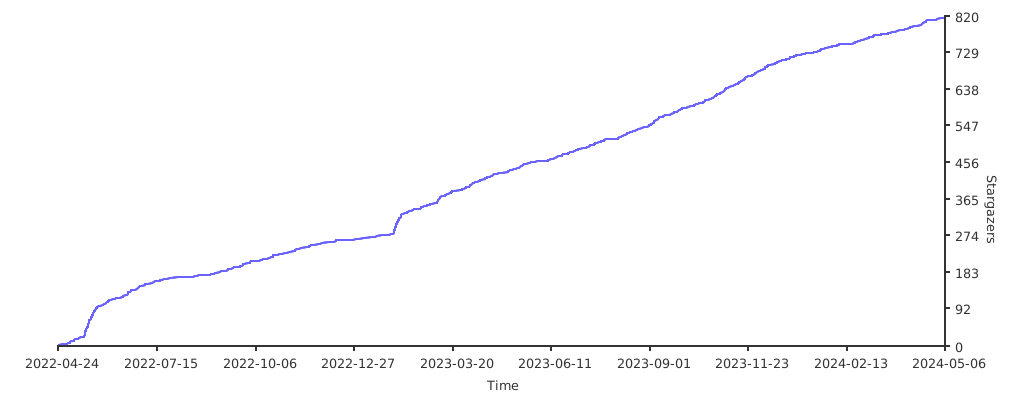

如果这个项目对你有帮助,欢迎 ⭐ Star 支持一下!